A 3D printed PC case is practical for small Mini-ITX builds, open-frame test benches and custom parts for an existing case: side panels, fan shrouds, GPU support brackets, drive mounts and I/O covers. Print near-heat parts in PETG, ASA or PC rather than PLA, follow the motherboard spec for mounting, and never print the power supply’s housing.
For the cables inside, our guide to 3D printed cable management covers combs, clips and tie points.
The short answer
| Question | Answer |
|---|---|
| Best project for a first case | Mini-ITX (170 × 170 mm board) or an open frame |
| Easiest upgrades to an existing case | GPU support, fan shrouds, drive mounts, cable combs, panels |
| Material near hot components | PETG at minimum; ASA or PC for the hottest spots |
| PLA | Cool, low-load parts only; it bends at about 55 °C (131 °F) |
| Never print | Power supply housing, anything carrying mains voltage |
| Big boards | Split frames and panels; an ATX board alone is 305 mm long |
Can you 3D print a PC case?
Yes, you can 3D print a working PC case, and the smaller the motherboard, the easier it gets. A Mini-ITX frame fits on most desktop printers in a few large parts, while an ATX tower needs dozens of sections joined together.
Plastic changes three things compared with a steel case. It softens with heat, so the material must suit the air around the GPU and CPU. It burns, so the power supply must stay in its own metal enclosure. And it does not shield or ground anything, so the electrical design still has to come from the motherboard and power supply makers. Get those right and a printed case is a reasonable, well-documented hobby project.
What parts of a PC case can you 3D print?
Most PC case prints are either complete frames built from scratch or add-on parts for an existing case. The add-ons are quicker, cheaper and lower risk.
| Part | What it does | Suggested material |
|---|---|---|
| Full small form factor (SFF) case | Complete enclosure for a Mini-ITX build | PETG, ASA or PC |
| Open-frame or test bench | Board and parts mounted in the open air | PETG or ASA |
| Side, front or top panels | Custom vents, grilles or styling on a bought case | PETG; ASA near exhaust |
| Fan shrouds, ducts and adapters | Direct air to a cooler, or fit a fan size the case lacks | ASA or PC |
| GPU support bracket | Props up a heavy graphics card | PETG or ASA |
| SSD and HDD mounts | Hold drives where the case has no bay | PETG |
| I/O and slot covers | Close gaps on the back panel | PETG |
| Cable combs and tie bars | Keep cables neat and away from fans | PLA or PETG |
GPU support brackets
A GPU support bracket is a post or arm that holds up the far end of a heavy graphics card. It takes stress off the card’s slot and stops the card from sagging over time. Give it a wide, flat foot or screw it to the case floor, and keep it clear of the card’s fans.
Fan shrouds and ducts
Shrouds and ducts guide air from a fan straight onto a heatsink or out through a vent. They sit in the warmest air in the case, so print them in ASA or PC and check the fan’s spec sheet for its exact hole spacing before you model anything.
Where to find 3D printed PC case designs
The big model libraries hold most of the free PC case designs: Printables, Thingiverse and MakerWorld all have Mini-ITX cases, open frames, GPU brackets and fan adapters. Search by form factor (“mini itx case”, “matx open frame”) rather than “PC case”, and read the description before you download.
Before you start a multi-day print, check these points on the model page:
- Form factor and parts list: the board size, GPU length, cooler height and power supply type the design fits.
- Hardware: screws, threaded inserts, standoffs and magnets the design needs.
- Makes and comments: photos from people who finished the build reveal fit problems early.
- Print profile: the material, wall count and infill the designer used.
- License: whether you may remix the files or share prints.
Our guide to Thingiverse 3D prints shows how to judge a model page and its license.
Motherboard sizes for a 3D printed PC case
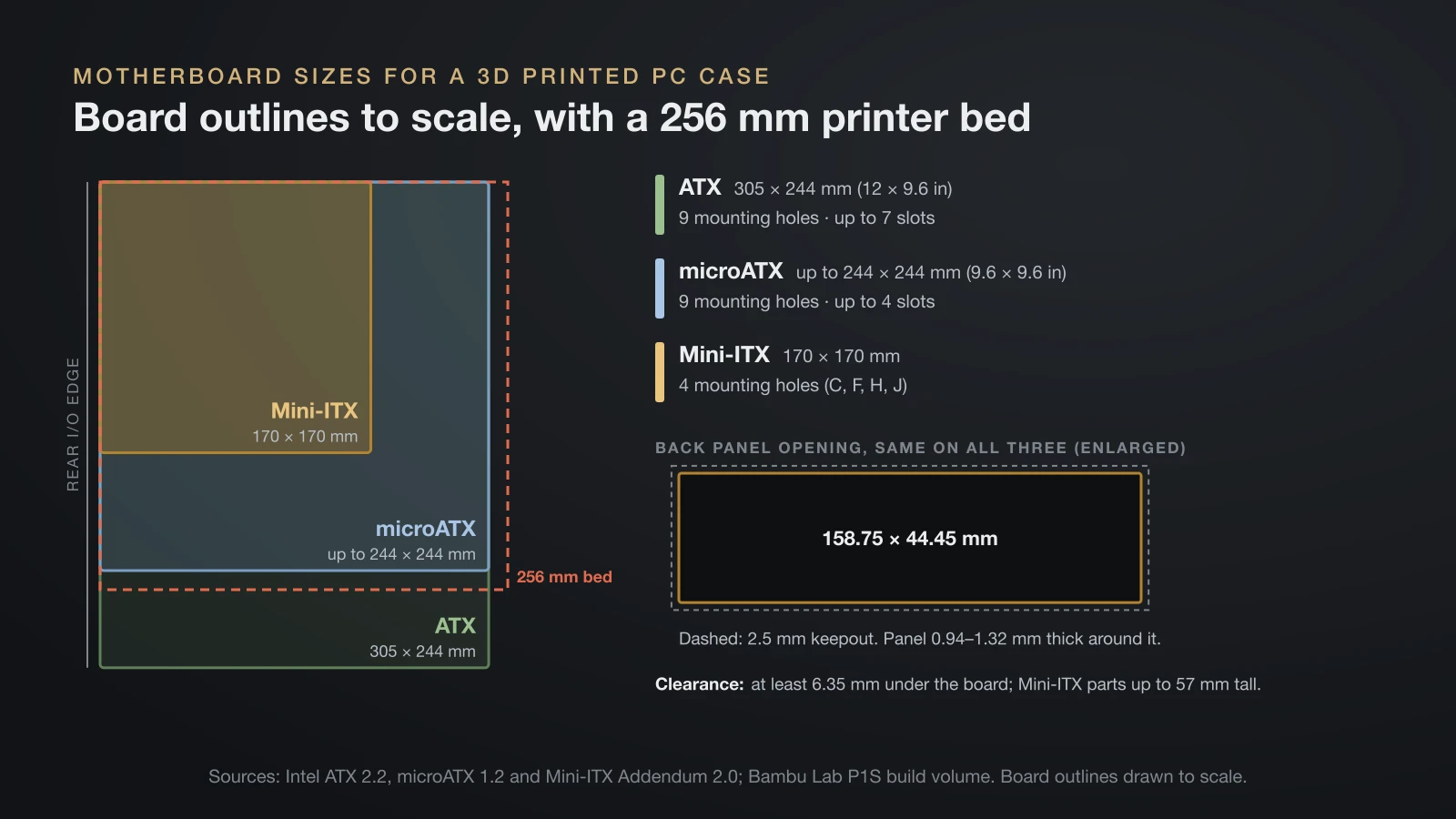
Motherboard form factors fix the size of the frame, the mounting holes and the back panel opening of every 3D printed PC case. Intel’s ATX, microATX and Mini-ITX specifications define these values:
| Form factor | Board size | Mounting holes | Expansion slots |
|---|---|---|---|
| ATX | 305 × 244 mm (12 × 9.6 in) | 9 (A, C, F, G, H, J, K, L, M) | Up to 7 |
| microATX | Up to 244 × 244 mm (9.6 × 9.6 in) | 9 (B, C, F, H, J, L, M, R, S) | Up to 4 |
| Mini-ITX | 170 × 170 mm | 4 (C, F, H, J) | Not set in the addendum |
| Thin Mini-ITX | 170 × 170 mm, board and parts within 20 mm | 4 | Not set in the addendum |
Mini-ITX uses a subset of the ATX holes, so one frame can serve several sizes. The spec warns that standoffs in places not listed for a board should be removable or left out, because a standoff under the wrong spot can damage traces.
Back panel and clearances
The back panel opening is the same on all three standard sizes: 158.75 × 44.45 mm (6.25 × 1.75 in), with a 2.5 mm (0.1 in) keepout around it. The I/O shield clips into a back panel 0.94–1.32 mm thick, so a printed panel must be thinned to that range around the opening.
Under the board, the chassis must leave at least 6.35 mm (0.25 in) of clearance, except at the standoffs. Above it, Mini-ITX allows parts up to 57 mm tall in its main area, so the cooler clearance listed by the case design matters.
Will a PC case fit your printer’s build volume?
A full PC case almost never fits a desktop printer in one piece, so plan on splitting it. Bambu Lab’s P1S, a common enclosed printer, builds 256 × 256 × 256 mm, while an ATX board alone is 305 mm long.
Good case designs are already split into parts that fit a 250 mm class bed. If you split your own, PrusaSlicer’s Cut tool divides a model with a planar or dovetail cut and can add plug, dowel or snap connectors at the seam. Put seams on flat faces away from screw bosses, and let metal screws, not the joints, carry the load.
A bigger machine reduces the number of seams but adds cost and space; our guide to large 3D printers explains where that line sits.
Best filament for a 3D printed PC case
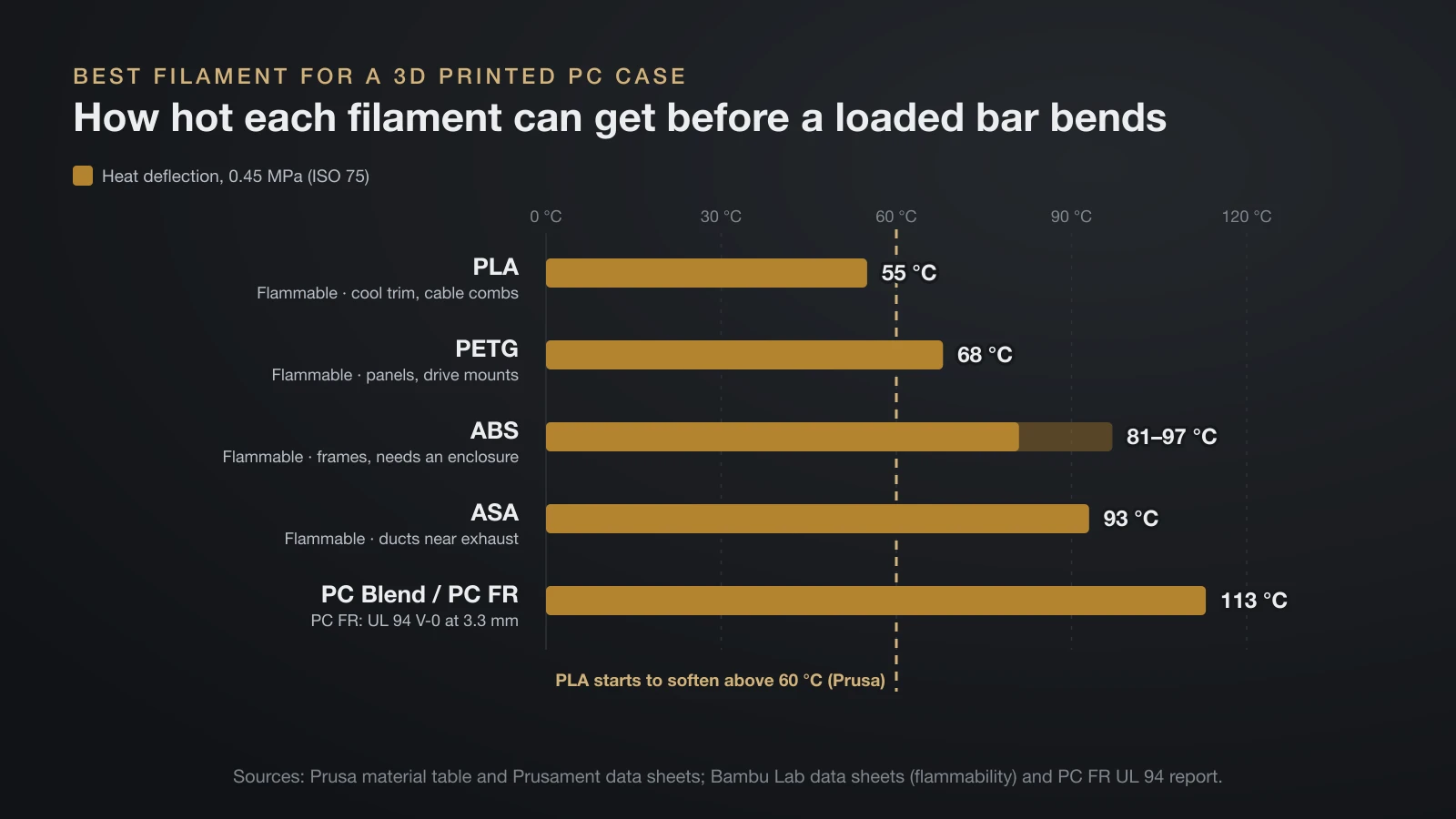
The best filament for a PC case depends on how warm each part gets: PETG for most panels, ASA or PC near hot exhaust, and PLA only for cool, decorative pieces. Heat deflection temperature (HDT) is the point where a loaded test bar bends (ISO 75, 0.45 MPa):
| Material | Heat deflection, 0.45 MPa | Flammability on the Bambu Lab data sheet | Where it fits |
|---|---|---|---|
| PLA | 55 °C (Prusament) | Flammable | Cool trim, badges, feet, cable combs |
| PETG | 68 °C (Prusament) | Flammable | Panels, drive mounts, brackets |
| ABS | 81–97 °C (several brands, Prusa table) | Flammable | Frames and panels; needs an enclosure |
| ASA | 93 °C (Prusament) | Flammable | Ducts and parts near exhaust |
| PC Blend / PC FR | 113 °C (Prusament PC Blend; Bambu Lab PC FR) | PC FR: UL 94 V-0 at 3.3 mm | Hottest spots, flame-retardant builds |
HDT is not a safe working temperature, since a part under constant load creeps below it. Prusa notes that PLA starts to soften above 60 °C (140 °F); our page on the PLA melting point explains why that limit matters more than the melting point. For load-bearing frames, our comparison of the strongest filament types covers stiffness and impact.
ABS, ASA and PC warp on open printers and print best in an enclosure, in a ventilated room. Our guide to enclosed 3D printers covers what that changes.
Is a 3D printed PC case safe?
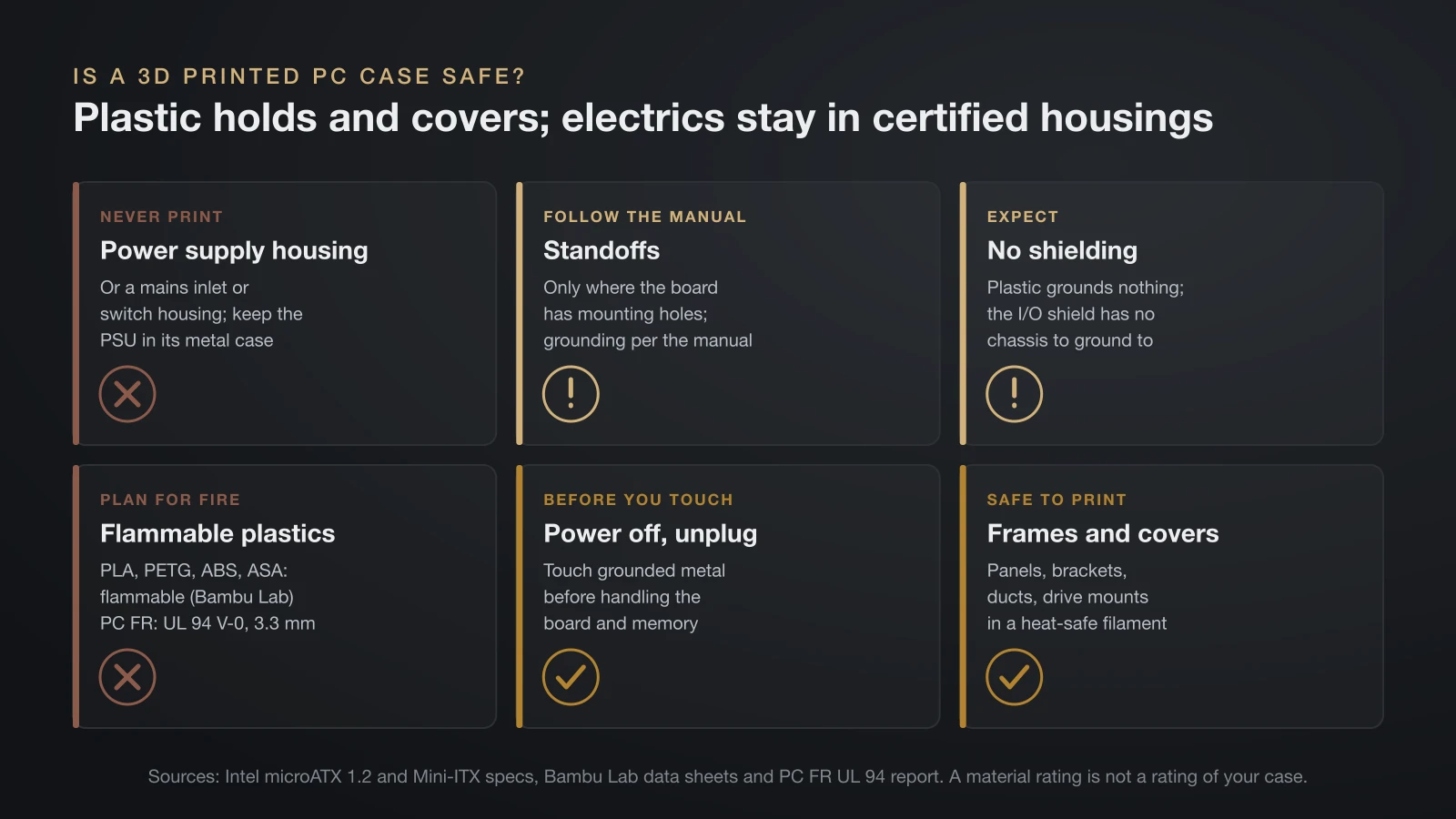
A 3D printed PC case is safe when the plastic only holds and covers parts, while everything electrical stays in its certified housing. Follow these rules:
- Never print the power supply housing or any part that touches mains voltage, such as a power inlet or switch housing. Mount the power supply in its original metal case.
- Use the motherboard’s standoff locations: fit standoffs only where the board has mounting holes, and follow the motherboard manual for standoffs and grounding.
- Expect no shielding: plastic does not ground anything. The microATX spec ties I/O shield grounding to EMI (electromagnetic interference) control; a printed back panel gives the shield no metal chassis to ground to.
- Plan for fire: Bambu Lab lists its PLA, PETG, ABS and ASA as flammable. Its PC FR passed UL 94 V-0, a burn test on 3.3 mm bars, in a third-party report it publishes. That rates the material, not your case.
- Handle parts safely: touch grounded metal before handling the board and memory, and power off and unplug before you open the case.
Airflow and cooling in a 3D printed case
A printed case cools well when it gives every fan a clear inlet and outlet and keeps cables out of the airflow. Intel’s Mini-ITX addendum recommends leaving the space between a boxed CPU cooler’s fan inlet and the chassis side vent open.
The same spec notes that small systems must leave room for airflow and cabling, and it leaves thermal design to separate chassis guides. In practice:
- Put vents in front of fan inlets and behind the GPU and CPU exhaust.
- Leave the full fan diameter open rather than a small grille pattern.
- Add dust filters on intake vents; a printed frame with a mesh insert works.
- Check temperatures with monitoring software after the first build, under load.
Print settings for large flat case panels
Large flat panels are the hardest PC case parts to print, because their corners tend to lift and their long edges can bow. These settings help:
- Print panels flat on the bed, so their largest face is the first layer.
- Use a brim on long panels in ABS, ASA or PC, and print them in an enclosure.
- Add walls, not just infill, around screw holes and edges; walls carry most of the load. Our guide to 3D printing infill shows how much density each job needs.
- Orient brackets so loads run along layers, never across them, because parts split most easily between layers.
- Use threaded inserts for screws you will remove often, set with the insert maker’s recommended tool.
- Test-fit one corner first, such as a section with the I/O opening, before printing every panel.
Other 3D printed computer accessories
Beyond the case itself, desk and computer accessories are quick prints that rarely need heat-resistant filament. Popular options include:
- Keyboard clicker fidgets: a single key switch in a printed shell, with a keycap on top.
- Laptop stands and sleeves: stands raise the screen; a rigid sleeve or case needs exact measurements of the laptop.
- Headphone hooks, monitor risers and controller stands.
- Display stands and turntables for showing off a finished build.
Small, personal pieces like these also make good 3D printed gifts for anyone with a desk setup.
The bottom line
A 3D printed PC case is a realistic project for a Mini-ITX build or an open frame, and printed brackets, shrouds and panels can improve almost any case. Design around the motherboard spec, print warm parts in PETG, ASA or PC, and keep PLA for cool trim. Never print the power supply’s housing or anything that carries mains voltage.
Sources
- Intel (formfactors.org, archived): ATX Specification 2.2, microATX Motherboard Interface Specification 1.2 and Mini-ITX Addendum 2.0 (board sizes, mounting holes, slots, I/O aperture, keepout, back panel thickness, shield grounding, clearances, standoffs, cooler inlet and airflow notes)
- Prusa Research: material table, Prusament ASA and PLA pages, the PLA material guide and the Cut tool (heat deflection at 0.45 MPa, PLA softening above 60 °C, cut connectors)
- Bambu Lab: data sheets for PLA Basic, PETG Basic, ABS, ASA and PC FR, the PC FR product page, its UL 94 test report and the P1S page (flammability entries, PC FR heat deflection, UL 94-2023 V-0 on 3.3 mm bars, P1S build volume)