The strongest filament depends on how the part is loaded. For pulling strength along the layers, carbon fiber nylon leads common desktop filaments, at 102 MPa on Bambu Lab’s data sheet. Polycarbonate (PC) is the strongest unfilled option in Bambu Lab’s data and holds up to heat, while a toughened PLA or TPU survives impacts that crack stiffer plastics.
Strength is not one number: tensile strength along and across the layers, impact strength, stiffness and heat resistance can each pick a different winner, and they compare fairly only within one manufacturer’s data sheets, tested the same way. The values come from technical data sheets (TDS), the lab reports each maker publishes for its filament. For the materials themselves, see our guides to nylon filament, carbon fiber filament and polycarbonate 3D printer filament.
The short answer
| If the part must… | Strongest common choice | Data sheet value (Bambu Lab) |
|---|---|---|
| Resist pulling along the layers | PA6-CF (carbon fiber nylon) | 102 MPa tensile, X-Y |
| Hold together across the layers | PA6-CF, then PETG | 48 and 35 MPa tensile, Z |
| Survive drops and knocks | TPU, then a toughened PLA such as PLA Tough+ | 123.2 and 80.6 kJ/m² impact, X-Y |
| Stay stiff | PA6-CF | 4,430 MPa Young’s modulus, X-Y |
| Stay rigid when hot | PA6-CF, then PC | 164 and 117 °C heat deflection at 1.8 MPa |
| Print easily and still be strong | PETG Basic | 51 MPa tensile, 230–260 °C nozzle |
What does “strongest filament” mean?
The strongest filament is the one that resists the specific force your part will see, and data sheets measure several different forces. A spool that wins one test can lose another, which is why lists that crown a single winner disagree with each other.
- Tensile strength (ISO 527): the pull a test bar takes before it breaks, in megapascals (MPa). This is what most people mean by strong.
- X-Y vs Z: X-Y bars are printed flat, so the load runs along the layers. Z bars stand upright, so the load pulls the layers apart. Z values measure layer adhesion and are always the weak spot.
- Impact strength (ISO 179): the energy a bar absorbs when a pendulum hits it, in kJ/m². High values mean a part bends or dents instead of shattering.
- Stiffness (Young’s modulus): how little a part flexes under load. Stiff is not the same as strong: a stiff part can still snap.
- Heat deflection temperature (HDT, ISO 75): the temperature at which a loaded bar bends by a set amount. A strong filament that softens in a hot car is not strong in a hot car.
Strongest filament compared: one data sheet, eight materials
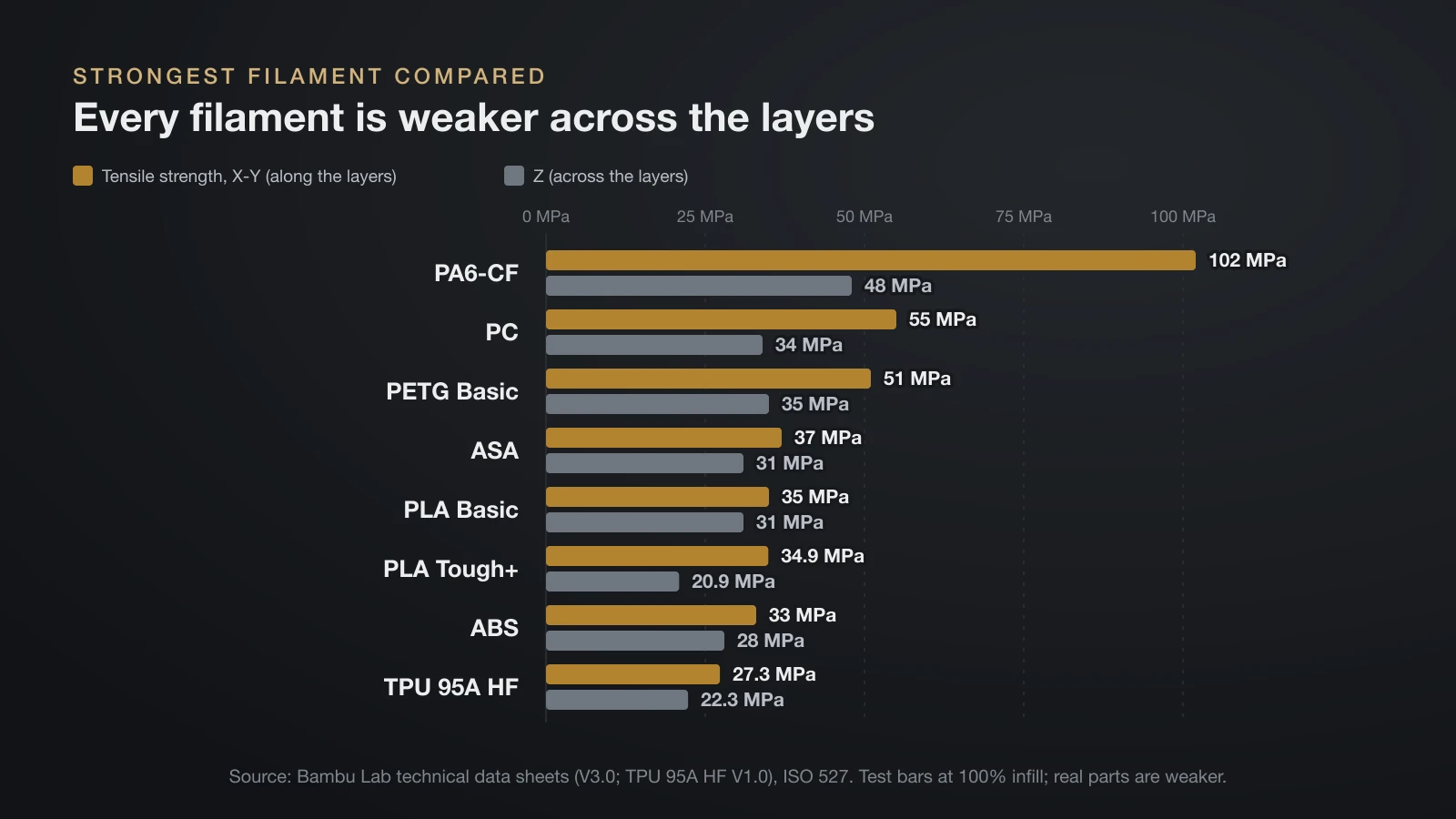
The fairest comparison uses one manufacturer that tests every material with the same methods and print settings. Bambu Lab publishes data sheets for all of the common desktop filaments below (version 3.0; version 1.0 for TPU 95A HF), with tensile strength per ISO 527, unnotched impact per ISO 179 and heat deflection per ISO 75 at 1.8 MPa.
| Bambu Lab data sheet | Tensile X-Y | Tensile Z | Impact X-Y | Impact Z | Young’s modulus X-Y | HDT, 1.8 MPa |
|---|---|---|---|---|---|---|
| PLA Basic | 35 MPa | 31 MPa | 26.6 kJ/m² | 13.8 kJ/m² | 2,580 MPa | 54 °C |
| PLA Tough+ | 34.9 MPa | 20.9 MPa | 80.6 kJ/m² | 25.9 kJ/m² | 1,860 MPa | 58 °C |
| PETG Basic | 51 MPa | 35 MPa | 34.2 kJ/m² | 10.5 kJ/m² | 2,780 MPa | 68 °C |
| ABS | 33 MPa | 28 MPa | 39.3 kJ/m² | 7.4 kJ/m² | 2,200 MPa | 84 °C |
| ASA | 37 MPa | 31 MPa | 41.0 kJ/m² | 4.9 kJ/m² | 2,450 MPa | 92 °C |
| PC | 55 MPa | 34 MPa | 34.8 kJ/m² | 9.0 kJ/m² | 2,110 MPa | 117 °C |
| PA6-CF | 102 MPa | 48 MPa | 40.3 kJ/m² | 15.5 kJ/m² | 4,430 MPa | 164 °C |
| TPU 95A HF | 27.3 MPa | 22.3 MPa | 123.2 kJ/m² | 86.3 kJ/m² | 9.8 MPa | Not listed |
Bambu Lab’s PC sheet lists 112 °C at the lighter 0.45 MPa load, below its 1.8 MPa figure as printed; the table uses the 1.8 MPa column for every material. Five things stand out:
- Carbon fiber nylon wins tension and stiffness. PA6-CF is about 2.9 times as strong as PLA Basic along the layers and about 1.7 times as stiff (our ratios from the table).
- Layers are the weak point for every filament. PA6-CF keeps 47% of its X-Y strength in Z, PC 62% and PETG 69%, while plain PLA keeps 89% (our ratios). Stiff, filled and engineering grades lose the most across the layers.
- PETG is the strongest easy filament. It beats PLA, ABS and ASA in tension along and across the layers, and it is the stiffest unfilled plastic here.
- ABS and ASA trade strength for heat. They are weaker than PETG in tension but deflect at 84 and 92 °C, and they take more impact along the layers. Our ABS vs PLA comparison shows where that trade pays off, and the ABS filament and PLA filament guides cover printing each.
- TPU is tough, not strong. It pulls apart at a lower stress than PLA, but it stretches past 650% and absorbs the most impact energy in this set.
Strongest filament by job
Pick the filament by the failure you want to avoid, not by its headline tensile number. The table turns the data above into a shortlist, with the printer demands that come with each choice.
| Job | Pick | Why (Bambu Lab data) | What it asks of the printer |
|---|---|---|---|
| Brackets, mounts, shelf supports indoors | PETG Basic | 51 MPa X-Y, 35 MPa Z | 230–260 °C nozzle, 65–75 °C bed |
| Clips, handles, parts that get dropped | PLA Tough+ | 80.6 kJ/m² impact, prints like PLA | 220–250 °C nozzle, 35–65 °C bed |
| Fixtures, jigs, clamps, stiff arms | PA6-CF | 102 MPa X-Y, 4,430 MPa modulus | 260–290 °C nozzle, 45–60 °C chamber, dry spool |
| Parts near motors, lights or a hot dashboard | PC or PA6-CF | 117 and 164 °C HDT at 1.8 MPa | 260–280 °C (PC) or 260–290 °C (PA6-CF) nozzle, enclosed printer |
| Bumpers, feet, grips, phone cases | TPU 95A HF | 123.2 kJ/m² impact, over 650% stretch | 220–240 °C nozzle, slow feeding |
| Display models and prototypes | PLA Basic | Stiff, good layer bonding | 190–230 °C nozzle, 35–45 °C bed |
Abrasive carbon fiber grades need a hardened nozzle, and PC and nylon print best in an enclosure; the carbon fiber filament guide and the TPU filament guide cover those setups. For car interiors and other hot, safety-relevant spots, our guide to 3D printed car parts lists what you should never print.
Beyond the common filaments: engineering grades and brand differences
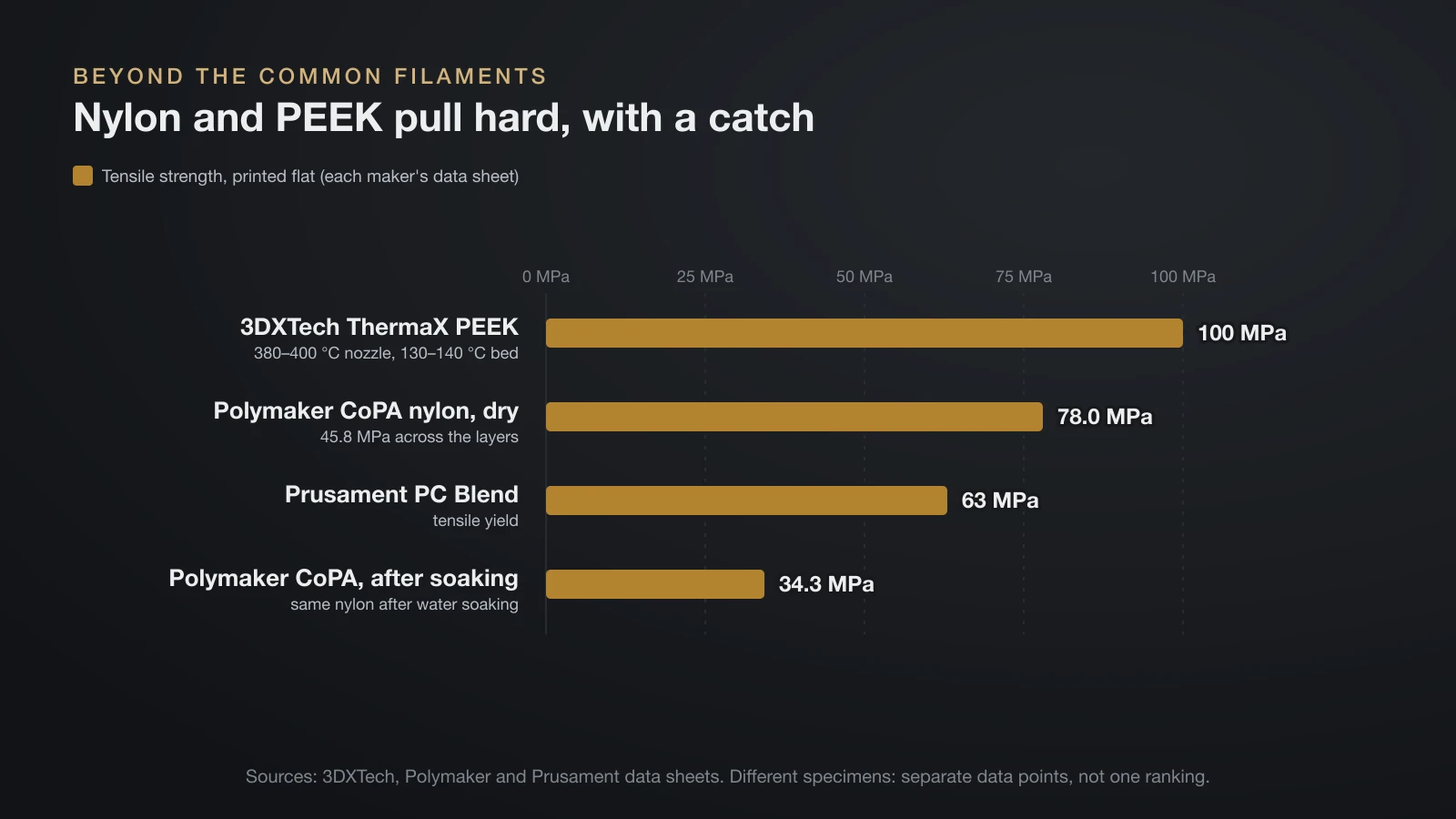
Unfilled nylon and PEEK outpull every unfilled filament in the table above, and PEEK comes close to PA6-CF, but each comes with a catch. These values come from other makers’ data sheets, so read them as separate data points, not as rows in Bambu Lab’s table.
| Filament (data sheet) | Tensile strength | Heat deflection | The catch |
|---|---|---|---|
| Polymaker PolyMide CoPA (nylon), dry | 78.0 MPa X-Y, 45.8 MPa Z (ISO 527) | 70 °C at 1.8 MPa | Drops to 34.3 MPa X-Y after water soaking |
| 3DXTech ThermaX PEEK | 100 MPa (ISO 527, printed flat) | 140 °C at 0.45 MPa | 380–400 °C nozzle, 130–140 °C bed |
| Prusament PC Blend | 63 MPa tensile yield, printed flat | 93 °C at 1.8 MPa | Hot nozzle, enclosure, warping |
Nylon’s water uptake changes everything. Polymaker’s wet CoPA bars kept less than half their dry tensile strength but became far tougher, with notched impact rising from 6.9 to 27.7 kJ/m². A nylon gear in a humid garage will not match its dry data sheet, as the nylon filament guide explains.
PEEK nearly matches carbon fiber nylon in tension without any fiber filler, yet few hobbyists ever print it. 3DXTech printed its test bars at 380–400 °C (716–752 °F) on a 130–140 °C bed, beyond most consumer machines; our PEEK 3D printer filament guide covers what a PEEK-capable printer needs.
Brands also disagree on the same plastic. Bambu Lab’s PC lists 55 MPa and 117 °C at 1.8 MPa, while Prusament PC Blend lists 63 MPa and 93 °C. Compare filaments within one maker’s data, and treat cross-brand gaps of a few MPa as noise. How the main makers compare on quality and price is in our filament brands guide.
How to make 3D prints stronger
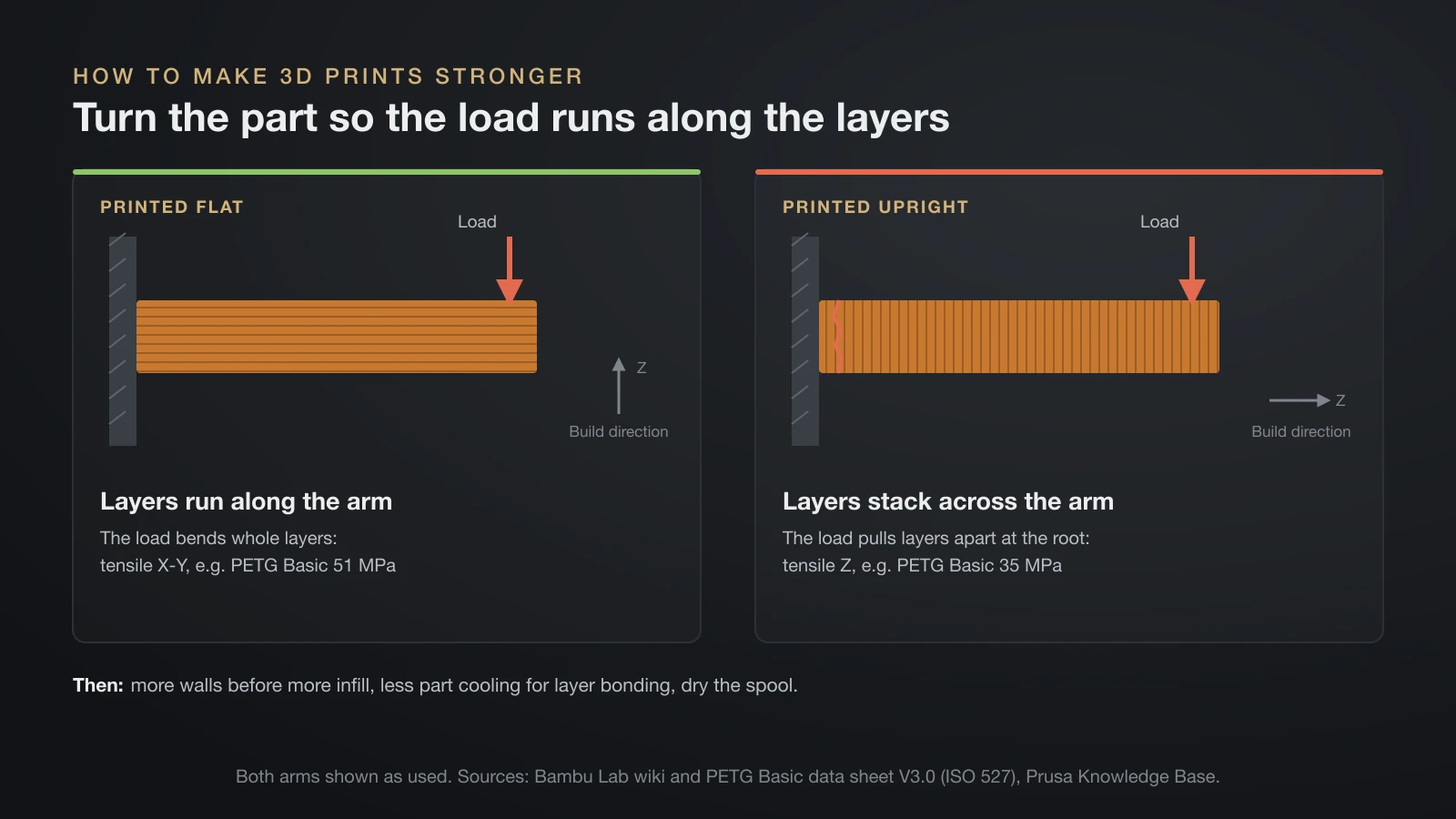
You can make a 3D print much stronger with settings and orientation, often more than by switching filament. These steps are listed in the order that usually pays off most.
- Orient the part so the load runs along the layers. Every filament above is weaker in Z. Bambu Lab’s advice for weak layer bonding is to turn the part so the force lies in the X-Y plane.
- Add walls before infill. Prusa states that a model’s strength is mostly defined by the number of perimeters, not infill, which mainly helps with compression. Go from two walls to three or four on loaded parts.
- Raise infill for parts that are squeezed or clamped. Prusa says most models print fine at 10–15%; our 3D printing infill guide explains when 30–50% and stronger patterns make sense.
- Help the layers bond. colorFabb advises using the least part cooling needed for optimal layer adhesion, and Bambu Lab’s silk guide raises the nozzle temperature within the spool’s range to improve interlayer adhesion.
- Do not count on thinner layers for strength. Thin layers mainly improve surface finish and cost print time; the trade-offs are in our guide to 3D printing layer height.
- Dry moisture-sensitive filament. Bambu Lab’s PC and PA6-CF sheets both call for an 80 °C (176 °F) forced-air oven for 8 hours or more before printing.
- Anneal only where the maker supports it. Bambu Lab anneals its PLA Basic test bars and suggests 50–60 °C for 6–12 hours, but warns that parts can deform. Polymaker’s HT-PLA rises from 61 to 107 °C heat deflection at 0.45 MPa after annealing.
How strong are 3D printed parts?
3D printed parts are strong enough for many functional jobs, but data sheet values are a best case. Every number in this guide comes from solid test bars printed at 100% infill on tuned settings: Bambu Lab printed its bars at 100% infill and, for most materials, dried and annealed them before testing.
Real parts are weaker. They have walls and infill instead of solid plastic, corners and holes that concentrate stress, and layers that the load may cross. Bambu Lab and Polymaker both state that their values are for reference and comparison, and that printed part performance depends on the printer, settings and design.
Treat that gap seriously. Use printed parts for jigs, brackets, clips and replacement trim, not for anything that holds a person, a load overhead or a vehicle’s safety system. If failure could hurt someone, a printed plastic part is the wrong part.
The bottom line
The strongest filament for most desktop printers is carbon fiber nylon, but only along the layers and only when dry. PETG is the strongest filament that prints easily, PC adds heat resistance, a toughened PLA or TPU wins on impact, and PEEK, on industrial machines, nearly matches carbon fiber nylon without fibers. Pick by the load, orient the part so the layers are not pulled apart, and add walls before you add infill.
Sources
- Bambu Lab technical data sheets (version 3.0; TPU 95A HF version 1.0): PLA Basic, PLA Tough+, PETG Basic, ABS, ASA, PC, PA6-CF, PLA-CF and TPU 95A HF; Wiki PLA guide and silk printing guide (tensile, impact, modulus, heat deflection, elongation, print settings, specimen and annealing conditions, orientation and temperature advice for layer bonding)
- Polymaker technical data sheets: PolyMide CoPA and HT-PLA (dry and wet tensile and impact values, heat deflection, annealed heat deflection)
- 3DXTech: ThermaX PEEK technical data sheet (tensile strength, heat deflection, test print settings)
- Prusa: Knowledge Base Infill (perimeters vs infill, 10–15% for most models) and Prusament PC Blend technical data sheet (tensile yield strength, heat deflection)
- colorFabb: PLA Economy product page (least cooling needed for optimal layer adhesion)