The best places to get free STL files are community model libraries such as Printables, Thingiverse and MakerWorld, plus open collections from NIH, NASA and the Smithsonian. Find a model with plenty of successful prints, download its STL or 3MF file, read the license on the model page, then check scale and supports in your slicer before printing.
The sites are run by printer makers, independent companies and public agencies, and that shapes what you get: print profiles, paid stores, engineering CAD or scientific models. If you have no project in mind yet, browse our list of 3D print ideas first.
Thingiverse has its own walkthrough in our guide to Thingiverse 3D prints. Every fact about a site comes from that site’s own help, license and about pages.
The short answer
| If you want | Look first at | Why |
|---|---|---|
| Everyday functional prints | Printables, Thingiverse | Large free libraries with makes, remixes and comments |
| Ready print settings for a Bambu Lab printer | MakerWorld | Many models come with 3MF print profiles |
| Tabletop miniatures and premium art | MyMiniFactory, Cults | Free and paid files from professional designers |
| Engineering parts and CAD formats | Thangs, GrabCAD | STEP files on Thangs, a community CAD library on GrabCAD |
| Science, space and museum objects | NIH 3D, NASA, Smithsonian | Free files from public institutions |
Where to get free STL files: 10 sites compared
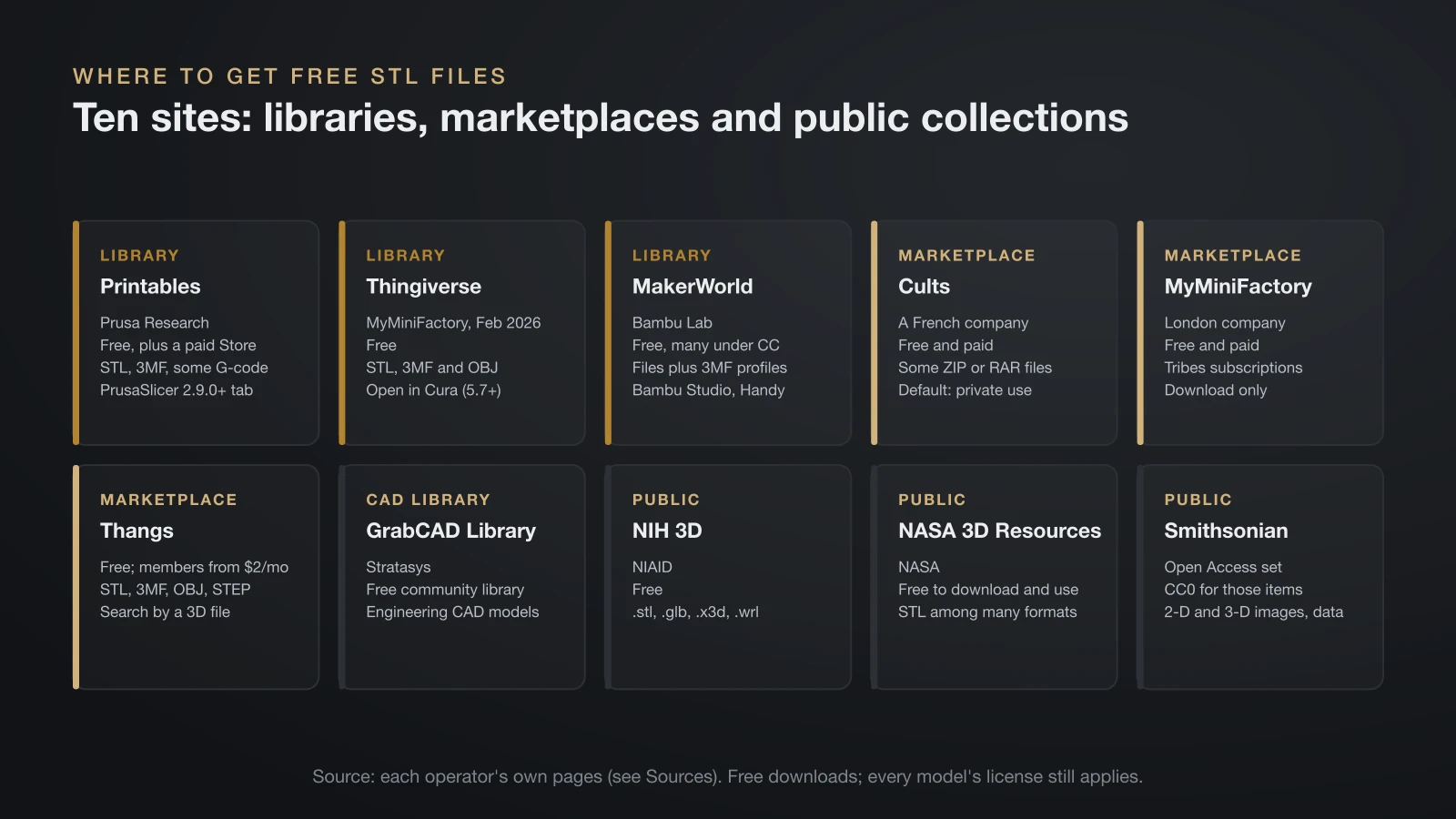
Ten sites cover almost every kind of free STL file, and they split into community libraries, mixed free and paid marketplaces, and public institutions. The table uses each operator’s own pages; “free” means the site offers free downloads, while individual licenses still differ.
| Site | Run by | Free or paid | What you download | Licenses | Slicer link |
|---|---|---|---|---|---|
| Printables | Prusa Research | Free database plus a separate paid Store | STL and 3MF files, some ready G-code | Designer’s choice; Store has 3 own licenses | Printables tab in PrusaSlicer 2.9.0 and later |
| Thingiverse | MyMiniFactory (since February 2026) | Free | STL, 3MF and OBJ files | Designer’s choice, often Creative Commons | Open in Cura button (Cura 5.7 and later) |
| MakerWorld | Bambu Lab | Free models, many under Creative Commons | Model files plus 3MF print profiles | Designer’s choice; reposted CC models must credit the original | One-click printing via Bambu Studio and Bambu Handy |
| Cults | Cults, a French company | Free and paid | Files, sometimes in ZIP or RAR archives | Designer sets price and license; default is private use | Download only |
| MyMiniFactory | MyMiniFactory, London | Free and paid, plus Tribes subscriptions | Designer files | Designer’s choice | Download only |
| Thangs | Thangs | Free models plus memberships from $2 a month | STL, 3MF, OBJ, STEP, STP, GLB and more | Designer’s choice | Download; search by uploading a 3D file |
| GrabCAD Library | Stratasys | Free community library | Engineering CAD models | Files owned by the users who upload them | Download only |
| NIH 3D | National Institute of Allergy and Infectious Diseases | Free | .stl, .glb, .x3d and .wrl | Many public domain or CC BY; varies | Download only |
| NASA 3D Resources | NASA | Free to download and use | STL among many 3D formats | NASA media usage guidelines | Download only |
| Smithsonian Open Access | Smithsonian Institution | Free | 2-D and 3-D images and data | CC0 for Open Access items | Download only |
The owner matters more than it looks. A library run by a printer maker builds in its own slicer and printers: Printables feeds PrusaSlicer, and MakerWorld feeds Bambu Studio and the Bambu Handy app. Independent marketplaces focus on paid designers, and public institutions focus on accuracy over printability.
Community libraries: Printables, Thingiverse and MakerWorld
These three hold most free, everyday functional models, and each adds a different shortcut. Prusa’s Store launch post says the main Printables database stays downloadable without paywalls, without even logging in. Prusa’s knowledge base adds that Printables offers pre-made G-code files for many projects, next to the model files.
Thingiverse launched in 2008 and is the oldest of the big libraries; MyMiniFactory bought it from UltiMaker in February 2026. MakerWorld, which Bambu Lab announced in August 2023, requires every model reposted under a Creative Commons license to include the original link and to appear under the original creator’s name.
Marketplaces: Cults, MyMiniFactory and Thangs
These sites mix free files with paid ones, which is where many professional miniature and art designers sell. Cults lets each designer set the price and license, and its default license allows private use only. MyMiniFactory, a London company, adds Tribes, monthly subscriptions to individual creators, and it also runs YouMagine, which has turned into a marketplace for 3D printable RC vehicles.
Thangs lists many file types, from STL and 3MF to STEP and GLB, and lets you search by uploading a 3D file, which helps when you need a part that matches one you already have.
How to search free STL file sites well
The fastest way to a good free STL file is to search by function on two or three libraries and compare the versions you find. Remixes that fix a weak spot often live on a different site from the original.
- Name the job, not the theme. “Wall mount for 40 mm drill” beats “workshop stuff”. Add a product model or a size when fit matters.
- Search two libraries. A design missing from Thingiverse may be on Printables or MakerWorld.
- Trust makes over renders. Photos from people who printed the model prove it works; a polished render only proves someone can render.
- Use the slicer link. Searching Printables inside PrusaSlicer, or MakerWorld with Bambu Studio, puts the file straight into your print setup.
- Search by shape. On Thangs, uploading a 3D file finds similar geometry when you don’t know the right words.
Free 3D print files from science and museum collections
Public institutions publish free 3D print files of molecules, anatomy, spacecraft and museum objects, and their licenses are often the most generous you will find. They are also built for accuracy, so some models need scaling, cutting or supports before they print well.
- NIH 3D: run by the National Institute of Allergy and Infectious Diseases, it replaced the NIH 3D Print Exchange (2013) in 2023. Any visitor may browse and download; most models come as .stl, .glb, .x3d and .wrl. NIH 3D recommends .stl for single-color printing and .wrl for full-color powder bed printing.
- NASA 3D Resources: a repository of mission models and textures, some marked 3D printable, all free to download and use under NASA’s media usage guidelines. A filter shows only printable assets.
- Smithsonian Open Access: on February 25, 2020, the Smithsonian released over 2.8 million 2-D and 3-D images and related data under CC0. Only items in the Open Access set carry CC0, so check each object.
NIH 3D’s terms add an important caveat: uploaders choose the license, and while many entries are public domain or CC BY, others are more restrictive. Read the license on each model page, as you would on any community site.
STL vs 3MF vs STEP: which file to download
Download the 3MF when a designer offers one, the STL when that is all there is, and the STEP when you plan to change the design. Most free STL files are made for filament printers; our explainer on FDM 3D printing shows how those printers turn a mesh into layers.
| Format | What it holds | Best use |
|---|---|---|
| STL | A triangle mesh of the surface, with no units, colors or settings | Universal; opens in every slicer |
| 3MF | The mesh plus units, colors, plates and often print settings | Print profiles on MakerWorld and Printables |
| STEP / STP | Exact CAD geometry with true curves | Editing in CAD; some slicers open it directly |
| OBJ | A mesh, sometimes with color textures | Color models and mesh editors |
| G-code | Toolpaths for one printer setup | Only if it was sliced for your exact printer, nozzle and filament |
Slicers read most of these: Bambu Studio’s quick start guide lists .3mf, .stl, .stp, .step, .amf and .obj. A ready-made G-code file skips slicing but locks in someone else’s printer and filament, so slice the model yourself; our guide to STL to G-code walks through that step.
Free STL file licenses: what “free” lets you do
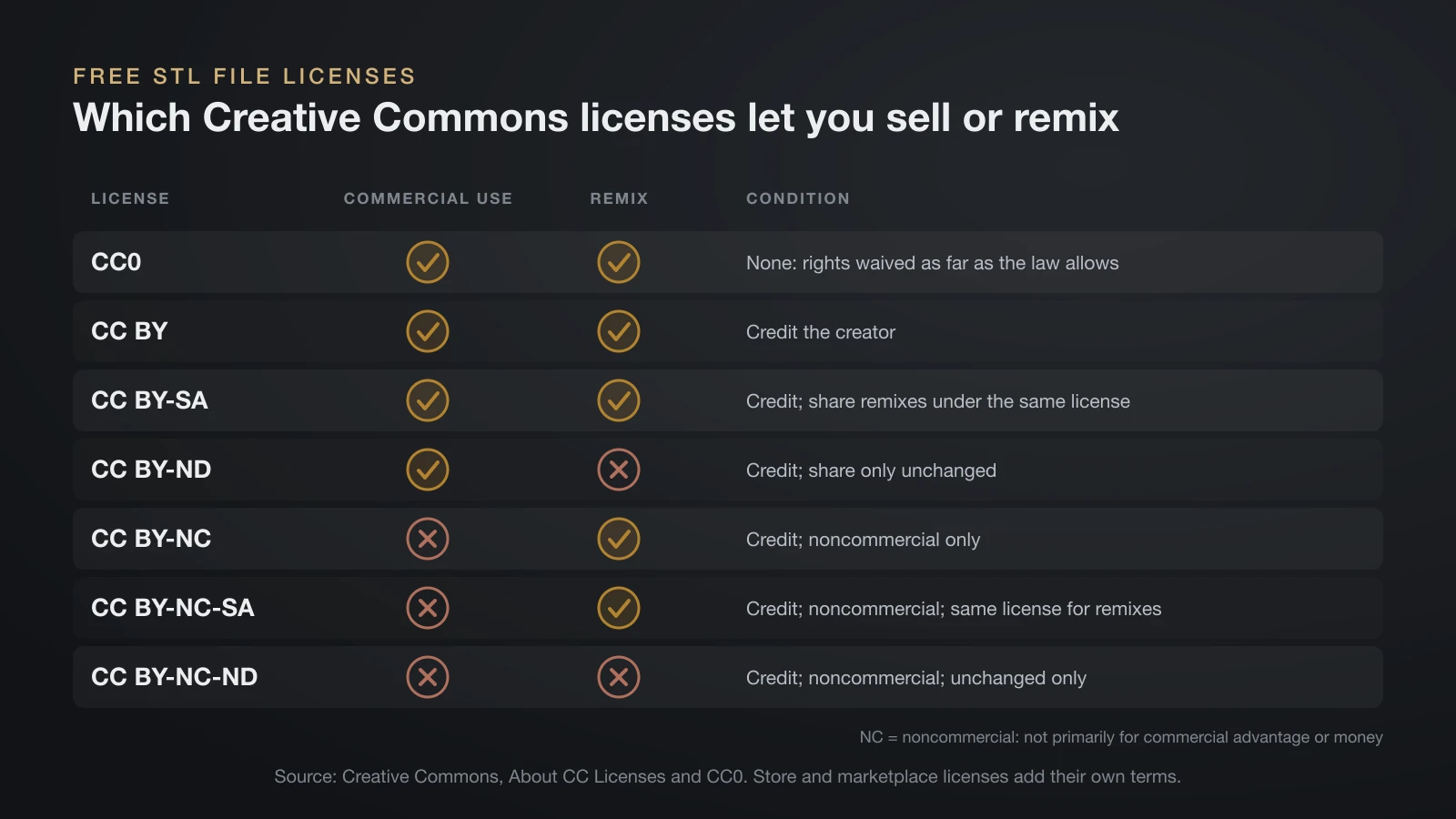
A free STL file is free to download, but its license decides whether you may remix it, share it or sell the prints. Creative Commons offers six licenses, from most to least permissive, plus CC0, its “no rights reserved” public domain dedication.
| License | Commercial use | Remixes | Condition |
|---|---|---|---|
| CC0 | Yes | Yes | None; rights waived as far as the law allows |
| CC BY | Yes | Yes | Credit the creator |
| CC BY-SA | Yes | Yes | Credit; share remixes under the same license |
| CC BY-ND | Yes | No | Credit; share only unchanged |
| CC BY-NC | No | Yes | Credit; noncommercial only |
| CC BY-NC-SA | No | Yes | Credit; noncommercial; same license for remixes |
| CC BY-NC-ND | No | No | Credit; noncommercial; unchanged only |
Creative Commons defines noncommercial as use not primarily intended for commercial advantage or monetary compensation. Paid marketplaces add their own terms: the Printables Store’s Standard Digital File license allows personal use of the model and its prints, while its two commercial licenses allow selling prints, one of them only of the unmodified model.
If you want to sell, filter for commercial-friendly licenses or buy a commercial license from the designer; our guide to 3D print ideas to sell covers pricing and brand rules. A logo or film character keeps its trademark and copyright limits whatever the model’s license says.
How to check a free STL file before printing
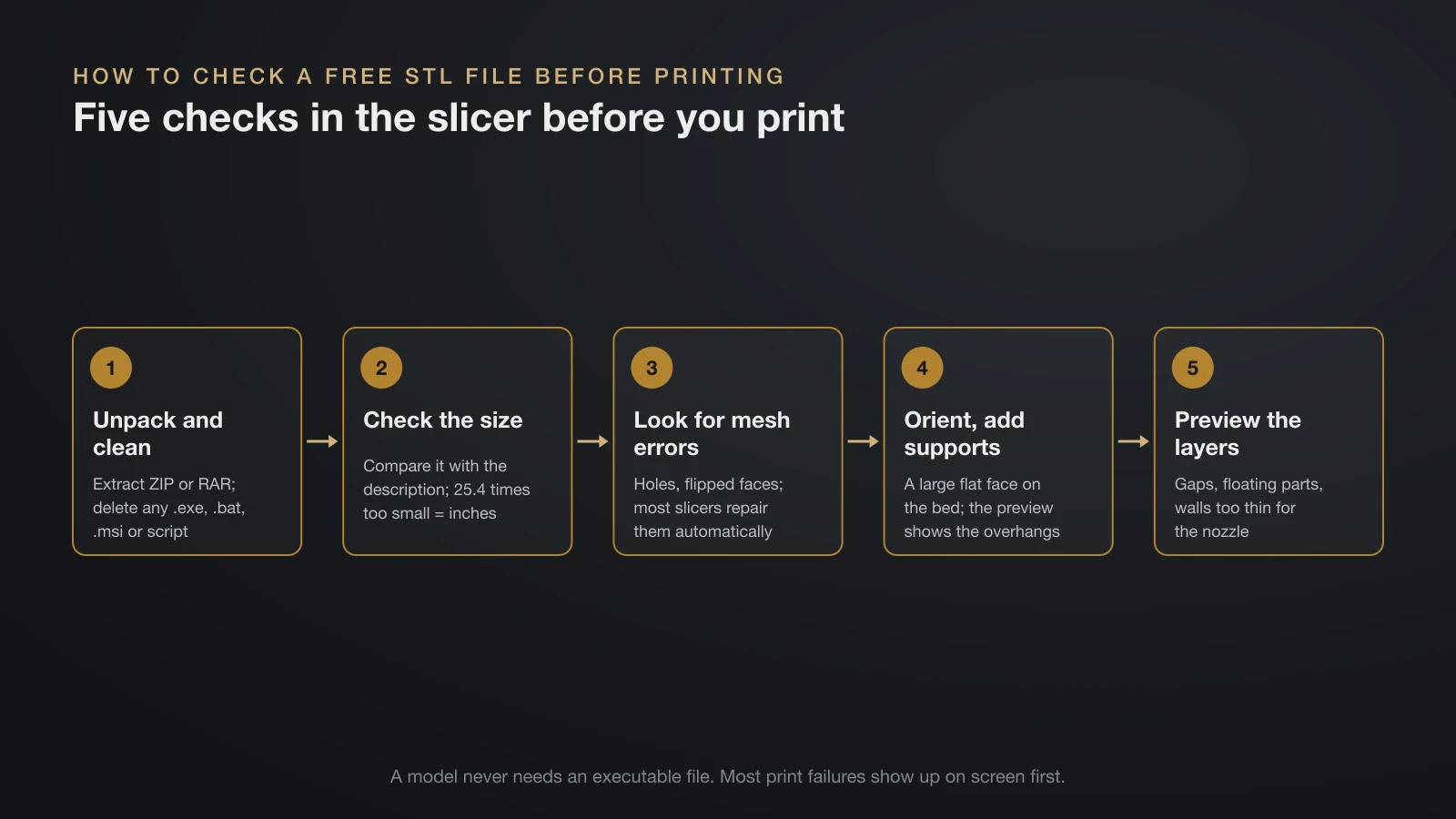
Check every free STL file in your slicer before you print it, because most failures show up on screen first. These checks take a few minutes and catch the usual problems:
- Unpack and clean the download. Extract ZIP or RAR archives and keep only model, image and text files. Delete any .exe, .bat, .msi or script; a model never needs one.
- Check the size. Compare the slicer’s dimensions with the description. A part exactly 25.4 times too small was exported in inches.
- Look for mesh errors. Most slicers flag holes and flipped faces and can repair them automatically.
- Choose orientation and supports. Put a large flat face on the bed and let the preview show which overhangs need support.
- Preview the layers. Scroll through the sliced layers for gaps, floating parts and thin walls the nozzle cannot draw.
Can’t find the right file? Modify or make your own
When no library has the part you need, change a close match or model it yourself. Slicers can scale, cut and combine meshes, and our guide on how to edit STL files covers repairs and conversions.
For new parts, a CAD program records exact dimensions that a downloaded mesh lacks. Start with our list of free CAD software for 3D printing, then follow the design rules in how to make 3D models for printing.
The bottom line
Free STL files are easy to find on Printables, Thingiverse and MakerWorld, with paid designer files on MyMiniFactory, Cults and Thangs and accurate science and museum models from NIH, NASA and the Smithsonian. Pick designs with real makes, prefer 3MF or STEP when they are offered, and read the license before you share or sell. Check each file in your slicer, and delete anything executable that arrives with it.
Sources
- Prusa Research: Printables Store launch (free database, no login; Store licenses), Where can you get 3D models? (pre-made G-code on Printables; .stl, .obj and .3mf for PrusaSlicer) and Printables in PrusaSlicer (tab from PrusaSlicer 2.9.0; STL or 3MF downloads)
- Library owners: MyMiniFactory acquires Thingiverse (February 12, 2026; launched 2008), UltiMaker Cura 5.7 release notes (Open in Cura), YouMagine About (a MyMiniFactory company, London), Tribes FAQ, Bambu Lab’s MakerWorld launch post (Creative Commons credit rules, 3MF profiles) and Bambu Studio quick start guide (import formats)
- Marketplaces: Cults FAQ (French company; designer-set price and license; default private use; ZIP and RAR archives), Thangs support FAQ (file types; memberships from $2 a month; upload for search) and GrabCAD Library (Stratasys; files owned by uploading users)
- Public institutions: NIH 3D About, FAQs and Terms (NIAID, 2023 successor to the 2013 Print Exchange, formats, open downloads, licenses), NASA 3D Resources and Smithsonian Open Access on the Registry of Open Data on AWS (February 25, 2020; 2.8 million CC0 2-D and 3-D images)
- Creative Commons: About CC Licenses (six licenses, noncommercial definition) and CC0 (“no rights reserved” public domain dedication)