To clean a 3D printer bed, let it cool, then wipe it with isopropyl alcohol of about 90% for a quick clean, or wash it with warm water and a plain dish soap when prints stop sticking. The right method depends on the surface: textured PEI must never touch acetone, while smooth PEI tolerates it once in a while.
Not sure what surface you have? Our guide to 3D printer build plates explains each type. Below: supplies, cleaning by surface, a step-by-step deep clean, how often to do it, and a maintenance checklist for the rest of the printer, all from the makers’ own guides.
The short answer
| Surface | Quick clean | Deep clean | Never use |
|---|---|---|---|
| Textured PEI | About 90% IPA when cold (Prusa) | Dish soap, water and a sponge (Bambu Lab’s standard method) | Acetone, skin products |
| Smooth PEI | About 90% IPA or denatured alcohol when cold | Acetone, one or two times a month at most (Prusa) | Skin products |
| Satin sheet (Prusa) | About 90% IPA when cold | Dish soap, then dry at once | Acetone, leaving it wet |
| Glass | Alcohol or glass cleaner | Lukewarm water, non-abrasive sponge, detergent for glue | Abrasive pads |
| Cool, SuperTack and Engineering plates (Bambu Lab) | Alcohol wipes for marks | Water and dish soap | Acetone (any organic solvent on SuperTack) |
| Flexible plate (UltiMaker) | Over 95% IPA with a microfiber cloth | Same | Water (rust) |
What to clean a 3D printer bed with
To clean a 3D printer bed you need only a few supplies, and each maker is specific about which ones:
- Isopropyl alcohol (IPA): Prusa recommends about 90% and says weaker solutions may contain unsuitable chemicals and oils. UltiMaker asks for more than 95% on its flexible plates.
- Plain dish soap: Bambu Lab’s cleaning guide warns against detergents with oils or moisturizers, which stay on the plate. Prusa specifies dish soap, not hand soap.
- A sponge or soft brush: Bambu Lab suggests a scouring pad or plastic brush for textured plates, because it reaches into the grooves. UltiMaker uses a non-abrasive sponge on glass.
- A lint-free or microfiber cloth: UltiMaker and Prusa both note that some paper towels leave fibers behind.
- A plastic scraper for solid residue. Prusa says its textured and satin sheets are not scratch-resistant, so keep metal tools off them.
Prusa’s most important warning is what to leave out: nothing made for skin. Hand wipes and cosmetic alcohol can contain oils or sugars that ruin adhesion. Prusa also notes that nail polish remover and brake cleaner can contain acetone. Our list of 3D printer accessories covers the rest of a basic kit.
Safety: heat, alcohol and power
Clean the bed only when it is cold. Bambu Lab says to wait until the heatbed and print have cooled to room temperature before removing parts, to avoid burns, and Prusa’s alcohol wipe is always done on a cold sheet.
Isopropyl alcohol is a flammable liquid. NIOSH lists its flash point at 53 °F (about 12 °C), well below room temperature, and warns that the vapor can irritate the eyes, nose and throat and cause dizziness or headaches. Use small amounts, keep the bottle closed and away from heaters, and work with some ventilation. For anything beyond wiping the plate, Creality and Bambu Lab both say to power the printer off first.
How to clean a 3D printer bed by surface type
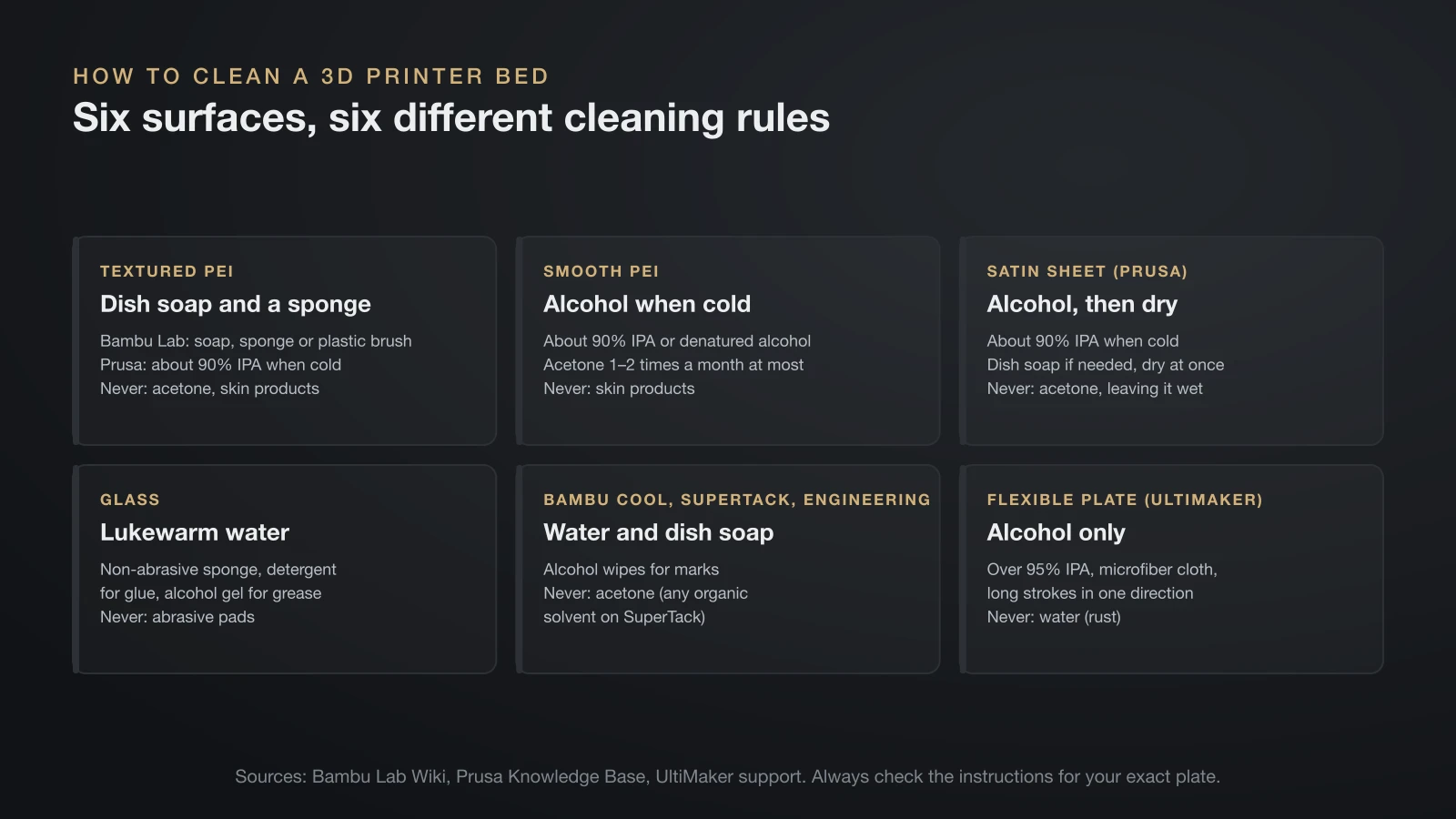
How to clean a 3D printer bed depends on its surface, because the makers disagree on water, alcohol and solvents. Check the instructions for your exact plate, then use the notes below.
Textured (powder-coated) PEI
Textured PEI needs a degreaser that reaches into its texture. Bambu Lab’s method is dish soap: wet the plate, apply detergent, scrub with a sponge or plastic brush until it foams, rinse, and dry with a paper towel. It explains that alcohol may just spread oils across a textured surface instead of lifting them.
Prusa takes the opposite default. It cleans its textured sheet with about 90% IPA when cold and keeps a warm-water wash with a few drops of dish soap as a last resort, because that sheet is not waterproof. Both agree on one rule: never use acetone, which permanently damages textured PEI.
Smooth PEI
Smooth PEI is the most solvent-tolerant surface. Prusa cleans it with about 90% IPA or denatured alcohol on an unscented paper towel, and allows acetone one or two times a month when alcohol is not enough. It warns that heavy acetone use makes PEI brittle and says not to use acetone right before printing PETG.
After a year or two, smooth PEI can polish itself and lose grip. Prusa says light sanding with 600–1000 grit paper brings fresh PEI to the surface.
Satin sheets
Prusa’s satin sheet follows the textured rules with one addition. Clean it with about 90% IPA when cold, use dish soap only if alcohol is not enough, and never leave it wet, even though it has an anti-corrosion layer. Prusa notes that fingerprints show clearly on satin, which makes dirty spots easy to find.
Glass
Glass is the easiest surface to wash. UltiMaker’s instructions for its glass plates: remove the plate, clean it with lukewarm water and a non-abrasive sponge, use a little detergent to lift glue, and use alcohol gel for greasy residue. Creality’s Ender-5 S1 manual allows glass cleaner or IPA on the print surface. Handle glass carefully when it is wet.
Cool, SuperTack and Engineering plates
Bambu Lab’s specialty plates prefer soap to solvents, and its filament guide says not to clean its plates with acetone at all. It cleans the Engineering Plate and the older Cool Plate with warm water and dish soap. For the Cool Plate SuperTack, it recommends water and detergent only when heavy dirt appears, and warns that organic solvents, especially acetone, damage the soft coating. Faint marks that survive a wash are normal and don’t affect adhesion.
Flexible and special sheets
Some sheets must stay dry. UltiMaker cleans its flexible build plate with a microfiber cloth and IPA above 95%, wiping in long strokes in one direction, and advises against water because it can cause rust. Prusa’s PA Nylon sheet is stricter still: no acetone, IPA or other alcohol-based cleaners, including window cleaner.
Deep clean: step by step
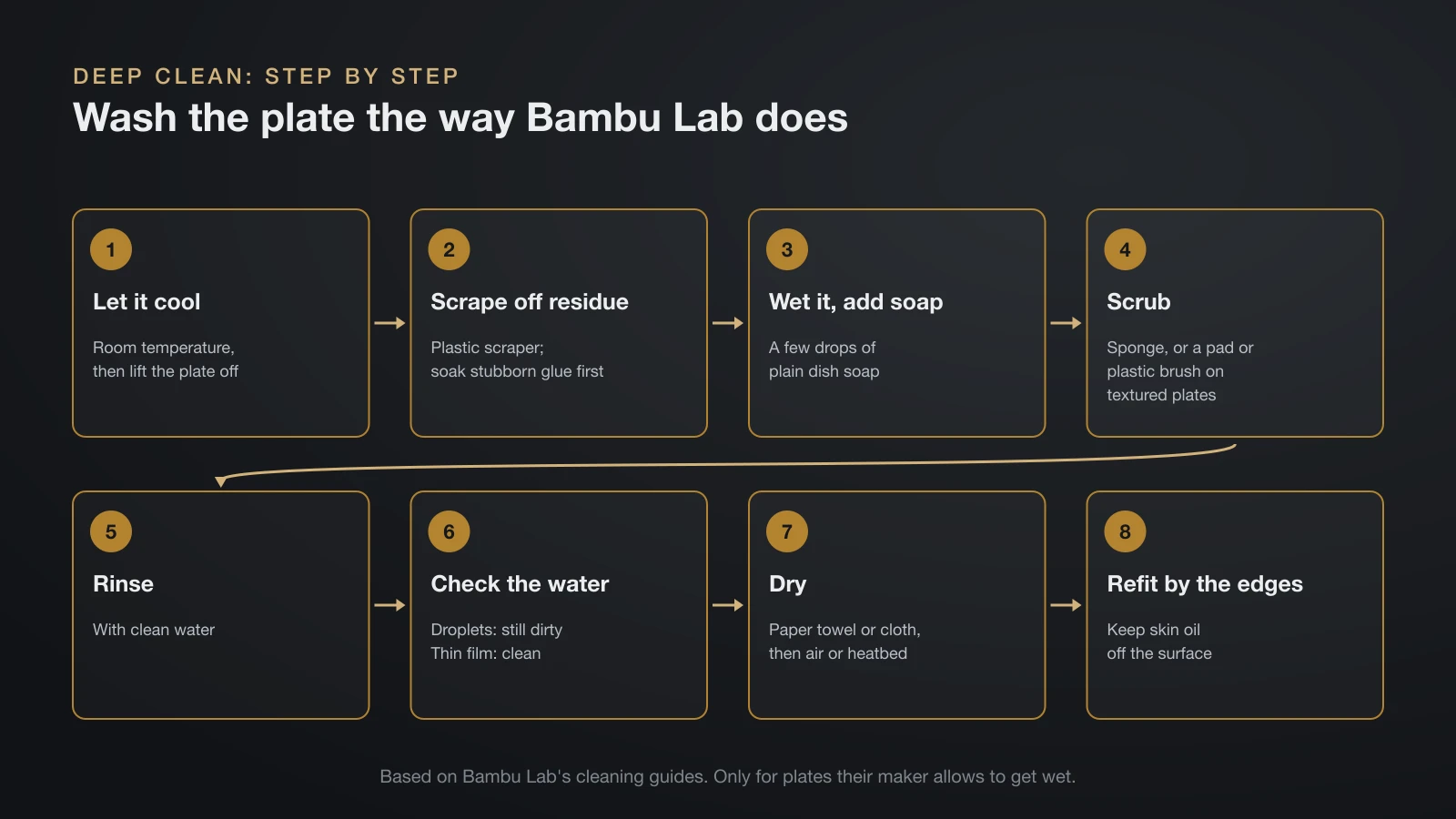
A deep clean with soap and water removes the oils, sugars and glue film that alcohol leaves behind. These steps follow Bambu Lab’s cleaning guides and suit any plate that its maker allows to get wet.
- Let it cool to room temperature and lift the plate off the printer.
- Scrape off solid residue with a plastic scraper. Old glue dissolves in water, so soak stubborn glue spots first.
- Wet the plate and add a few drops of plain dish soap.
- Scrub with a sponge, or a scouring pad or plastic brush on textured plates, until it foams.
- Rinse with clean water.
- Check the water. Bambu Lab’s test: on a dirty plate, water pulls into streams and droplets; on a clean one, it spreads into a thin film.
- Dry with a clean paper towel or cloth, then let the plate air-dry or warm it on the heatbed.
- Handle it by the edges from now on, so skin oil doesn’t undo the work.
If prints still don’t stick to a freshly washed plate, the problem is probably elsewhere. Check the nozzle height with our guide on how to level a 3D printer bed, or match the symptom in our guide to 3D printing first layer problems. Bed adhesion tips such as glue and brims will get a guide of their own.
How often should you clean a 3D printer bed?
Clean a 3D printer bed when it gets touched or contaminated, not on a fixed clock. Prusa says that if you don’t touch the surface with your hands or dirty tools, you don’t need to clean it before every print.
| When | What to do |
|---|---|
| After touching the surface | Quick wipe with IPA, or wash if your plate prefers soap |
| After using glue stick | Wash with water and dish soap |
| Every few prints to monthly | Deep clean; UltiMaker cleans glass after several prints or at least once a month |
| When prints start letting go | Deep clean before changing any settings |
| One or two times a month at most | Acetone, on smooth PEI only (Prusa) |
| After 1–2 years on smooth PEI | Light sanding if grip is gone (Prusa) |
Your first layer is the best indicator. Bambu Lab points out that fingerprints invisible on the plate often show up clearly in the first layer, as patches where lines don’t stick.
Fingerprints, glue and stubborn marks
Most residue comes off with the right order: scrape, soak, wash. Prusa notes that PVA glue stick wipes off with dish soap and water, and Bambu Lab traces white marks on the bottom of prints to glue residue. For small shiny marks from the nozzle, Prusa suggests the hard side of a dry kitchen sponge or 400–600 grit paper, followed by an IPA wipe. Bambu Lab allows fine sandpaper or steel wool on its textured PEI to expose a fresh surface, as long as all the dust is washed off.
3D printer maintenance checklist
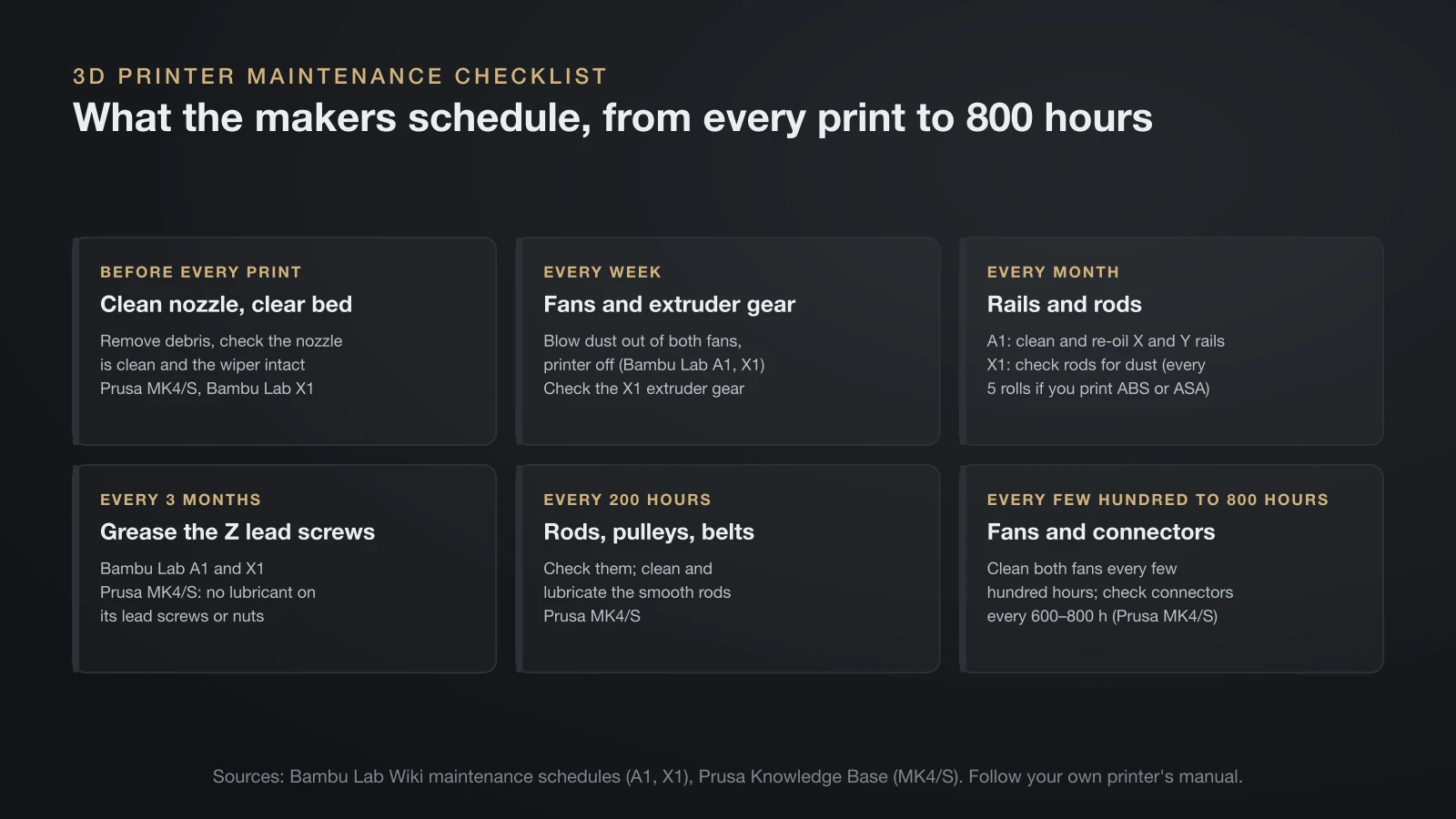
A clean bed is only one part of routine 3D printer maintenance; rails, belts, fans and the nozzle need attention too. The intervals below come from Bambu Lab’s and Prusa’s official schedules. Use your own printer’s manual, because lubrication rules differ between machines.
| Interval | Task | Maker’s schedule |
|---|---|---|
| Before every print | Remove debris, check the nozzle is clean and the nozzle wiper is intact | Prusa MK4/S; Bambu Lab X1 |
| Every week | Blow dust out of the hotend and part cooling fans (printer off) | Bambu Lab A1 and X1 |
| Every week | Check the extruder gear for filament dust | Bambu Lab X1 |
| Every month | Clean the X and Y rails and re-oil them | Bambu Lab A1 |
| Every month | Check carbon and linear rods for dust (every 5 rolls if you print ABS or ASA) | Bambu Lab X1 |
| Every 3 months | Grease the Z lead screws | Bambu Lab A1 and X1 |
| Every 200 hours | Check rods, pulleys and belts; clean and lubricate smooth rods | Prusa MK4/S |
| Every few hundred hours | Clean both fans | Prusa MK4/S |
| Every 600–800 hours | Check electrical connectors | Prusa MK4/S |
Lubrication: use the right product in the right place
Lubrication mistakes do more harm than skipped lubrication. A few rules from the makers:
- Bambu Lab A1: oil, not grease, on the X linear rail and Y guide rail; grease on the lead screws. Bambu Lab switched the Y rail from grease to oil because grease attracted dust, and it prohibits grease on the X rail.
- Bambu Lab X1 and P1: no oil or grease at all on the X-axis carbon rods; clean them with IPA and a dust-free cloth instead.
- Prusa MK4/S: a small amount of Prusa lubricant on the smooth rods, but none on the Z lead screws or their nuts.
When you oil the A1’s Y rail, Bambu Lab says to keep oil off the build plate and suggests removing the plate if needed. Oil on a plate is exactly the contamination this guide is about.
Belts, nozzle and firmware
Belts should be tight without strain. Prusa says a correctly tensioned belt sounds like a low bass note when plucked, and Bambu Lab’s A1 checks tension automatically and prompts you to re-tension it.
Clean the nozzle as part of the same routine. Prusa heats it to 250 °C (482 °F) for 3–5 minutes and brushes off old plastic with a brass brush; our guide to the 3D printer hotend explains the parts you are cleaning. After a firmware update, Creality’s K2 guide recommends running the printer’s calibration again before the next print.
What goes in a 3D printer maintenance kit
A 3D printer maintenance kit needs only a few items. Bambu Lab’s A1 tool list, plus the bed supplies above, covers it:
- IPA and clean, lint-free cloths
- Plain dish soap and a sponge or plastic brush (for the bed)
- The lubricant oil and grease your printer maker specifies
- Hex keys for your machine
- Tweezers for strands of filament
- Heat-resistant gloves
- An air blower or compressed air for fans and the extruder
The bottom line
Clean a 3D printer bed cold, with about 90% isopropyl alcohol for quick wipes and plain dish soap and water for a deep clean, and match the method to the surface. Never use acetone on textured PEI, satin or Bambu Lab’s specialty plates, and keep water off plates their makers say must stay dry. Add the rest of the printer to a simple routine: fans weekly, rails monthly, lead screws every three months, with the lubricant your manual names.
Sources
- Bambu Lab Wiki: Textured PEI Plate Cleaning Guide, Work after printing, Build plates, Cool Plate SuperTack, Engineering Plate, Filament guide, A1 maintenance, A1 Y-axis lubrication, X1 maintenance and Lubricant grease and oil
- Prusa Knowledge Base: First layer issues (IPA strength, dish soap, acetone, glue, resurfacing), Smooth, Textured and Satin steel sheets, and Regular printer maintenance (MK4/S) (intervals, belts, lubrication, nozzle cleaning)
- UltiMaker support: Cleaning the S series printer (glass and flexible plate cleaning, IPA above 95%, monthly cleaning)
- NIOSH Pocket Guide to Chemical Hazards: Isopropyl alcohol (flash point, flammability class, symptoms)
- Creality Wiki: Ender-5 S1 user manual (power off to clean, glass cleaner or IPA) and K2 first layer adhesion (dish soap for hand sweat, calibration after firmware updates)