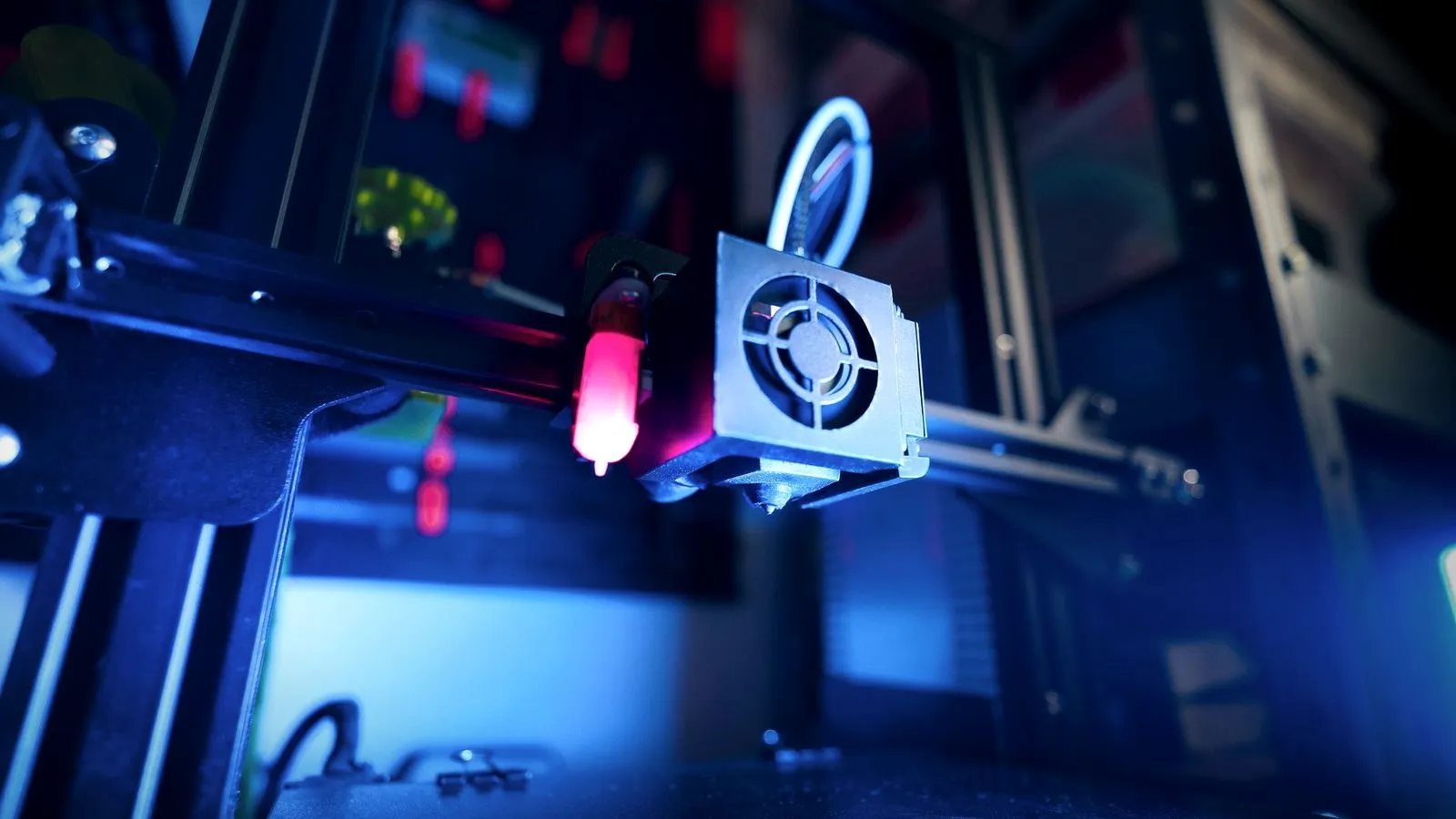
A 3D printer hotend is the heated part of the print head that melts filament and pushes it out through the nozzle. It combines a heatsink and fan that keep incoming filament solid, a heat break, and a heater block holding a heater, a temperature sensor and the nozzle. Its design sets your maximum temperature and how fast you can print.
The hotend is only half of the filament path: the motor and gears that push filament into it make up the extruder, covered in our guide to the 3D printer extruder. Below are the parts, PTFE-lined vs all-metal designs, high-flow hotends, fans, heat creep and safe replacement.
The short answer
| Part | What it does |
|---|---|
| Heatsink and hotend fan | Pull heat away so the filament stays solid above the melt zone |
| Heat break | Thin tube that separates the cold side from the hot side |
| Heater block | Metal block that holds the heater, sensor and nozzle together |
| Heater cartridge | Electric heater, often 30 W on E3D hotends |
| Thermistor or PT100 | Temperature sensor the firmware reads to control the heater |
| Nozzle | The tip that shapes the molten plastic into a line |
| PTFE liner (some hotends) | Slippery tube inside the heat break; caps temperature (240 °C on E3D’s Lite6) |
- PTFE-lined hotends suit PLA, PETG, ABS and flexible filament below their liner limit.
- All-metal hotends reach 290–300 °C on popular Prusa and Bambu Lab models, and more with high-temperature parts.
- High-flow hotends melt more plastic per second, with a longer melt zone or high-flow nozzles.
What is a 3D printer hotend made of?
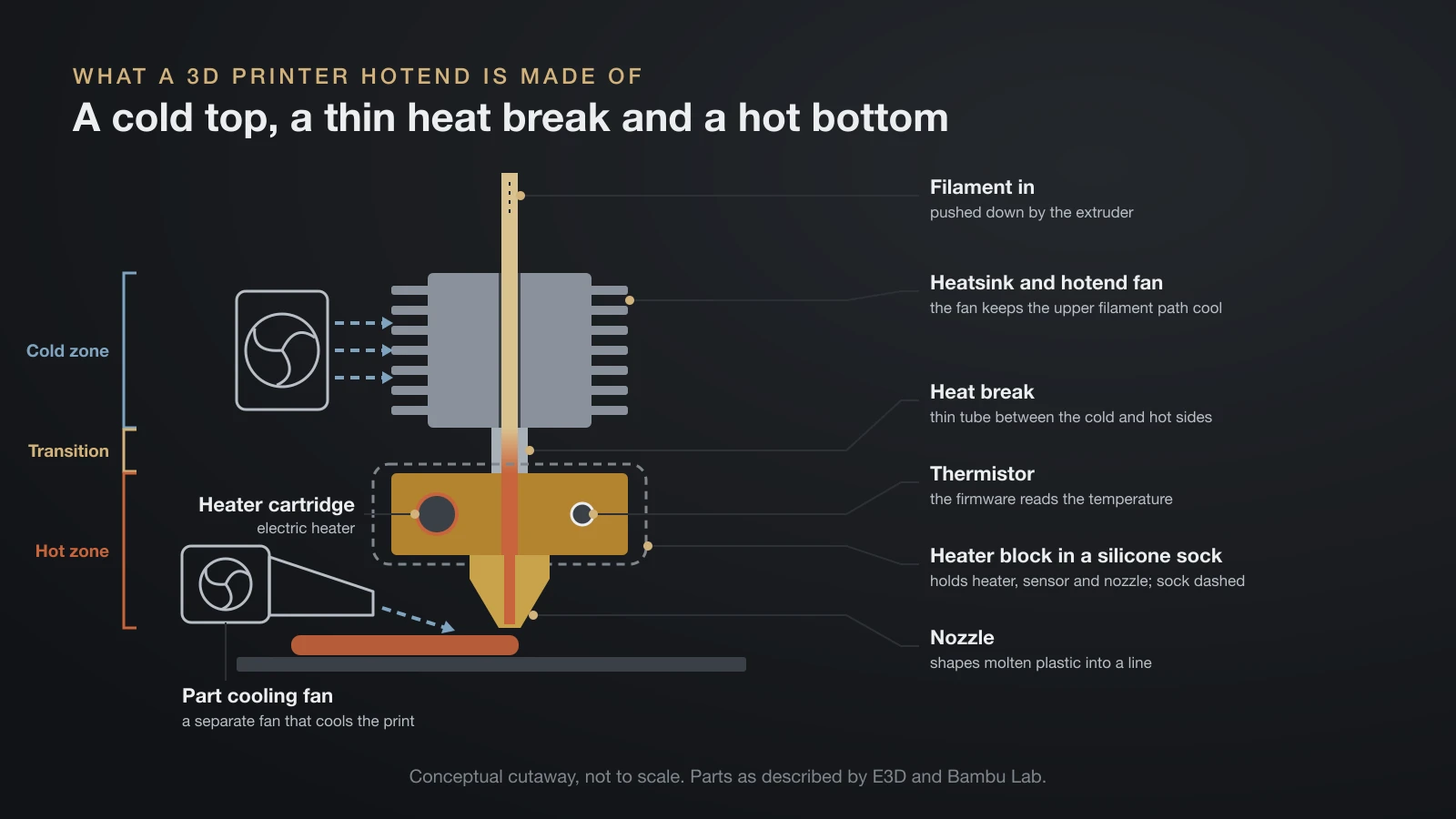
A 3D printer hotend is built as a stack, from a cold top to a hot bottom. Hotend maker E3D describes the parts this way:
- Heatsink: a finned aluminium heat exchanger; a fan blows through the fins to keep the upper filament path cool.
- Heat break: a threaded tube joining the cold and hot sides while limiting heat flow between them, made of stainless steel or lower-conductivity titanium.
- Heater block: usually aluminium or copper, holding the heater, sensor and nozzle.
- Heater cartridge: E3D’s standard heater is 30 W, sized to print at up to 300 °C (572 °F).
- Temperature sensor: usually a thermistor; PT100 sensors and thermocouples respond more precisely and reach higher temperatures.
- Nozzle: the brass, steel or plated copper tip screwed into the block.
Bambu Lab’s X1 and P1 hotend pairs a titanium alloy heat break with a nickel-plated brass block, an aluminium heatsink, a ceramic heater and an NTC thermistor. A silicone sock over the block, Bambu Lab says, keeps the temperature stable and stops plastic from building up. On the A1 series, a quick-release hotend clips into a separate hotend heating assembly, which Bambu Lab suggests cleaning monthly.
How a hotend melts filament
Solid filament enters the heatsink and softens inside the heat break. E3D keeps that transition zone very short on its V6, about 2 mm. The softened plastic expands into a rubbery plug that seals the bore, so the solid filament behind it works like a piston and forces molten plastic out of the nozzle.
Hotend vs extruder and nozzle
The extruder grips and pushes the filament, the hotend melts it and the nozzle shapes it. Brands often sell them as one print head, which is why the terms get mixed up; Bambu Lab’s X1 and P1 hotend is a single unit that can be installed cold.
PTFE-lined vs all-metal hotend
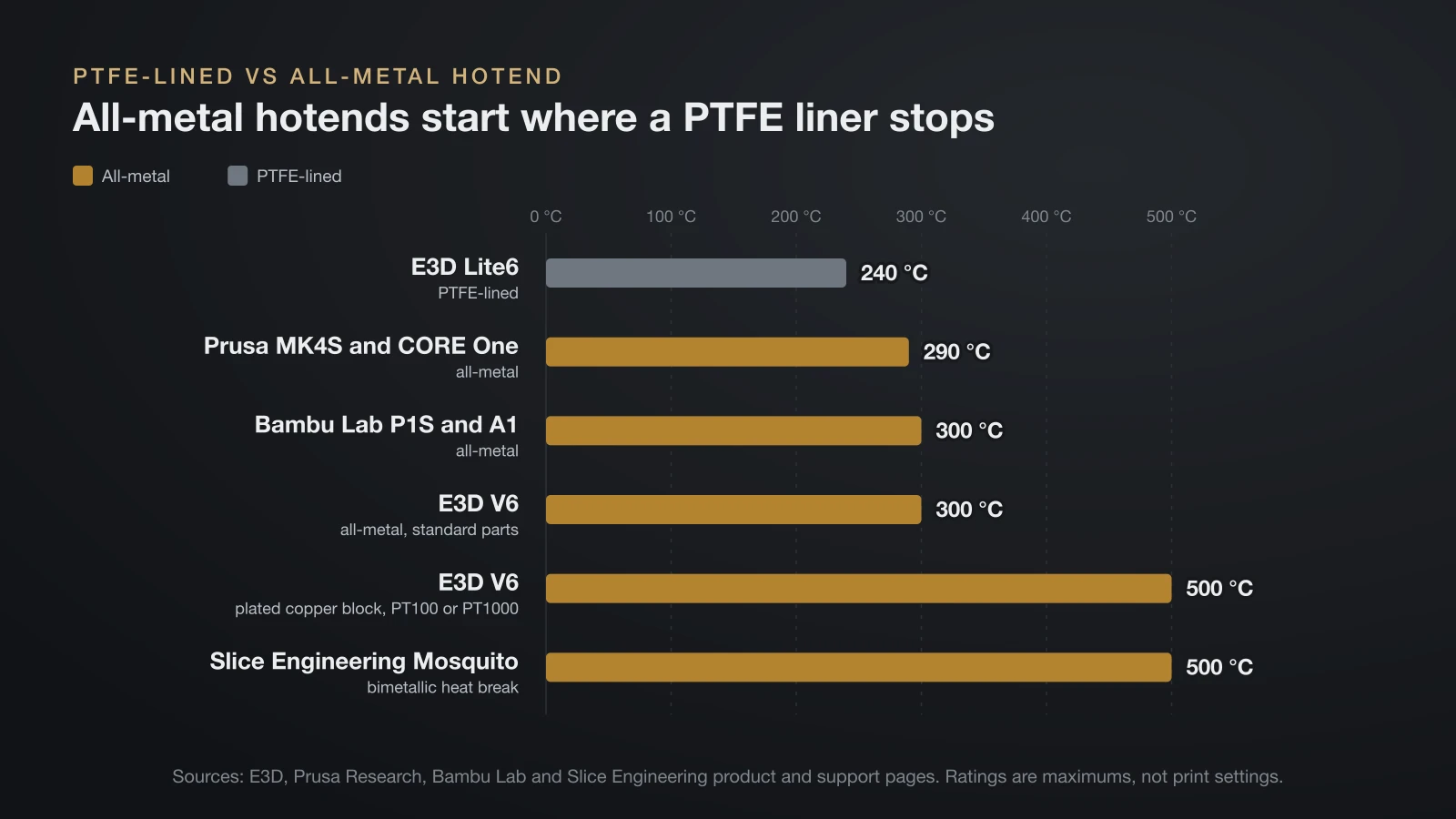
The difference is what lines the heat break. A PTFE-lined hotend runs a slippery plastic tube down into the hot zone, while an all-metal hotend keeps the filament path metal all the way to the nozzle. The liner is the weak point: E3D limits its PTFE-lined Lite6 to 240 °C (464 °F) because of it.
| PTFE-lined | All-metal | |
|---|---|---|
| Heat break | Plastic liner reaches into the hot zone | Metal from heatsink to nozzle |
| Typical limit | About 240 °C (E3D Lite6) | 290–300 °C stock; 500 °C with high-temperature parts |
| Good for | PLA, PETG, ABS, flexible filament | Everything above, plus nylon, polycarbonate and hotter plastics |
| Watch out for | A liner that overheats and has to be replaced | Heat creep with PLA if cooling is poor |
E3D says the Lite6 cannot print nylon or polycarbonate, but credits its full-length liner with good results on flexible filaments, and an overheated liner can simply be swapped.
All-metal designs push the ceiling higher. E3D rates its V6 at 300 °C as standard, limited by the aluminium block and the thermistor; with a plated copper block and a PT100 or PT1000 sensor, it reaches 500 °C (932 °F). Slice Engineering rates its Mosquito at 500 °C, using a bimetallic heat break of copper alloy and steel.
Popular consumer printers already ship all-metal hotends. Prusa rates the MK4S and CORE One at 290 °C (554 °F), Bambu Lab rates the P1S and A1 at 300 °C, and its H2D hotend reaches 350 °C (662 °F).
Temperature is the main reason to go all-metal. Nylon and polycarbonate need more heat than a PTFE liner survives, which is why E3D rules them out for the Lite6; see our nylon filament guide and polycarbonate filament guide for their ranges. PEEK filament needs a specialist high-temperature machine.
One trap with upgrades: E3D warns that hardened steel nozzles are not suitable in its aluminium heater blocks above 240 °C. For hotter work with abrasive filament, E3D specifies a plated copper block.
How to choose a 3D printer hotend: upgrade checklist
Choose a 3D printer hotend by fit first, then by temperature and flow.
- Fit: made for your printer model, or with a matching mount, cooling duct and wiring. Bambu Lab printers use their own swap-in hotends.
- Filament diameter: usually 1.75 mm; E3D and Slice Engineering also make 2.85 mm versions.
- Maximum temperature: comfortably above your hottest filament, counting the heater block and sensor ratings.
- Heater and sensor: the right voltage (E3D sells 12 V and 24 V heaters) and a sensor your firmware supports.
- Nozzles: Slice Engineering’s Mosquito takes RepRap-style M6 × 1.0 nozzles, while E3D’s Revo takes only Revo nozzles.
- Flow: only useful if your printer moves fast enough (next section).
- Abrasives: filled filaments need a hardened nozzle, and sometimes a matching heater block.
After fitting any new hotend, run a PID tune and recheck the first layer, as described in our guide on how to calibrate a 3D printer.
High-flow hotends: more plastic per second
A high-flow hotend melts more filament per second, measured as volumetric flow in cubic millimeters per second (mm³/s). Bambu Lab’s formula makes it concrete: layer height × line width × speed. A 0.2 mm layer with a 0.45 mm line at 200 mm/s needs 18 mm³/s, and the same line at 300 mm/s needs 27 mm³/s.
If the hotend cannot melt that much, the result is under-extrusion, weak layers and thinner walls than planned. Designers raise flow in two main ways:
- A longer melt zone. More heated length gives the filament more time to melt. E3D ties the two together: its Lite6 has a shorter effective melt zone than the V6, and E3D points users who need more speed to the V6 or its Volcano.
- High-flow nozzles. E3D’s Revo High Flow nozzles fit the same Revo hotends as its standard nozzles and raise the flow limit.
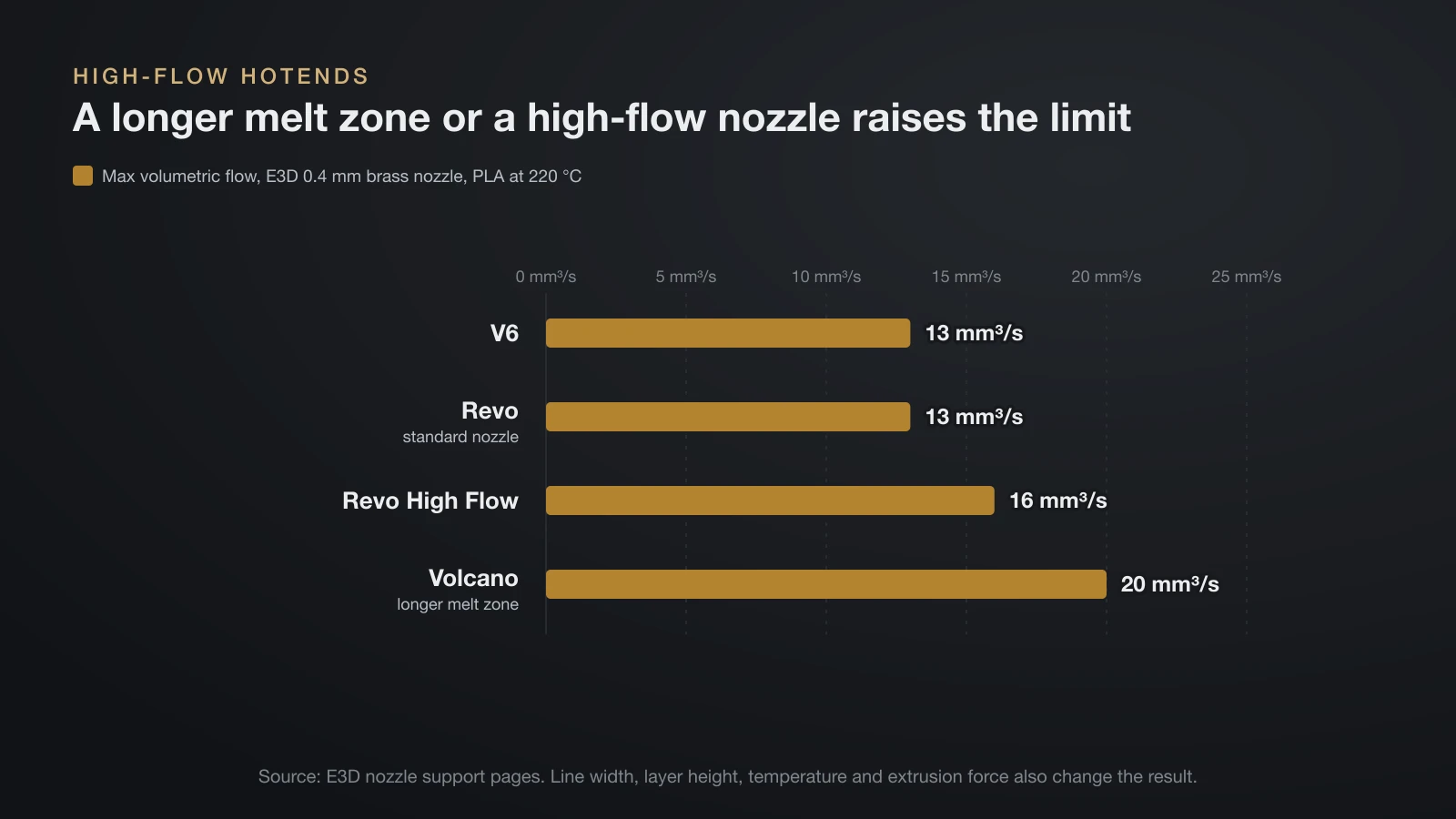
E3D publishes flow figures from one test method, 0.4 mm brass nozzles printing PLA at 220 °C:
| E3D nozzle (0.4 mm brass) | Max volumetric flow, PLA at 220 °C |
|---|---|
| V6 | 13 mm³/s |
| Revo (standard) | 13 mm³/s |
| Revo High Flow | 16 mm³/s |
| Volcano | 20 mm³/s |
Bambu Lab says its H2 series reaches around 35 mm³/s with PLA Basic through a 0.4 mm High Flow nozzle. Test methods differ between brands, and E3D notes that line width, layer height, temperature and extrusion force all change the result, so compare within one maker’s data.
Hotend cooling fan vs part cooling fan
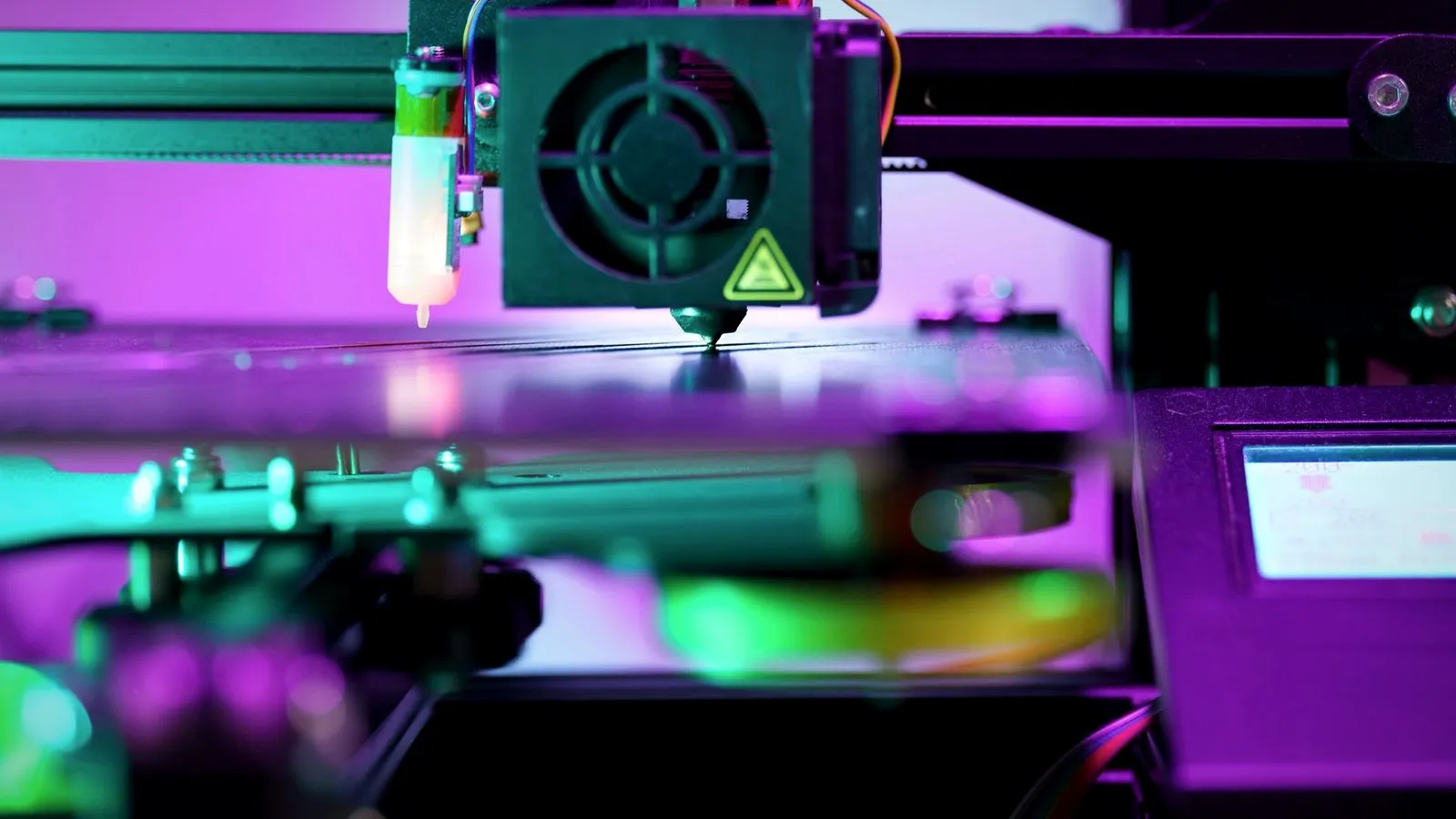
Most print heads carry two separate 3D printer cooling fans with opposite jobs. The hotend fan cools the heatsink, and the part cooling fan cools the plastic that has just left the nozzle.
| Hotend fan (heat break fan) | Part cooling fan | |
|---|---|---|
| Cools | The heatsink and upper filament path | The freshly printed layer |
| Runs | Whenever the hotend is hot | As the slicer sets it, per filament and layer |
| If it fails | Filament softens too high and jams | Droopier overhangs, rougher surfaces |
Bambu Lab’s X1 and P1 switch the hotend fan on automatically above 50 °C (122 °F), and their troubleshooting guide explains that a slow hotend fan lets the heat break warm up until the filament softens and jams. Prusa’s MK4/S monitors both fans and reports an error when one slows.
The part cooling fan is a print setting whose speed depends on the filament. Bambu Lab notes that PLA and TPU benefit from extra cooling. Both fans collect dust, so Bambu Lab’s A1 schedule checks both every week.
Heat creep: why all-metal hotends jam
Heat creep happens when heat climbs above the melt zone and softens filament inside the heat break. The plastic swells and sticks, and extrusion stops while the printer keeps moving.
Prusa lists the most common causes:
- A room above 35 °C (95 °F), or 30 °C for some filaments, or an enclosed printer.
- Filament with metal particles, which conduct heat upward.
- A hotend temperature set too high.
- Poor thermal contact between nozzle, heat break and heatsink, or not enough airflow.
- Too little filament flowing, as with very thin layers or slow printing.
PLA is the usual victim because it softens earliest. Bambu Lab recommends keeping an enclosure at least 10 °C below the glass transition temperature of the filament, and printing PLA with the door open or top cover off when the bed runs warm; our PLA temperature guide and our guide to enclosed 3D printers cover the details.
Prusa’s fixes start with the hardware: blow dust out of the heatsink fins, check that the fan faces the right way and spins, and use thermal paste on the heat break thread when reassembling. Lowering the bed by 5–10 °C, printing thicker layers or printing about 10% faster can also help. Not every jam is heat creep, though; ordinary clogs and cold pulls get their own guide.
When to upgrade or replace a 3D printer hotend
Replace or upgrade a 3D printer hotend when the part itself limits you, not because of a one-off clog:
- You need more heat than it is rated for, such as nylon on a PTFE-lined design.
- Your printer outruns it: walls come out thin at speed even with dry filament and calibrated flow.
- Abrasive filament has worn the nozzle, or you want to start printing it.
- Damage: a hotend bent in a crash or plastic leaking around the nozzle. Bambu Lab says to check that the hotend is straight after a failed print.
- Repeated heat creep after cleaning the heatsink and replacing a weak fan.
Heaters, thermistors, fans and worn nozzles can usually be replaced on their own.
How to replace a hotend safely
Replacing a hotend means working with hot metal and live wiring, so the order matters. These steps follow Bambu Lab’s X1 and P1 guide, with notes from Prusa; always use the guide for your model.
- Cool down, then power off. Bambu Lab waits until the hotend reads 50 °C or lower, then turns the printer off and disconnects it. Prusa notes that a hot hotend takes about 10 minutes to cool to room temperature.
- Unplug the heater, hotend fan and thermistor by their plugs, not the wires. Bambu Lab warns that working with the power on can short exposed wires.
- Remove the hotend. If old plastic holds it, Bambu Lab allows gentle heating while wearing heat-resistant gloves (80 °C on the A1).
- Refit the heater and sensor with thermal paste if you move them over, routing the wires so they can’t be pinched.
- Refit the silicone sock. Bambu Lab warns that the A1 gives temperature warnings without it.
- Update and test. Enter the new nozzle size on the printer if asked, then run a PID tune and a first-layer test.
If the first print after the swap looks wrong, our guide to first layer problems matches each symptom to a fix. For routine care, Prusa cleans the nozzle and heater block before prints by heating to 250 °C for 3–5 minutes and brushing off old plastic with a brass brush. The build plate needs its own routine, covered in our guide on how to clean a 3D printer bed.
The bottom line
A 3D printer hotend melts filament in a heated block and relies on a cool heatsink and a narrow heat break to keep the melt zone short. PTFE-lined hotends handle PLA, PETG and flexibles below about 240 °C, while all-metal hotends run 290–300 °C on popular printers and open up nylon and polycarbonate. Keep the hotend fan and heatsink clean to avoid heat creep, and upgrade only for a clear reason: more heat, more flow or abrasive filament.
Sources
- E3D: V6 hotend support (temperature ratings, hardened steel limit, heater, voltage), Anatomy of a hotend (parts, 2 mm transition zone), Lite6 (240 °C PTFE limit) and nozzle flow tables for V6, Volcano, Revo and Revo High Flow
- Bambu Lab Wiki: Replace the hotend (X1/P1), What is heat creep?, Hotend fan error, Volumetric speed, A1 maintenance and X1 maintenance; store specifications for the P1S, A1 and H2D
- Prusa Research: CORE One and MK4S specifications (290 °C) and Knowledge Base: Heat creep and Regular printer maintenance (cleaning, cooling time, fans)
- Slice Engineering: Mosquito hotend (500 °C rating, heat break, nozzle thread)