PLA plus (PLA+) is not one material but a family: each brand modifies standard PLA (polylactic acid) in its own way, mostly for more impact toughness, and sells it as PLA+, PLA Pro or Tough PLA. Related grades add heat resistance after annealing (HT-PLA) or faster melting (high-speed PLA). All print at roughly 190–230 °C (374–446 °F) without an enclosure.
If you only want to know how much tougher a PLA+ is than the same brand’s regular PLA, our PLA+ vs PLA comparison answers that with paired data sheets. This guide covers the whole enhanced-PLA family instead: what each name means, what the technical data sheets (TDS) really show, how to print and anneal them, and which grade suits which project.
The short answer
| Variant | Example on the data sheets below | What it improves | Heat deflection, 0.45 MPa | Choose it for |
|---|---|---|---|---|
| Standard PLA (reference) | Prusament PLA | Baseline | 55 °C | Display models, prototypes |
| PLA+ | eSUN PLA+ | Impact toughness | 53.78 °C | Everyday functional prints |
| PLA Pro | Polymaker PolyLite PLA Pro | Toughness with stiffness | 59 °C | Clips, brackets, armor parts |
| Tough PLA | UltiMaker Tough PLA | Toughness close to ABS, per UltiMaker | 58.3 °C | Jigs, tooling, large functional parts |
| HT-PLA | Polymaker HT-PLA | Heat resistance after annealing | 61 °C printed, 107 °C annealed | Parts near warm electronics |
| High-speed PLA | Creality Hyper PLA, eSUN PLA+HS | Melts and flows faster | 54 °C (eSUN PLA+HS) | High-speed printers |
What does PLA plus mean?
PLA plus means a PLA that its manufacturer has modified to fix a weakness of plain PLA, and there is no industry standard behind the name. Each company uses its own additives and does not publish the recipe. Two spools labeled PLA+ from different brands can behave very differently.
The marketing claims point in the same direction. eSUN says the strength of its PLA+ is “significantly improved compared with ordinary PLA.” UltiMaker describes Tough PLA as a technical PLA with toughness comparable to its own ABS. Polymaker calls PolyLite PLA Pro a PLA that combines high toughness and high rigidity with the ease of printing of regular PLA.
Not every enhanced PLA is tougher, though. HT-PLA is built for heat, and high-speed PLA is built for flow. The name after “PLA” tells you what the maker optimized, and the data sheet tells you what it achieved.
How to choose a PLA plus filament from its data sheet
Choosing a PLA plus filament comes down to reading its technical data sheet correctly, because brands test in different ways. Before you compare two spools, check these points:
- Diameter: most printers take 1.75 mm, but UltiMaker Tough PLA for the S series is 2.85 mm. Our guide to 1.75 mm filament explains why the two sizes are not interchangeable.
- Impact test: Izod (eSUN, under the Chinese standard GB/T 1843) and Charpy (Polymaker and UltiMaker, under ISO 179) are different tests. Compare impact values only within one test type.
- Heat deflection load: heat deflection temperature (HDT) is measured under 0.45 MPa or 1.8 MPa. Compare values at the same load only.
- Printed or molded specimens: eSUN’s PLA+HS values come from injection-molded bars, while the other sheets here use printed bars. Molded and printed results are not directly comparable.
- Direction: X-Y values (along the layers) beat Z values (across them). eSUN’s PLA+ drops from 7.27 to 2.22 kJ/m² Izod impact in Z.
- Missing data: “tougher” without a published number is a claim, not a spec.
PLA plus variants compared: data sheet numbers
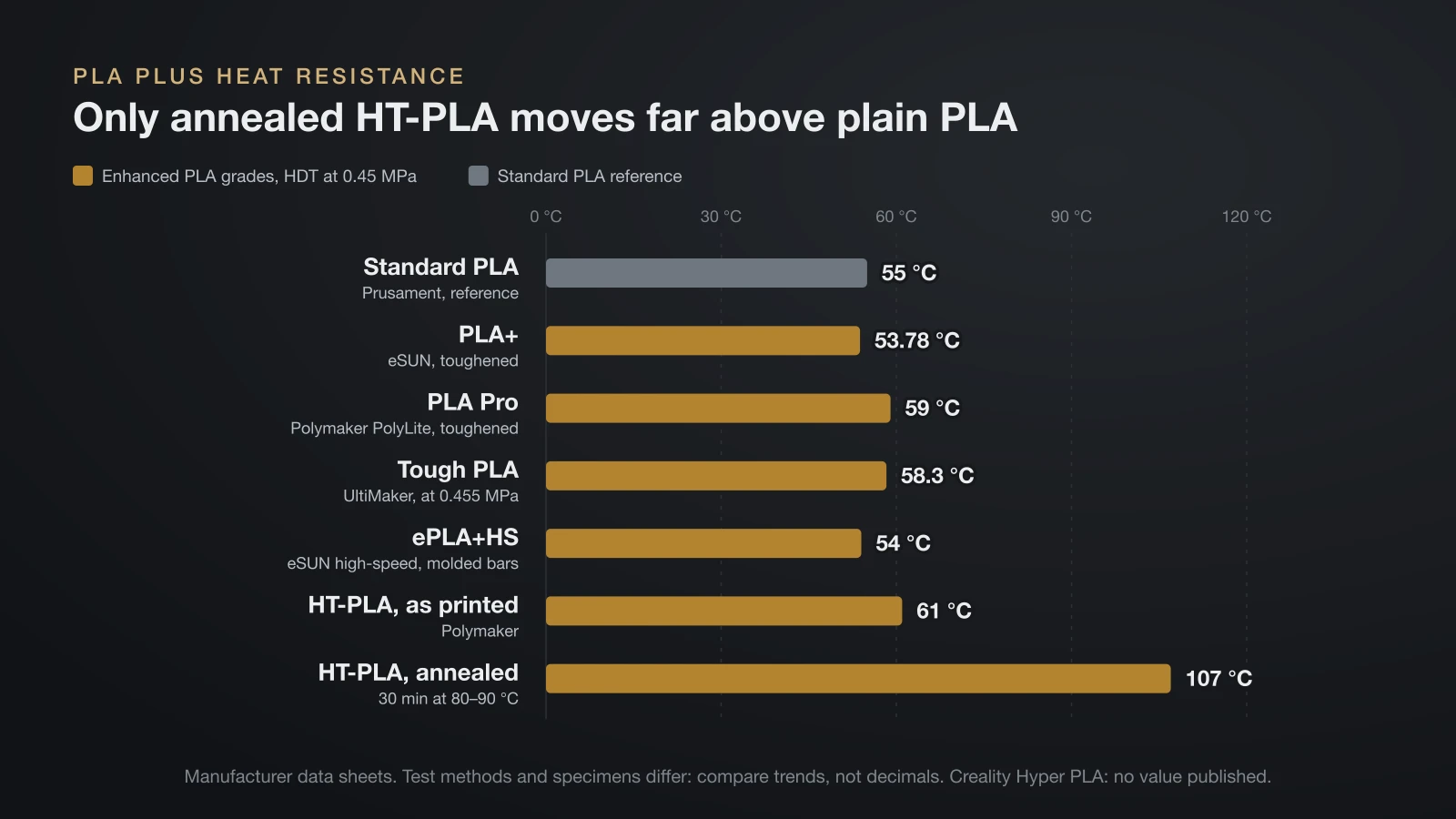
The table puts each variant’s official data side by side. Read it with the checklist above in mind: the tests differ, so the columns show trends rather than a strict ranking.
| Filament (data sheet) | Nozzle | HDT at 0.45 MPa | Impact strength, X-Y (test) | Elongation at break, X-Y | Specimens |
|---|---|---|---|---|---|
| Prusament PLA (reference) | 210 ± 10 °C | 55 °C (ISO 75) | Unnotched Charpy only | Not listed | Printed |
| eSUN PLA+ | 210–230 °C | 53.78 °C (GB/T 1634) | 7.27 kJ/m² (Izod, GB/T 1843) | 4.14% | Printed |
| Polymaker PolyLite PLA Pro | 190–230 °C | 59 °C (ISO 75) | 17.1 kJ/m² (notched Charpy, ISO 179) | 6.3% | Printed |
| UltiMaker Tough PLA | 215 °C (Cura profile) | 58.3 °C at 0.455 MPa (ISO 75-2/B) | 8.9 kJ/m² (notched Charpy, ISO 179-1) | 9.4% | Printed |
| Polymaker HT-PLA, as printed | 210–230 °C | 61 °C (ISO 75) | 4.94 kJ/m² (notched Charpy, ISO 179) | 2.80% | Printed |
| Polymaker HT-PLA, annealed | 210–230 °C | 107 °C (ISO 75) | 4.67 kJ/m² (notched Charpy, ISO 179) | 1.87% | Printed, then annealed |
| eSUN ePLA+HS | 210–230 °C | 54 °C (GB/T 1634) | 4.1 kJ/m² (Izod, GB/T 1843) | 17.5% | Injection molded |
| Creality Hyper PLA | 220 °C (Creality K1 guide) | Not published | Not published | Not published | Not published |
eSUN PLA+
eSUN PLA+ prints at 210–230 °C on a 45–60 °C bed with the fan at 100%. Its sheet lists “good toughness” and “hard to break” among its characteristics, while its heat deflection of 53.78 °C at 0.45 MPa sits right next to plain PLA’s 55 °C. eSUN also states that it is not UV resistant.
Polymaker PolyLite PLA Pro
PolyLite PLA Pro has the highest impact value among the printed specimens here, 17.1 kJ/m² in notched Charpy, while keeping a Young’s modulus of 2,932 MPa, so parts stay fairly stiff. Its HDT is 59 °C at 0.45 MPa and 58 °C at 1.8 MPa. Polymaker lists 190–230 °C at the nozzle and no enclosure.
UltiMaker Tough PLA and other “PLA Tough” grades
UltiMaker Tough PLA is sold for functional prototypes, tooling and manufacturing aids. Its data sheet lists 8.9 kJ/m² notched Charpy and 9.4% elongation at break in the flat (X-Y) direction, and UltiMaker says parts should not be exposed to temperatures above 58 °C. UltiMaker’s own Cura material profile prints it at 215 °C with a 60 °C bed. Bambu Lab sells a similar grade as PLA Tough+, covered in our comparison article.
Polymaker HT-PLA
HT-PLA (high temperature PLA) prints like ordinary PLA, at 210–230 °C on a 25–60 °C bed, but gains heat resistance after a short anneal. It is not a toughness upgrade: at 4.94 kJ/m² notched Charpy and 2.80% elongation, it is less impact resistant than Polymaker’s own PLA Pro in the same test. The next section covers annealing.
High-speed PLA: Creality Hyper PLA and eSUN PLA+HS
High-speed PLA is formulated to melt and solidify quickly, so fast printers can push more plastic per second. Creality advertises Hyper PLA for 30–600 mm/s and calls it tougher than traditional PLA, but its product pages publish no impact or heat values. Its K1 guide lists a maximum volumetric flow of 23 mm³/s for Hyper PLA against 18 mm³/s for generic PLA. eSUN rates ePLA+HS for 50–350 mm/s and notes that fast-printing formulas usually give up some physical properties.
HT-PLA heat resistance and how to anneal it
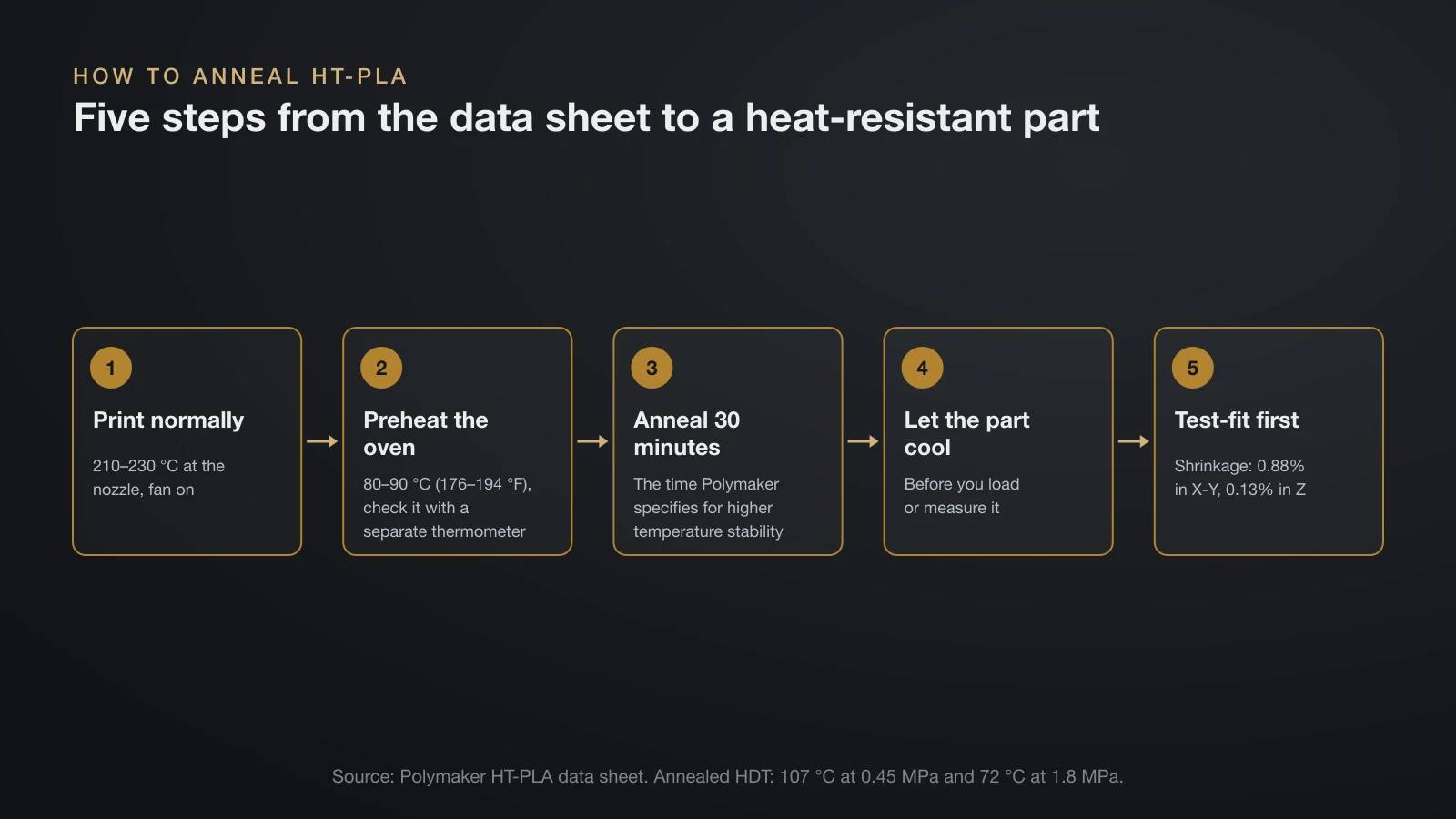
HT-PLA is the only member of the family whose heat deflection rises far above plain PLA, and only after annealing. At the same 0.45 MPa load, every other grade here, and HT-PLA as printed, lands between about 54 and 61 °C, so toughened PLA softens in a hot car just like regular PLA. Annealed HT-PLA reaches 107 °C (225 °F).
Polymaker also says HT-PLA keeps its shape up to 150 °C (302 °F) without sagging under its own weight, with no post-processing. That is a different, much gentler test than HDT: a part that carries a load needs the anneal. Under the heavier 1.8 MPa load, annealed HT-PLA reaches 72 °C.
To anneal HT-PLA the way its data sheet describes:
- Print the part normally, at 210–230 °C with the fan on.
- Preheat an oven to 80–90 °C (176–194 °F) and confirm the actual temperature with a separate thermometer.
- Anneal for 30 minutes, the time Polymaker specifies for higher temperature stability.
- Let the part cool before you load it or measure it.
- Test-fit first. Under dimensional stability, the sheet lists 0.88% shrinkage in X-Y and 0.13% in Z, so check a sample part before you anneal a batch that must fit.
For parts that sit in direct sun, annealed HT-PLA is still not the obvious pick: Polymaker lists no UV aging data. ASA filament is made for outdoor use and deflects at 93 °C at 0.45 MPa in Prusament’s data.
PLA plus print settings by brand
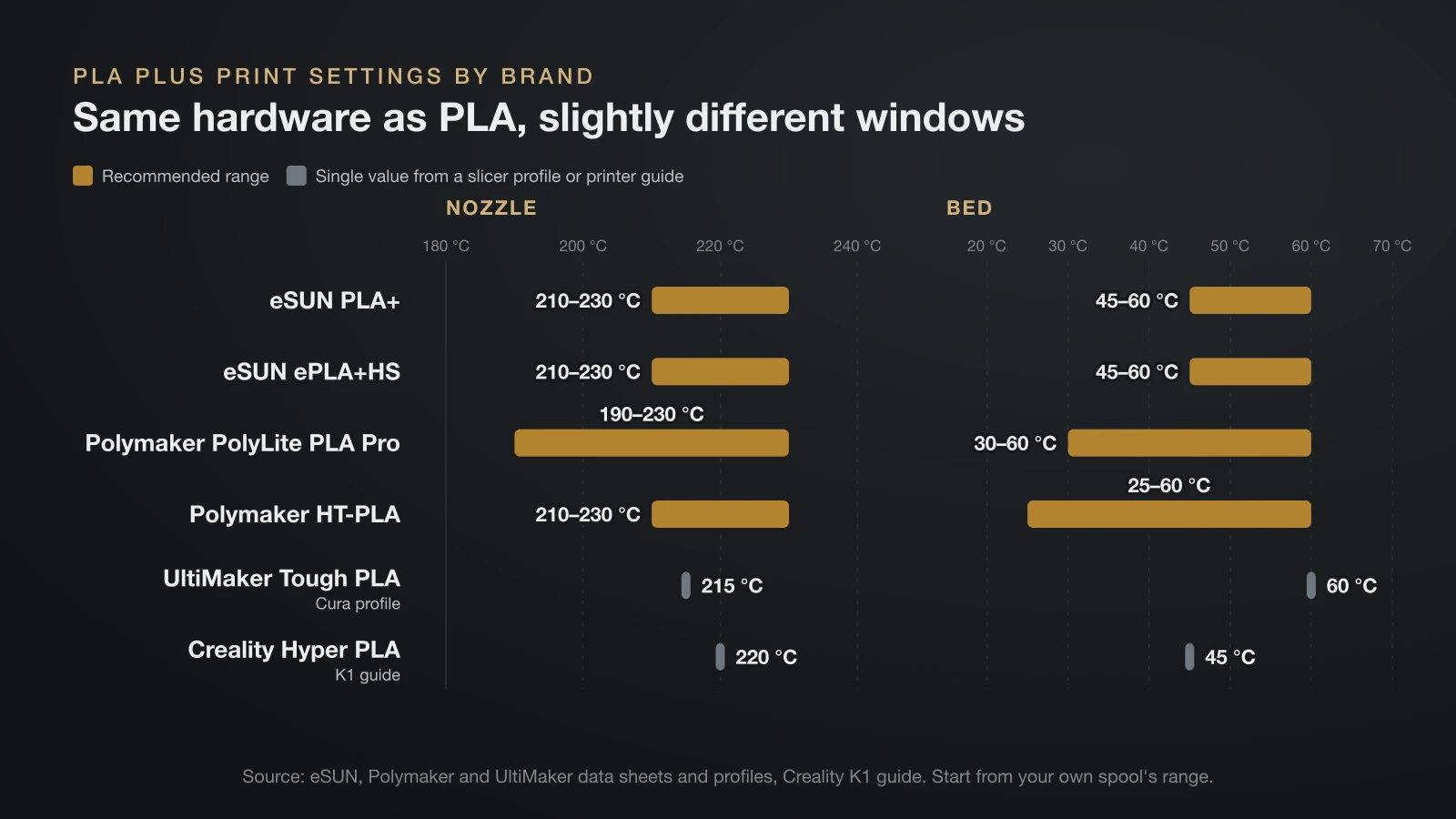
PLA plus prints on the same hardware as regular PLA, inside the same broad 190–230 °C nozzle window. The table collects each brand’s recommended values; start from your spool’s own range.
| Filament | Nozzle | Bed | Part cooling | Speed | Drying |
|---|---|---|---|---|---|
| eSUN PLA+ | 210–230 °C | 45–60 °C | 100% | Under 300 mm/s | 50 °C, 8–12 h |
| eSUN ePLA+HS | 210–230 °C | 45–60 °C | 100% | 50–350 mm/s | Not listed |
| Polymaker PolyLite PLA Pro | 190–230 °C | 30–60 °C | On | 50–200 mm/s | 55 °C, 6 h |
| Polymaker HT-PLA | 210–230 °C | 25–60 °C | On | Up to 300 mm/s | 60 °C, 6 h |
| UltiMaker Tough PLA (Cura profile) | 215 °C | 60 °C | 100% | Not listed | Not listed |
| Creality Hyper PLA (K1 guide) | 220 °C | 45 °C | 100% | 300 mm/s at 0.2 mm layers | Not listed |
Two habits help with any enhanced PLA:
- Print a temperature tower for each new brand, because the ranges differ. Our guide to PLA temperature walks through it.
- Match speed to melt capacity. High-speed PLA only helps if your 3D printer hotend can melt that much plastic; otherwise walls come out thin.
Which PLA plus filament for which project?
The right PLA plus filament depends on whether the part must survive knocks, heat or speed. Use this as a starting point, then check the data sheet of the exact spool.
| Project | Good starting grade | Why |
|---|---|---|
| Cosplay armor and props | PLA+ or PLA Pro | eSUN lists cosplay among PLA+ uses; thin edges and straps survive handling better |
| Toys, snap fits and moving joints | PLA Pro or Tough PLA | Higher impact values help pins and clips survive drops |
| Jigs, fixtures and tool holders | Tough PLA or PLA Pro | UltiMaker names tooling and manufacturing aids |
| Parts near warm electronics | Annealed HT-PLA | 107 °C HDT at 0.45 MPa after 30 minutes at 80–90 °C |
| Outdoor or sun-exposed parts | ASA instead of any PLA | eSUN PLA+ is not UV resistant; ASA is made for weather |
| Very fast printers | High-speed PLA | Higher volumetric flow, 23 vs 18 mm³/s in Creality’s K1 guide |
| Display models and prototypes | Standard PLA | No load, no need for extra toughness |
For costume builds, see our guide to 3D printed cosplay armor; for pins and moving joints, see 3D printed articulated toys. Whatever the grade, do not use printed PLA for parts whose failure could hurt someone.
Drying and storing PLA plus filament
PLA plus absorbs a little moisture from the air, so keep spools sealed and dry them when print quality drops. Polymaker’s moisture curve for PLA Pro levels off at 0.291% water at 70% relative humidity and 23 °C.
Drying settings stay low because PLA softens early: 50 °C for 8–12 hours (eSUN PLA+), 55 °C for 6 hours (Polymaker PLA Pro) and 60 °C for 6 hours (Polymaker HT-PLA). If a spool that printed cleanly starts to string, drying is the first thing to try. Store opened spools in a sealed bag or box with desiccant.
The bottom line
PLA plus is a label, not a standard: PLA+, PLA Pro and Tough PLA mostly buy you impact toughness, HT-PLA buys heat resistance after a 30-minute anneal, and high-speed PLA buys flow. At the same 0.45 MPa load, only annealed HT-PLA clears plain PLA’s 55 °C by a wide margin. Pick the grade by the problem you need to solve, then trust the spool’s data sheet over its name.
Sources
- eSUN technical data sheets: PLA+ (Feb 2026) and ePLA+HS (July 2023) (heat distortion, Izod impact, elongation, specimen type, UV resistance, uses, print and drying settings)
- Polymaker technical data sheets: PolyLite PLA Pro and HT-PLA (heat deflection, notched Charpy impact, elongation, modulus, moisture, annealing, 150 °C claim, shrinkage, print and drying settings)
- UltiMaker: Tough PLA technical data sheet and Tough PLA Cura material profile (diameter, heat deflection, notched Charpy, elongation, 58 °C limit, applications, 215 °C nozzle, 60 °C bed, fan)
- Creality: Hyper PLA product page and K1 series filament parameter guide (30–600 mm/s claim, 220 °C nozzle, 45 °C bed, 300 mm/s, 23 vs 18 mm³/s maximum volumetric flow)
- Prusa Polymers: Prusament PLA data sheet, Prusament PETG data sheet and Prusament ASA page (heat deflection at 0.45 MPa: PLA 55 °C, PETG 68 °C, ASA 93 °C; 210 ± 10 °C nozzle)