A used 3D printer can be a good deal if you see it print before you pay. Check that the frame is square, the axes move smoothly, the belts are tight, the bed and hotend heat up, and the extruder feeds cleanly. Prefer models that still get firmware and spare parts, and budget for a new nozzle and build plate.
Once it’s home, a second-hand printer needs the same setup as a new one: a clean nozzle, a properly leveled bed and a full calibration. This guide covers where to buy, a detailed inspection checklist, questions for the seller, red flags and the extra checks that resin printers need.
If you are still deciding whether to buy a printer at all, our guide on whether a 3D printer is worth it weighs the running costs and learning time.
The short answer
| Check | Good sign | Walk away if |
|---|---|---|
| Test print | Seller shows it heating, moving and printing a first layer | They won’t power it on |
| Motion | Smooth, quiet travel on every axis | Grinding, binding or a cracked frame |
| Hotend and extruder | Reaches temperature and extrudes a steady line | Clicking, leaks or a burnt heater cable |
| Electronics | Stock or documented firmware, clean wiring | Melted connectors or unknown custom firmware |
| Support | Current firmware, parts still sold | Discontinued model with proprietary parts |
| Paperwork | Original invoice included | No proof of purchase at all |
Used vs refurbished 3D printers: what’s the difference?
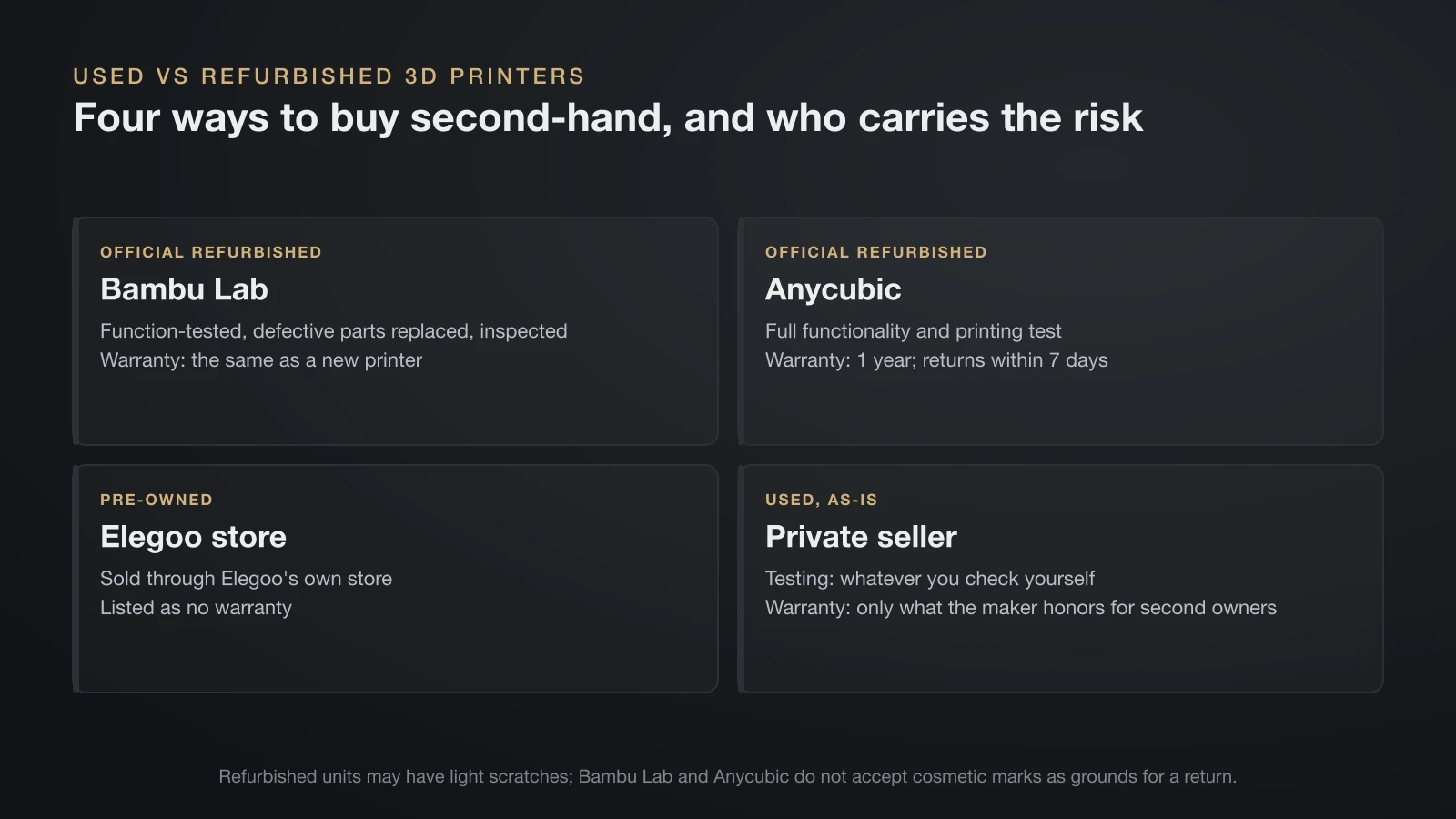
A used printer comes from a private seller, as-is. A refurbished one has been returned, inspected and repaired, ideally by the manufacturer itself. The difference is mostly who carries the risk.
| Source | Testing | Warranty |
|---|---|---|
| Bambu Lab official refurbished | Function-tested, defective parts replaced, cleaned and inspected | Same official warranty as a new printer |
| Anycubic official refurbished | Full functionality and printing test, faulty modules replaced | 1 year; returns within 7 days |
| Elegoo pre-owned | Sold through Elegoo’s store | Listed as no warranty |
| Private seller | Whatever you check yourself | Only what the maker honors for second owners |
Both Bambu Lab and Anycubic warn that refurbished units may carry light scratches, and neither accepts cosmetic marks as grounds for a return. Bambu Lab also exchanges a faulty refurbished unit only for another refurbished unit of the same model.
Where to buy a used 3D printer
You can buy a used 3D printer from the maker’s refurbished store, from local classifieds and marketplaces, or through a shipped private sale, and the risk rises in that order.
- The maker’s refurbished store: the lowest-risk option when it includes testing and a warranty. Bambu Lab and Anycubic sell tested refurbished units with a warranty; Elegoo’s pre-owned printers are listed without one.
- Local classifieds and marketplaces, such as Facebook Marketplace, OfferUp or local buy-and-sell groups: the best prices, and you can see the machine run. Pay through a method that offers buyer protection.
- Shipped private sales: the riskiest route. A printer that arrives damaged is hard to return, so ask how it will be packed, ideally in its original box.
Whatever the source, insist on seeing the exact unit you’re buying, not stock photos.
Used 3D printer inspection checklist
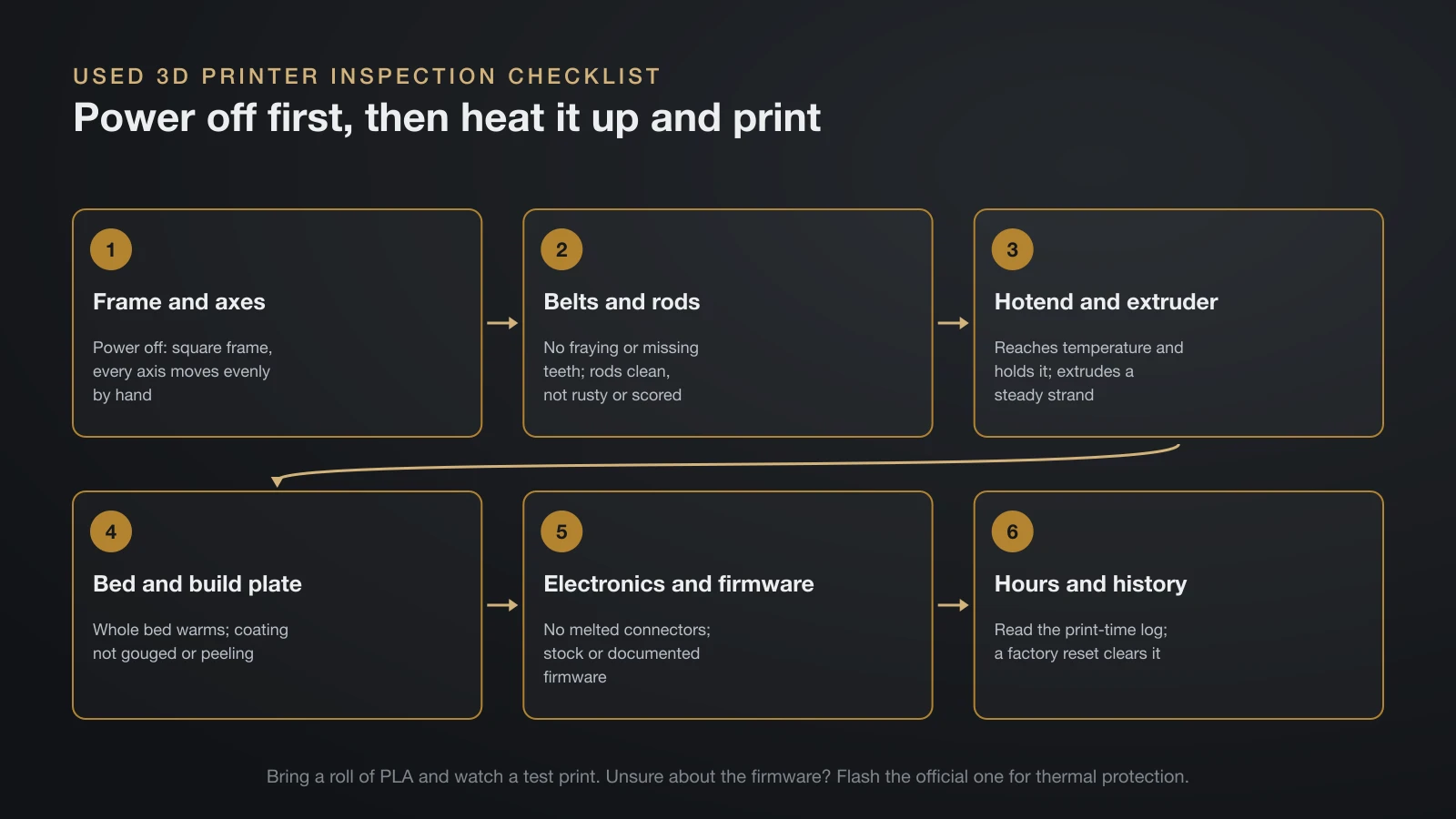
Check six areas in this order: frame and axes, belts and rods, hotend and extruder, bed and build plate, electronics and firmware, then the print hours. Do the mechanical checks with the power off, then the heat and print tests. Take a roll of PLA with you if the seller has none, and don’t let anyone rush you.
Frame and motion system
- Frame: square and solid, no cracks, bent parts or missing screws.
- Axes: push each axis by hand through its full travel. It should move evenly, without grinding, tight spots or play.
- Belts: no fraying or missing teeth. Prusa’s maintenance guide says belts should be tight enough to sound like a low bass note when plucked.
- Rods and rails: clean and lightly lubricated, not rusty or scored. Prusa suggests cleaning and lubricating them every 200 hours of printing.
Hotend, nozzle and extruder
Heat the hotend to printing temperature and watch it reach the target and hold steady. Then extrude a few centimeters of filament: you want a smooth, steady strand, with no clicking from the drive gears. Our guide to the 3D printer extruder explains the common faults.
Ask which filaments the printer has run. Bambu Lab warns that carbon fiber, glass fiber and particle-filled filaments wear out brass and stainless steel nozzles quickly, so a machine that printed them may need a new nozzle, or more.
Bed and build plate
Heat the bed and check that the whole surface warms, not just one corner. Look at the plate’s coating for gouges and peeling, since plates are consumables (our build plate guide covers the surface types). On a printer with auto leveling, run the leveling routine and watch it finish without errors.
Electronics, firmware and enclosure
- Wiring: no melted or browned connectors, no burn marks on the heater or bed cables. Prusa includes a check of electrical connectors in its yearly maintenance, every 600–800 hours of printing.
- Firmware: find out whether it runs stock firmware and whether updates are still published for the model.
- Enclosure: doors, panels and any filters intact. See our guide to enclosed 3D printers for what an enclosure should do.
Hours and history
Some printers log their total print time. Prusa’s i3 printers, for example, show it under LCD Menu, then Statistics, but Prusa notes that a factory reset clears the numbers, so treat the figure as a minimum. Compare it with the maker’s maintenance intervals to judge which wear parts are due.
Thermal runaway protection: the safety check
Marlin’s documentation calls thermal protection “one of the most vital safety features” in the firmware. If a temperature sensor comes loose, the printer reads a low temperature and keeps heating, which Marlin warns can lead to smoke, a ruined print and possibly fire. Thermal protection shuts the heaters down before that happens.
In Marlin, the protection is a build setting (THERMAL_PROTECTION_HOTENDS and THERMAL_PROTECTION_BED), so a custom firmware build can have it switched off. If the seller can’t tell you what’s installed, flash the maker’s official firmware before the first unattended print. Keep a working smoke alarm in the room either way.
Questions to ask the seller
Ask the seller about the printer’s age and invoice, its print hours, the filaments it ran, any repairs or upgrades, and whether you can watch it print before paying.
- When was it bought, and do you have the original invoice?
- Roughly how many hours has it printed, and how often was it used?
- Which filaments did you print? Any carbon fiber, glass fiber or glow-in-the-dark?
- What parts have been replaced or upgraded, and is the firmware stock?
- Has it ever been repaired, dropped or shipped without its box?
- Can I watch it heat up and print a small test before paying?
- What’s included: build plate, tools, spare nozzles, manual, original box?
The invoice matters beyond peace of mind. Prusa, for example, honors its warranty for one year from the date the printer was first delivered, not from your purchase, but only if you can show the original invoice.
Red flags that should end the deal
Walk away if the seller won’t run the printer, if it has undocumented custom firmware or modifications, or if it shows burn marks, a cracked frame or bent rods.
- The seller won’t power the printer on, or says it “just needs tuning.”
- Custom firmware or heavy modifications with no record of what changed.
- Burn marks, melted plugs or a smell of hot electronics.
- A cracked frame, bent rods or an axis that binds.
- A discontinued model that depends on proprietary parts you can’t buy.
- Model-specific accessories missing, such as the plate, hotend or filament system.
What to replace right away
Budget for wear parts even on a good machine. Prusa’s warranty lists build sheets, nozzles, silicone socks, bearings, smooth rods and rails, belts, hobbed gears and PTFE tubes as parts that wear out with normal use.
- Nozzle: cheap, and the most likely part to be worn or partly clogged.
- Build plate: if the coating is scratched through or no longer grips after cleaning.
- Belts and PTFE tube: if the belts are frayed or the tube is discolored or kinked.
- Then set it up from scratch: clean it, update the firmware and work through our guide on how to calibrate a 3D printer.
Buying a used resin 3D printer: extra checks
Resin printers wear differently, and two of their key parts are consumables.
- The LCD screen ages with use. Elegoo rates its monochrome LCD screens at a service life of about 2,000 hours and warrants them for only 3 months on new printers. Prusa limits its warranty on the SL1S exposure display to 2,000 hours of printing. Ask how many hours the printer has run.
- The FEP (release) film is disposable. Prusa’s warranty covers FEP film for only 10 print jobs, and Elegoo gives no warranty on release film. Prusa says to replace a film with scratches, dents or holes right away, or you risk a resin spill.
- Look for resin where it shouldn’t be: under the vat, around the screen and inside the base. Wear nitrile gloves if the vat still holds resin.
Still deciding between technologies? Our comparison of resin vs filament printers explains the trade-offs.
The bottom line
A used 3D printer is a good buy when you’ve seen it heat, move and print, the model is still supported and you’ve budgeted for a nozzle, plate and belts. A manufacturer’s refurbished unit costs more than a private sale but comes tested and under warranty. Walk away from sellers who won’t demonstrate the machine, and check the firmware’s thermal protection before any unattended print.
Sources
- Bambu Lab: Official refurbished products (testing, warranty, exchange and cosmetic terms) and Wiki: Filament guide (abrasive filaments and nozzle wear)
- Anycubic: Official refurbished printers (testing, 1-year warranty, 7-day returns); Elegoo: Mono LCD screen and warranty table (about 2,000 hours, 3-month LCD warranty, pre-owned and release film not covered)
- Prusa Knowledge Base: Warranty (second-hand terms, consumables, 2,000-hour display and 10-job FEP limits), Regular printer maintenance (MK4/S, MK3.9/S) (belts, 200 and 600–800 hour checks), Print statistics and SL1/SL1S maintenance (FEP inspection)
- Marlin documentation: Configuration, thermal runaway protection