
The Bambu Lab P1S is an enclosed CoreXY filament 3D printer with a 256 × 256 × 256 mm build volume, a 300 °C (572 °F) all-metal hotend and a 100 °C (212 °F) bed. Bambu Lab still sold it in October 2026, at $399 on its US store, next to its newer sibling, the $549 P2S. When we checked again on November 4, 2026, a store sale had cut both: the P1S to $349 (AMS Combo $479, AMS 2 Pro Combo $509) and the P2S to $449 (Combo $649).
Both printers share the same build volume and a passively warmed chamber, so the choice comes down to what the P2S adds: a hardened steel toolhead, a 1080p camera with AI error detection, a touchscreen and a 30-second nozzle swap. For where both sit among Bambu Lab’s other models, see our guide to Bambu Lab 3D printers.
The short answer
| Question | P1S | P2S |
|---|---|---|
| US store price, October 20, 2026 | $399; AMS Combo $549; AMS 2 Pro Combo $579 | $549; Combo $749 |
| Build volume | 256 × 256 × 256 mm | 256 × 256 × 256 mm |
| Nozzle and extruder gears | Stainless steel nozzle, steel gears | Hardened steel nozzle and gears |
| Camera | 1280 × 720 at 0.5 fps | 1920 × 1080 at 30 fps, AI error detection |
| Screen | 2.7-inch, button controlled | 5-inch touchscreen |
| Still sold? | Yes; Bambu Lab has “no plans” to stop | Yes, launched October 2025 |
Bambu Lab P1S vs P2S: spec comparison
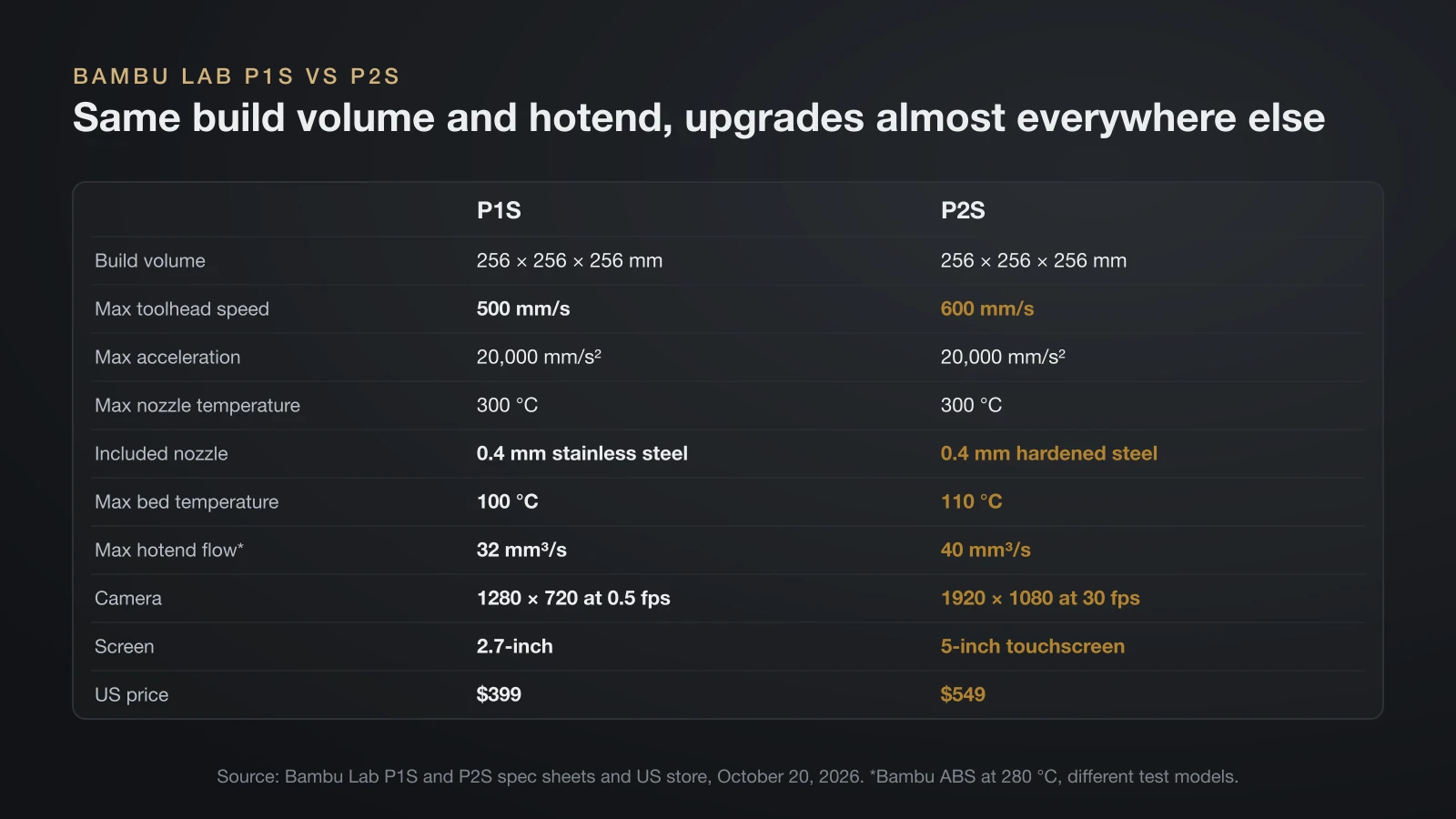
The P1S and P2S print the same size of part at the same nozzle temperature, but the P2S upgrades almost every part around that core. All values come from Bambu Lab’s spec sheets and US store pages, read on October 20, 2026.
| Spec | Bambu Lab P1S | Bambu Lab P2S |
|---|---|---|
| Build volume | 256 × 256 × 256 mm | 256 × 256 × 256 mm |
| Motion | CoreXY | CoreXY |
| Max toolhead speed | 500 mm/s | 600 mm/s |
| Max acceleration | 20,000 mm/s² | 20,000 mm/s² |
| Max nozzle temperature | 300 °C | 300 °C |
| Included nozzle | 0.4 mm stainless steel | 0.4 mm hardened steel |
| Extruder gears | Steel | Hardened steel, servo (PMSM) motor |
| Max hotend flow, Bambu ABS at 280 °C | 32 mm³/s | 40 mm³/s |
| Max bed temperature | 100 °C | 110 °C (230 °F) |
| Chamber | Enclosed, warmed by the bed | Enclosed, airflow flap, no heater |
| Filter | Activated carbon | Activated carbon (coconut shell) |
| Camera | 1280 × 720 at 0.5 fps | 1920 × 1080 at 30 fps |
| Screen | 2.7-inch, 192 × 64 | 5-inch touchscreen, 854 × 480 |
| Filament units | AMS, AMS 2 Pro, AMS HT; up to 4 AMS, 16 colors | AMS 2 Pro and AMS HT; up to 8 units, 20 slots |
| Max power at 110 V | 350 W | 1,000 W |
| US price | $399 | $549 |
The flow figures come from different test models (a 150 mm single-wall part for the P1S, 250 mm round for the P2S), so treat the gap as a rough guide. The open-frame P1P, which shared the P1S’s core, reached its end of life on February 10, 2026, and Bambu Lab has stopped making and selling it.
Is the Bambu Lab P1S still sold in 2026?
Yes, the Bambu Lab P1S was still on sale in October 2026, and Bambu Lab says it has no plans to stop selling it. That answer sits in the P2S product page FAQ, which asks the question directly and tells buyers to watch for official announcements.
The timeline explains the overlap. Bambu Lab launched the P1S in July 2023 as an enclosed version of the P1P, then announced the P2S on October 14, 2025 as a reengineered P1 series printer.
What changed from the P1S to the P2S?
The P2S keeps the P1S’s size and enclosed CoreXY layout but takes its extruder, sensors and airflow from Bambu Lab’s H2 printers. These are the official changes:
- Extruder: a servo (PMSM) extruder with up to 8.5 kg of push force, 70% more than its predecessor, that checks resistance 20,000 times a second to catch grinding and clogs.
- Hardened toolhead: the nozzle and extruder gears are hardened steel, so carbon and glass fiber blends need no upgrade.
- Flow calibration: an eddy current sensor measures flow dynamics and adjusts the flow rate automatically.
- Airflow: a flap pulls cool outside air in for PLA with the door closed, or seals heat in for warping plastics; Bambu Lab markets the chamber as ready for 50 °C (122 °F).
- Camera and AI: 1080p live view plus detection of spaghetti, nozzle clumping and purge chute jams, and a start check of plate and nozzle against the slicer settings.
- Nozzle swap: one clip releases the nozzle and heatsink with no wiring to unplug.
- Interface: a 5-inch touchscreen with Bambu Lab’s second-generation interface.
Bambu Lab also swapped the carbon rods for smooth steel rods, which it says are easier to wipe clean. One thing did not change: neither printer actively heats its chamber. For printers that do, see our guide to enclosed 3D printers.
Who the P1S and the P2S suit
The P1S suits buyers who print mostly PLA, PETG, ABS and ASA and want the lowest price for an enclosed Bambu Lab machine. The P2S suits buyers who plan to print fiber-filled filament, want a usable camera feed or swap nozzles often. Match your plans to the rows below.
| If you plan to | P1S | P2S |
|---|---|---|
| Print PLA, PETG, ABS and ASA | Ideal materials, per its spec sheet | Supported |
| Print carbon or glass fiber blends | Needs hardened hotend and gears first | Ready out of the box |
| Print PLA with the door closed | Open the door above a 45 °C bed | Cold-air intake allows it |
| Watch prints remotely | 0.5 fps snapshots | 30 fps video and AI alerts |
| Change nozzle sizes often | Hotend swap with plugs and screws | One-clip swap |
| Keep the price lowest | $399 | $549 |
If you need two nozzles or a heated chamber instead, Bambu Lab’s larger H2D adds both. For another brand’s take on this class, our Bambu Lab vs Prusa comparison covers the A1 vs P1S vs X1C question and the two ecosystems.
P1S Combo vs non-Combo: what is in the box
The P1S Combo bundles add a four-spool filament changer to the printer for $150 or $180 more. The US store offered three P1S editions on October 20, 2026.
| Edition | Price | Adds to the printer box |
|---|---|---|
| P1S | $399 | Spare stainless steel hotend with nozzle, build plate, a spool of Bambu PLA, unclogging pin, power cable, accessory box |
| P1S AMS Combo | $549 | AMS, two spare filament cutters, bus cables, two sample spools |
| P1S AMS 2 Pro Combo | $579 | AMS 2 Pro (with filament drying), switching adapter, filament buffer, PTFE tube coupler; no PLA spool |
Bambu Lab’s store tags the AMS 2 Pro Combo as recommended; its AMS 2 Pro adds active filament drying. Adding an AMS 2 Pro to a non-Combo P1S later requires its upgrade compatibility kit. Four AMS units raise the P1S to 16 colors; the AMS lite does not fit the P series at all. Our guide to multi-color 3D printers compares the AMS with other filament changers.
The P2S comes in two editions: the printer alone or the Combo with an AMS 2 Pro and filament buffer. The AMS 2 Pro power adapter is not included, but the P2S can power drying in one AMS 2 Pro while it is not printing.
Setting up the P1S and starting the first print
Setting up a P1S takes a few unlocking steps before the printer runs its own calibration. The Bambu Lab wiki lists this order:
- Unpack: lift the printer out by its two plastic handles, remove the foam, the plastic wrap and the tape, and take out the accessory box.
- Free the toolhead: cut the two zip ties holding it.
- Fit the screen: plug in its cable and press it into the slot.
- Release the bed: remove the three safety screws at the Z axis.
- Mount the spool holder in the right-hand screw hole.
- Power on and follow the screen through the self-test, then remove the foam under the heatbed.
- Bind the printer in the Bambu Handy app.
- Print a test file: pre-sliced models sit on the included microSD card.
The printer then handles bed leveling and vibration compensation itself. Bambu Studio caps the printable height at 250 mm by default to protect the bed, and the wiki explains how to use the last 6 mm safely. If you slice in OrcaSlicer instead, our Orca Slicer vs Bambu Studio comparison covers the differences.
How to change the nozzle on the Bambu P1S
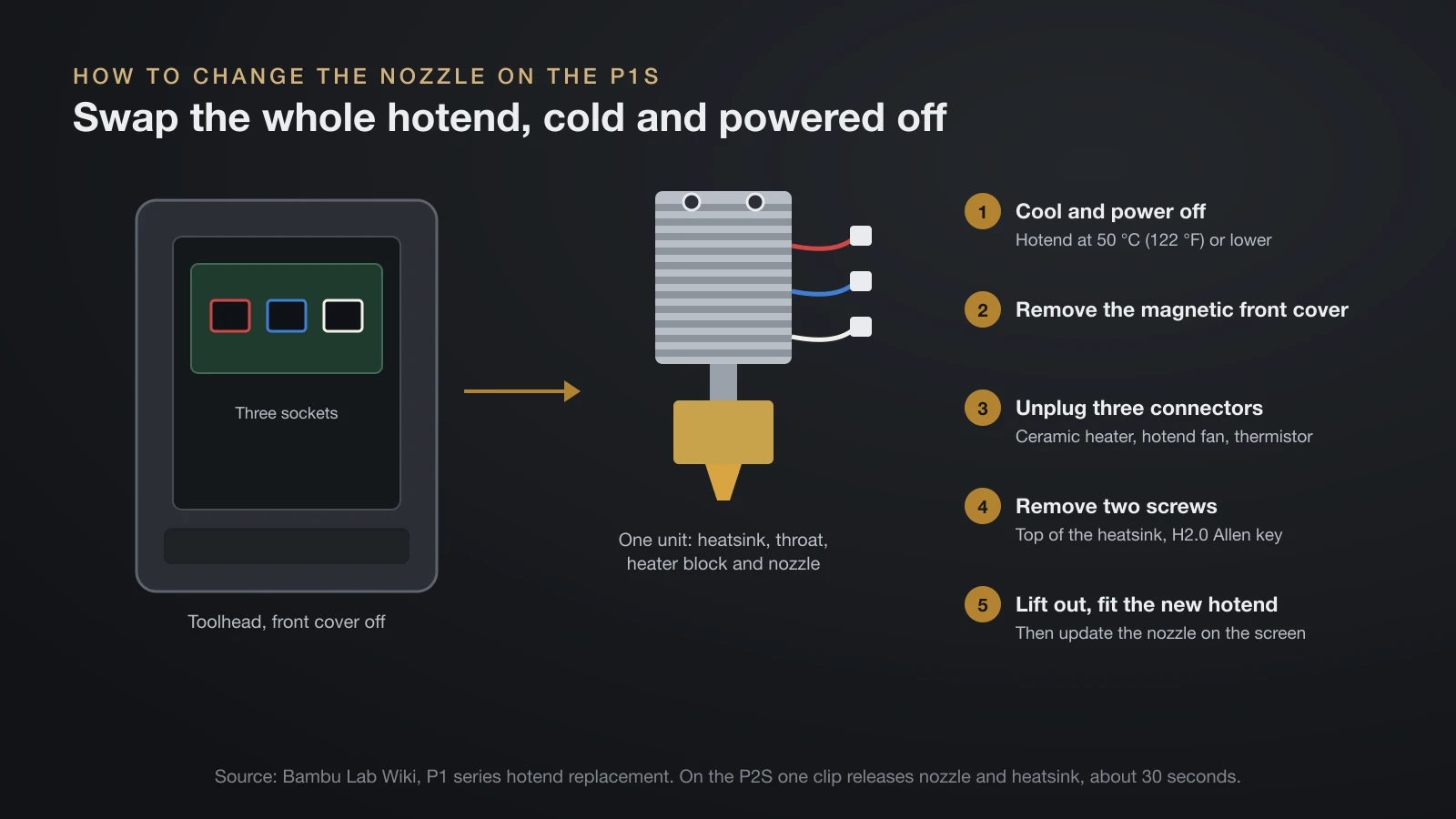
On the P1S you change the nozzle by swapping the whole hotend, because Bambu Lab builds the heatsink, throat, heater block and nozzle as one unit. That also means the swap is done cold. Bambu Lab’s steps for a complete hotend assembly:
- Cool and power off. Set the hotend to 50 °C (122 °F) or lower, then switch the printer off.
- Open the toolhead. Remove the magnetic front cover.
- Unplug three connectors: the ceramic heater, the hotend fan and the thermistor.
- Remove two screws near the top of the heatsink with an H2.0 Allen key.
- Lift out the hotend, fit the new one and reverse the steps.
- Update the nozzle on the printer screen if the size or material changed.
Bambu Lab stresses the power-off step, since working on toolhead wires with the printer on can short the electronics. If filament residue holds the old hotend, it suggests warming it slightly and wearing heat-resistant gloves. For a blocked nozzle rather than a swap, our guide to the clogged 3D printer nozzle includes a P1S cold pull.
The P2S simplifies the job: one clip releases the nozzle and heatsink, with no wires to disconnect, and Bambu Lab rates the swap at about 30 seconds. It accepts H2D nozzles but not A1 nozzles.
Removing, loading and drying filament on the P1S
To remove filament from a P1S, choose Unload on the screen and pull the strand out once the printer prompts you. The printer heats the hotend and cuts the filament automatically first. If the nozzle holds at 142 °C and stops cooling, filament is still in the extruder: select Retry and repeat.
The P1S takes 1.75 mm filament, loaded from the spool holder on its back or from an AMS. Bambu Lab’s own spools carry RFID tags that the AMS reads to set the material and color; our Bambu filament guide explains that system.
Drying filament with the P1S
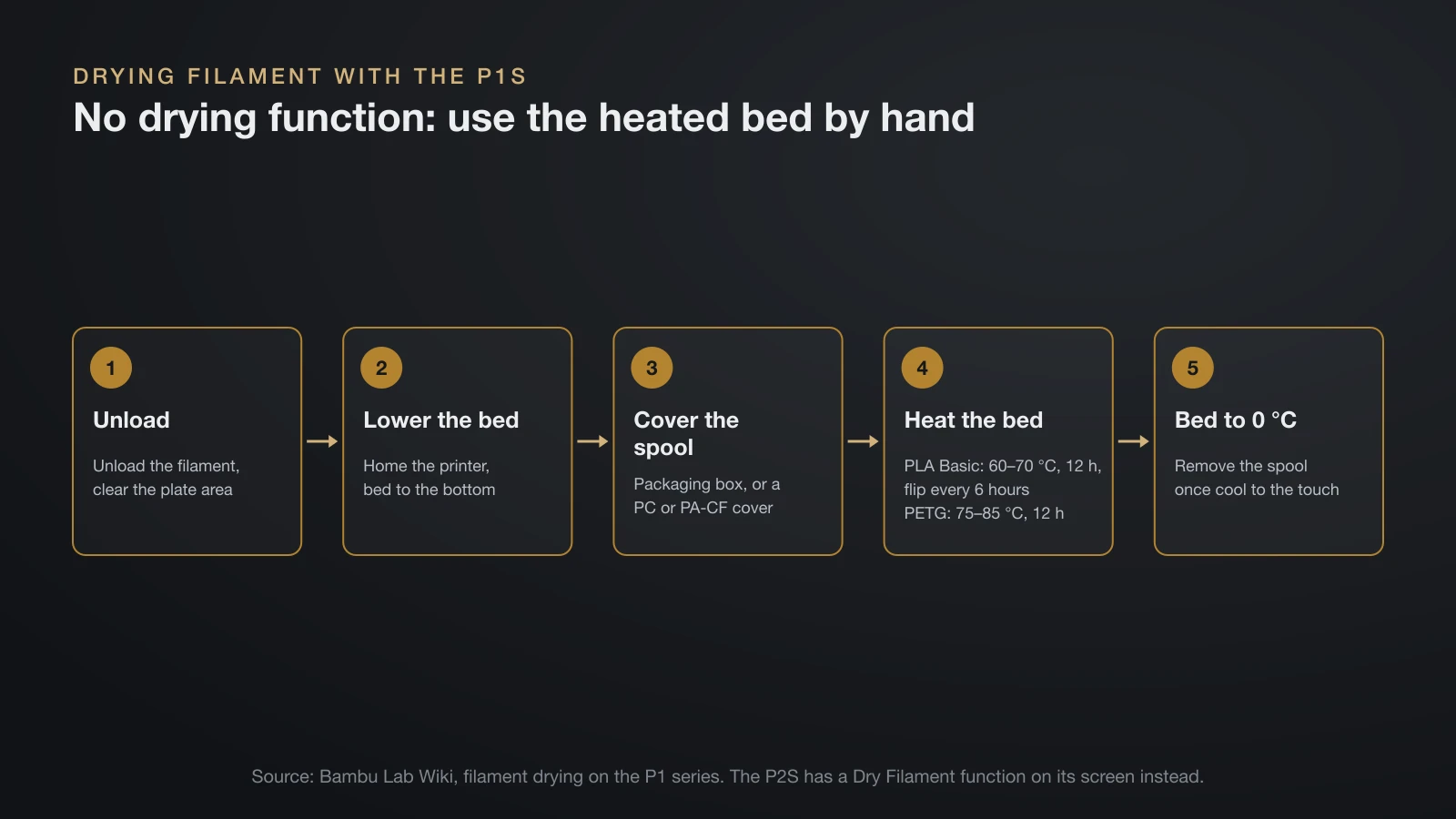
You can dry filament on the P1S’s heated bed, but only by hand, because the P1S has no built-in drying function. Bambu Lab’s wiki steps:
- Unload the filament and clear the plate area.
- Home the printer, then lower the bed to the bottom.
- Cover the spool with its packaging box or a cover printed in PC or PA-CF.
- Set the bed temperature for the material and time it yourself, for example 60–70 °C for 12 hours for PLA Basic, flipping the spool every 6 hours, or 75–85 °C for 12 hours for PETG.
- Set the bed to 0 °C when done and remove the spool once it is cool to the touch.
The P2S has a Dry Filament function on its screen instead. For faster or hotter drying, see our guide to choosing a filament dryer.
The bottom line
The Bambu Lab P1S is still a current printer: $399 on Bambu Lab’s US store in October 2026, with Combos at $549 and $579, and no announced end of sale. The $549 P2S keeps the same 256 mm build volume and 300 °C hotend but adds a hardened toolhead, a 1080p AI camera, a touchscreen and a one-clip nozzle swap. Choose by materials and convenience features, then check the store on the day you buy.
Sources
- Bambu Lab US Store, read October 20, 2026: P1S and P2S product pages (prices, editions, box contents, specs, P1S vs P1P FAQ, P2S features and FAQ), plus AMS lite, AMS 2 Pro and AMS HT (compatibility)
- Bambu Lab spec sheets: P1S technical specifications and P2S spec sheet (speed, acceleration, flow, gears, screen, camera, power)
- Bambu Lab Wiki: P1 series FAQ, P1S unboxing, first print, replacing filament on the P1 series, filament guide, replace the hotend (X1/P1) and filament drying (P1P end of life, chamber, AMS count, fiber upgrade, setup, unloading, hotend swap, bed drying)
- Bambu Lab Blog: The Icon Redefined: meet the P2S (October 14, 2025 launch, P1S introduced July 2023)