A filament dryer is a heated box that drives absorbed water out of 3D printer filament, typically at 45–100 °C (113–212 °F) for 4–12 hours depending on the plastic. You need one if you print PETG, TPU, nylon or polycarbonate often, or if opened spools start to string, pop or print rough walls.
A dryer removes water already in the filament; a sealed box with desiccant keeps it from coming back, as our guide to filament storage explains. This article covers the drying side: temperatures and times from three manufacturers, dryer types, and drying without one.
Every number below comes from a maker’s wiki or technical data sheet (TDS). If your spool’s data sheet differs, follow it.
The short answer
| Question | Answer |
|---|---|
| What it does | Heats the spool below the plastic’s softening point and vents the humid air |
| Do you need one? | Yes for TPU, nylon, PC and PVA; useful for PETG; optional for plain PLA |
| PLA | 45–55 °C (113–131 °F) for 6–8 h |
| PETG | 55–65 °C (131–149 °F) for 6–8 h |
| Nylon | 75–100 °C (167–212 °F) for 6–12 h |
| Key spec to check | Maximum temperature: the dryers covered here peak at 65–85 °C, below most nylon and PC settings |
| Without a dryer | Forced-air oven with a thermometer, an enclosed printer’s heated bed, or a food dehydrator for PLA |
| After drying | Store sealed with desiccant, or print straight from the dryer |
What is a filament dryer, and do you need one?
A filament dryer is a small heated enclosure that holds a spool at a set temperature, circulates warm air around it and vents the moist air. Many also have a hygrometer and an outlet that feeds the printer.
Whether you need one depends on the plastic. Bambu Lab’s drying guide lists drying before use as required for TPU, PC, PVA and nylon-based filaments, and as recommended for PLA, PETG, ABS and ASA. Prusa names polyamide (nylon), PVA and TPU as the filaments most often in need of drying, ahead of PLA.
A rough rule:
- Plain PLA only: sealed storage is usually enough; dry an old spool now and then.
- PETG, ABS or ASA: a dryer pays off once spools stay open for weeks.
- TPU, nylon, PC or PVA: treat a dryer as part of the printer. Our nylon filament and TPU filament guides explain why these two suffer most.
Signs your filament needs drying
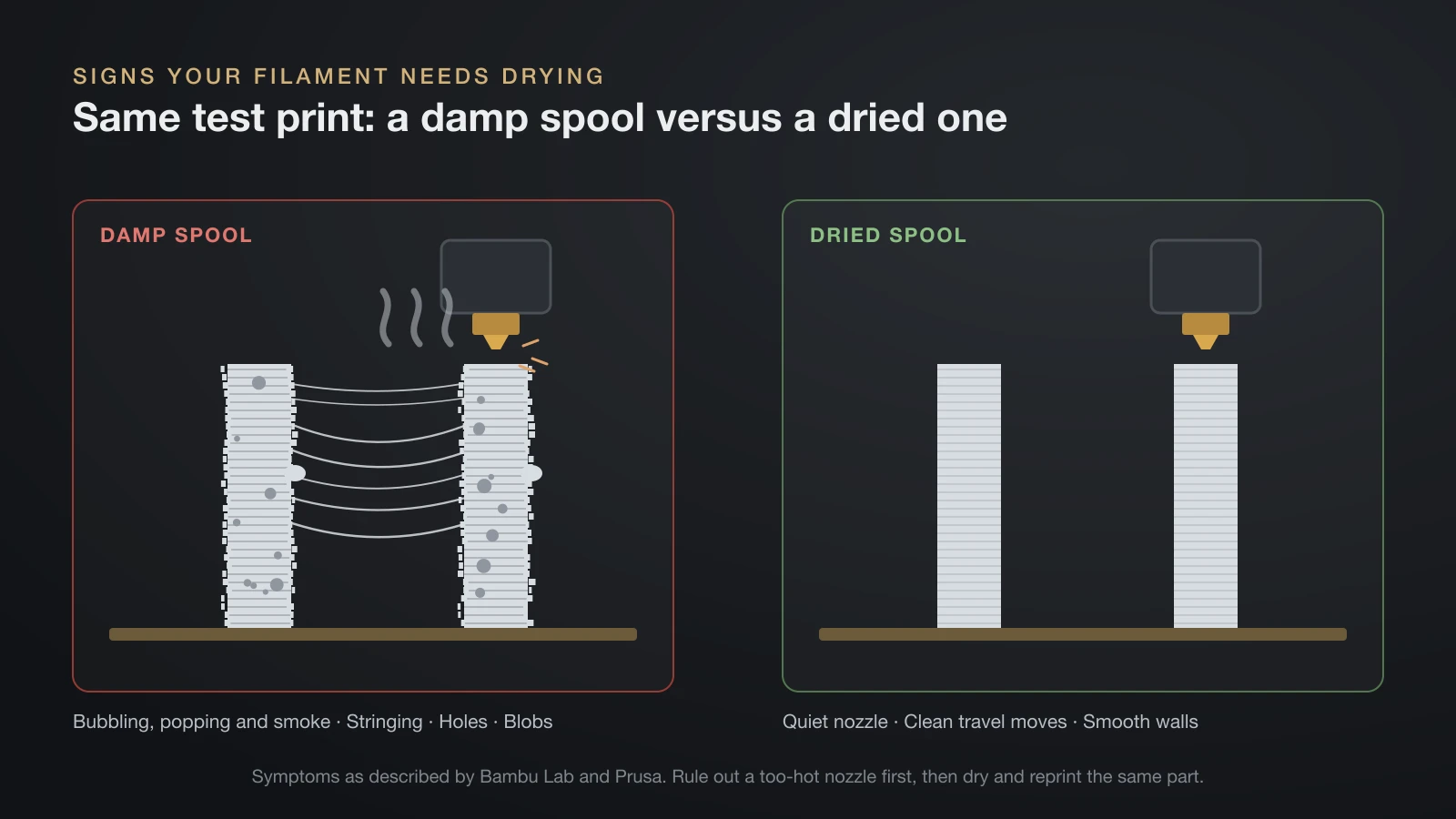
Wet filament shows itself at the nozzle, because the absorbed water turns to steam the moment it melts. Bambu Lab says the vapor makes the melt expand and extrude erratically, which leads to stringing, oozing, holes, rough surfaces and weaker parts.
Look and listen for these symptoms:
- Bubbling, popping or smoke at the nozzle during extrusion (Prusa).
- Stringing and oozing that a retraction test does not fix.
- Bubbles, holes and rough walls where the surface should be smooth.
- Weak layer adhesion and blobs on the print (Prusa).
- A different look on translucent filament: Bambu Lab illustrates moisture damage with damp and dry translucent PETG printed side by side.
Too much heat also causes stringing, so check the nozzle temperature against our PETG temperature guide first. Then dry the spool and reprint the same test part; if the defects disappear, water was the cause.
Filament drying temperature and time by material
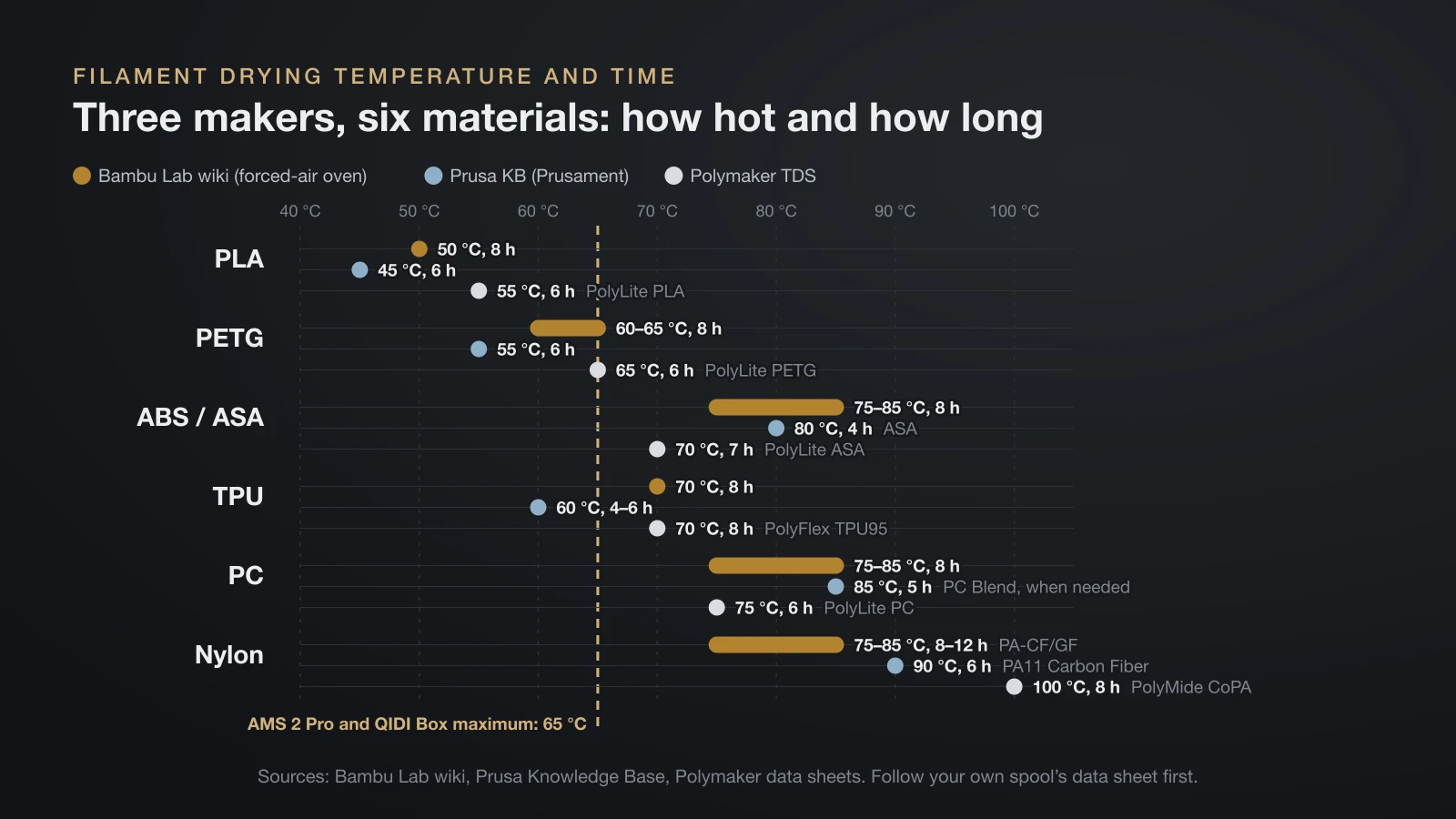
The right drying temperature sits safely below the point where the filament softens, which is why PLA dries cooler than nylon or polycarbonate. The table compares three manufacturers. Bambu Lab’s values are for a forced-air (convection) oven, Prusa’s are for Prusament filaments, and Polymaker’s come from the drying setting in each technical data sheet.
| Material | Bambu Lab wiki (forced-air oven) | Prusa KB (Prusament) | Polymaker TDS |
|---|---|---|---|
| PLA | 50 °C, 8 h | 45 °C, 6 h | 55 °C, 6 h (PolyLite PLA) |
| PETG | 60–65 °C, 8 h | 55 °C, 6 h | 65 °C, 6 h (PolyLite PETG) |
| ABS / ASA | 75–85 °C, 8 h | 80 °C, 4 h (ASA) | 70 °C, 7 h (PolyLite ASA) |
| TPU | 70 °C, 8 h | 60 °C, 4–6 h | 70 °C, 8 h (PolyFlex TPU95) |
| PC | 75–85 °C, 8 h | 85 °C, 5 h (PC Blend, when needed) | 75 °C, 6 h (PolyLite PC) |
| Nylon | 75–85 °C, 8–12 h (PA-CF/GF) | 90 °C, 6 h (PA11 Carbon Fiber) | 100 °C, 8 h (PolyMide CoPA) |
The hotter a plastic prints, the hotter it dries, and the makers disagree by 10–25 °C on the same material. Use your own spool’s data sheet; if it gives none, start at the lowest value in its row.
Prusa adds a warning that applies to every row: do not exceed the drying temperature, or the filament softens and the windings stick together. Stick to the stated time as well, since Prusa advises against overdrying.
How long to dry PLA and PETG filament
PLA needs about 6–8 hours at 45–55 °C (113–131 °F), and PETG about 6–8 hours at 55–65 °C (131–149 °F), on the three manufacturers’ data above. Those are the times for an oven or a dedicated dryer that holds the temperature steadily.
Lower-power methods take longer, as Bambu Lab’s settings show:
| Bambu Lab method | PLA Basic | PETG |
|---|---|---|
| Forced-air oven | 50 °C, 8 h | 60–65 °C, 8 h |
| AMS 2 Pro or AMS HT | 45 °C, 12 h | 65 °C, 12 h |
| Heated bed, enclosed printer, spool covered | 60–70 °C bed, 12 h | 75–85 °C bed, 12 h |
PLA is the forgiving case; our PLA filament guide covers when a spool really needs drying.
Types of filament dryers compared
Filament dryers range from passive boxes that only hold humidity down to heated units that dry and feed several spools at once. The table compares the main options, with the maximum temperature that decides which plastics each can handle.
| Type | Heats? | Typical maximum | Best for |
|---|---|---|---|
| Dedicated single-spool dryer | Yes | 68–73 °C at its hottest (Polymaker PolyDryer) | PLA, PETG, TPU; printing from the box |
| Passive dry box with desiccant | No | n/a | Keeping already-dry spools dry |
| Multi-material unit with drying | Yes | 65 °C (AMS 2 Pro, QIDI Box); settings up to 85 °C on AMS HT | Multi-color printers |
| Forced-air (convection) oven | Yes | High enough for any filament; Bambu Lab lists 100–140 °C for PPA-CF and PPS-CF | Nylon, PC and other high-temperature plastics |
| Food dehydrator | Yes | Usually low | PLA, sometimes PETG |
| Kitchen or microwave oven | Yes | Not suitable | Bambu Lab advises against both; Prusa warns home ovens are imprecise |
Multi-material units that also dry
Some automatic material systems now heat their spools. On Bambu Lab’s wiki, the AMS 2 Pro suits filaments that dry at 65 °C or less and may not fully dry hotter ones, while the AMS HT can dry all filaments, with some exceptions such as PVA and PPS-CF. QIDI lists a 65 °C maximum drying temperature for its four-slot QIDI Box, with drying while printing.
Bambu Lab adds a catch: static drying, where the spool does not turn, is not suitable for PLA, PVA, TPU and some support filaments, because their layers can stick together or deform. Our guide to multi-color 3D printers explains how these feeders work.
What to look for in a 3D printer filament dryer
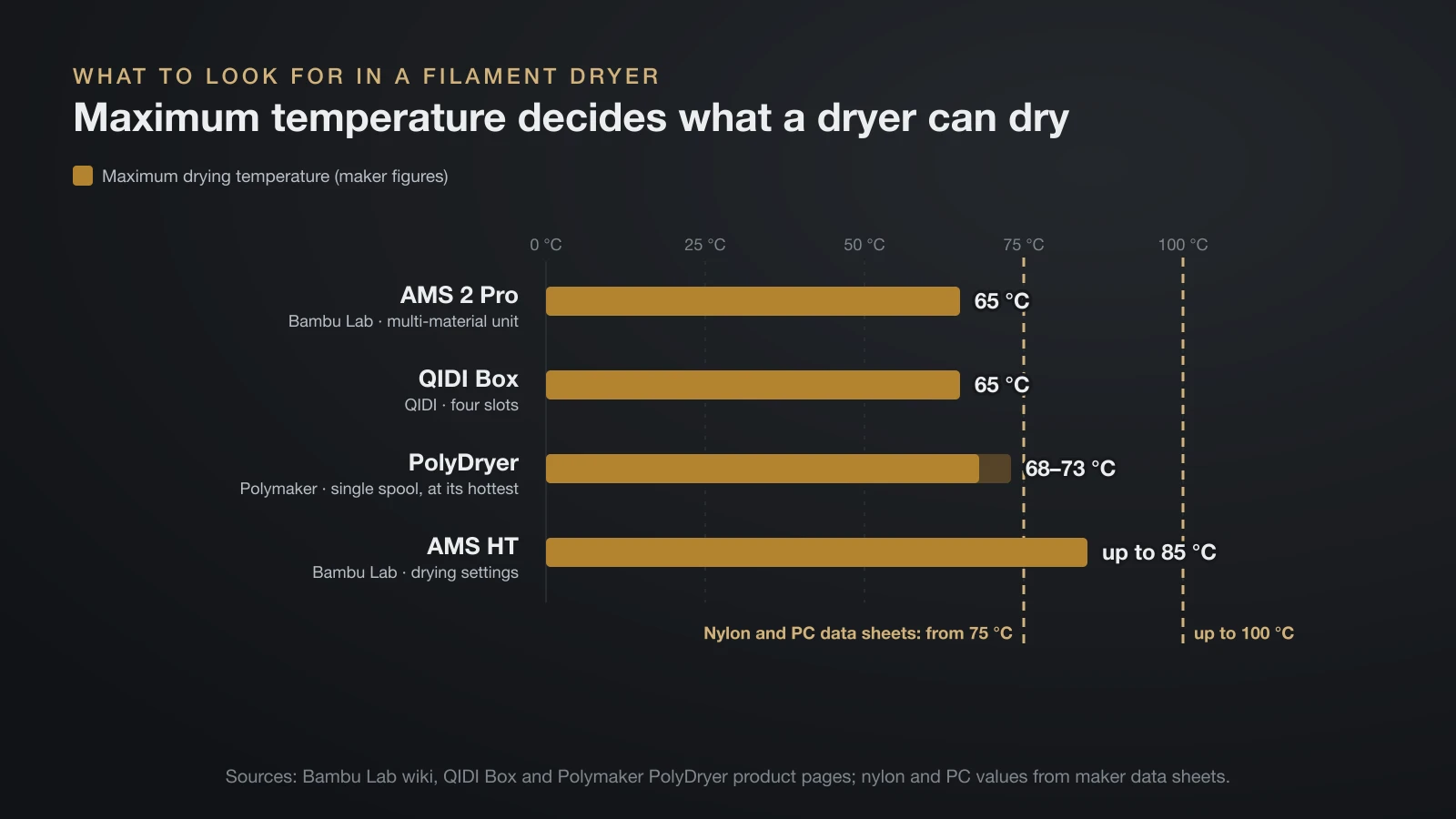
The most important spec on a 3D printer filament dryer is its maximum temperature, because a dryer that tops out at 65 °C cannot reach the 75–100 °C that nylon and polycarbonate data sheets ask for. Match the dryer to the hottest material you print.
Check these points before buying:
- Maximum temperature against your hottest filament’s data sheet value.
- Airflow and rotation: Polymaker says 360° airflow dries the spool evenly; Bambu Lab recommends rotation for low-softening plastics.
- Humidity venting: moist air must leave the box, or the spool simply sits in warm, damp air.
- Print-through outlet so the spool can feed the printer during long prints.
- Hygrometer: in Polymaker’s own test, its dryer reached 10–30% relative humidity depending on power level, and its display reads no lower than 10%.
- Spool fit: width and diameter, and whether cardboard spools are allowed. The QIDI Box, for example, takes 50–72 mm wide spools of 195–202 mm diameter and needs an adapter for cardboard.
- Number of spools: one-spool dryers are simplest; multi-spool units suit multi-color printing.
Other useful add-ons are in our list of 3D printer accessories.
How to dry filament in an oven
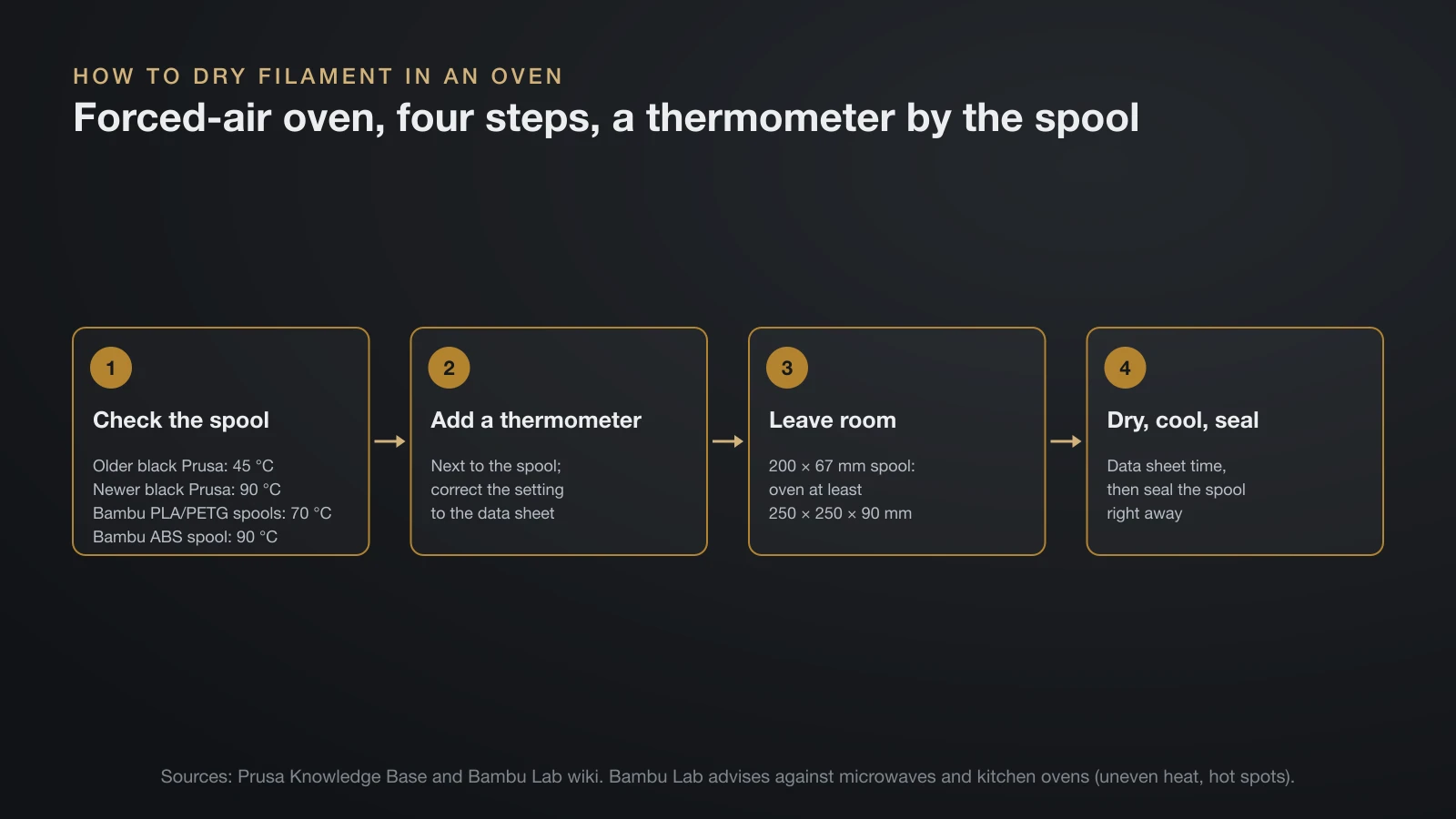
You can dry filament in an oven only if it holds a low temperature accurately, ideally a forced-air (convection) oven; Bambu Lab advises against kitchen and microwave ovens, and Prusa warns that home ovens are imprecise. Bambu Lab says microwaves heat unevenly and kitchen ovens have hot spots near the elements that can damage the spool and filament. Prusa adds that home ovens do not measure temperature precisely, and many cannot be set low enough for PLA.
If you use an oven, follow these steps:
- Check the spool’s heat limit. Prusa’s older black spools are safe only to 45 °C and its newer black spools, introduced in October 2025, to 90 °C; Bambu Lab rates its PLA and PETG spools to 70 °C and its ABS spool to 90 °C.
- Place an external thermometer next to the spool and correct the setting until it reads the data sheet temperature (Prusa).
- Leave room around the spool. Bambu Lab sizes the oven for its 200 mm by 67 mm spool at no less than 250 × 250 × 90 mm inside, with the spool kept away from the heating elements.
- Dry for the data sheet time, then let the spool cool and seal it right away.
Stay nearby on the first run. A spool that warps or fuses has been dried too hot.
How to dry filament without a dryer
You can dry filament without a dedicated dryer by using the heated bed of an enclosed printer, a food dehydrator, or a forced-air oven. A passive dry box with silica gel will not dry a damp spool.
On an enclosed printer’s heated bed
Bambu Lab documents bed drying for its enclosed printers. Unload the filament from the toolhead, lower the bed, place the spool on the plate and cover it with the filament box or a printed PC cover. Then set the bed temperature for the material, flip the spool halfway through, and let it cool before removing it.
Bambu Lab says its open-frame printers (A1, A1 mini, A2L and P1P) cannot be used this way. Bed drying is also slower: 12 hours for PLA, versus 8 hours in a forced-air oven.
In a food dehydrator
Prusa describes taking out the trays of a food dehydrator so a spool fits inside. Its maximum temperature decides which filaments it can dry, so compare it with the drying table above.
Can you make a DIY filament dryer?
You can build a DIY filament dryer, and 3D printed designs are popular, but the safety of the heater matters more than the box. The principle is simple: a sealed enclosure, a heat source held at a set temperature, airflow around the spool, a vent for the moist air and a hygrometer.
Commercial units show what a safe heater needs: QIDI lists a PTC fuse and two temperature sensors that cut power at abnormal temperatures. A homemade build needs a thermostat-controlled heater with its own thermal cutoff, never a bare heating element.
Print parts near the heater in a heat-resistant plastic: Polymaker recommends ABS or ASA for the adapter of its own dryer. Our ASA filament guide lists ASA’s heat deflection values.
The bottom line
A filament dryer is close to essential for TPU, nylon, polycarbonate and PVA, useful for PETG, and optional for plain PLA kept sealed. Dry at the temperature on your spool’s data sheet, roughly 45–55 °C for PLA and up to 75–100 °C for nylon, and buy a dryer whose maximum temperature covers your hottest material. Afterward, store the spool sealed or print straight from the dryer.
Sources
- Bambu Lab: Wiki Filament drying recommendations and technical data sheets for PLA Basic and ABS (spool heat ratings; moisture symptoms, drying requirement per material, forced-air oven, AMS 2 Pro, AMS HT and heated-bed temperatures and times, static drying limits, temperatures while printing, open-frame printers, oven size and microwave/kitchen oven warning, PC brittleness, 2–12 hours at 55% RH)
- Prusa Knowledge Base: Drying filament and Prusa USS Drybox (symptoms, materials most in need of drying, Prusament drying temperatures and times, overdrying, spool heat limits, oven thermometer, food dehydrator, drybox does not dry filament)
- Polymaker technical data sheets: PolyLite PLA, PolyLite PETG, PolyLite ASA, PolyFlex TPU95, PolyLite PC and PolyMide CoPA (drying temperature and time per material)
- Polymaker: PolyDryer product page (360° airflow, 68–73 °C highest internal range, humidity after drying, hygrometer minimum, heat-resistant adapter)
- QIDI Tech: QIDI Box product page (65 °C maximum drying temperature, drying while printing, four slots, spool dimensions, PTC fuse and dual temperature sensors)