The biggest difference in Prusa vs Bambu is openness. Prusa Research publishes its firmware source code, printable parts and CAD files, and designs its printers to run fully offline. Bambu Lab sells a tightly integrated, cloud-first ecosystem whose printer firmware is not public, with a LAN-only mode for local use. Both now make fast, enclosed CoreXY printers.
Specs alone rarely settle it, because the lineups overlap. This guide compares approach, connectivity, lineups, multi-material systems, repairs and slicers using only the makers’ own pages, checked in September 2026; prices are left out. If color is your main reason to buy, start with our guide to multi-color 3D printers.
The short answer
| Prusa Research | Bambu Lab | |
|---|---|---|
| Openness | Firmware source on GitHub (GPL v3), printable parts and CAD files published | Slicer open source (AGPL-3.0); printer firmware not published |
| Connectivity | Built for offline use; Prusa Connect (cloud) and PrusaLink (local) are optional | Cloud by default with the Bambu Handy app; LAN Only mode and Developer Mode available |
| Current printers | MK4S, CORE One+, CORE One L+, XL+ | A1 mini, A1, A2L, P1S, P2S, X2D, H2S, H2D, H2C |
| Multi-material | MMU3 filament changer, INDX toolchanger, XL+ with up to 5 toolheads | AMS lite and AMS filament changers, dual-nozzle and hotend-changing models |
| Repairs | Screwdriver-serviceable, spare parts stocked for years | Spare parts store, wiki replacement guides, quick-swap hotends on newer models |
| Slicer | PrusaSlicer (based on Slic3r) | Bambu Studio (based on PrusaSlicer) |
Company approach: open source vs a closed ecosystem
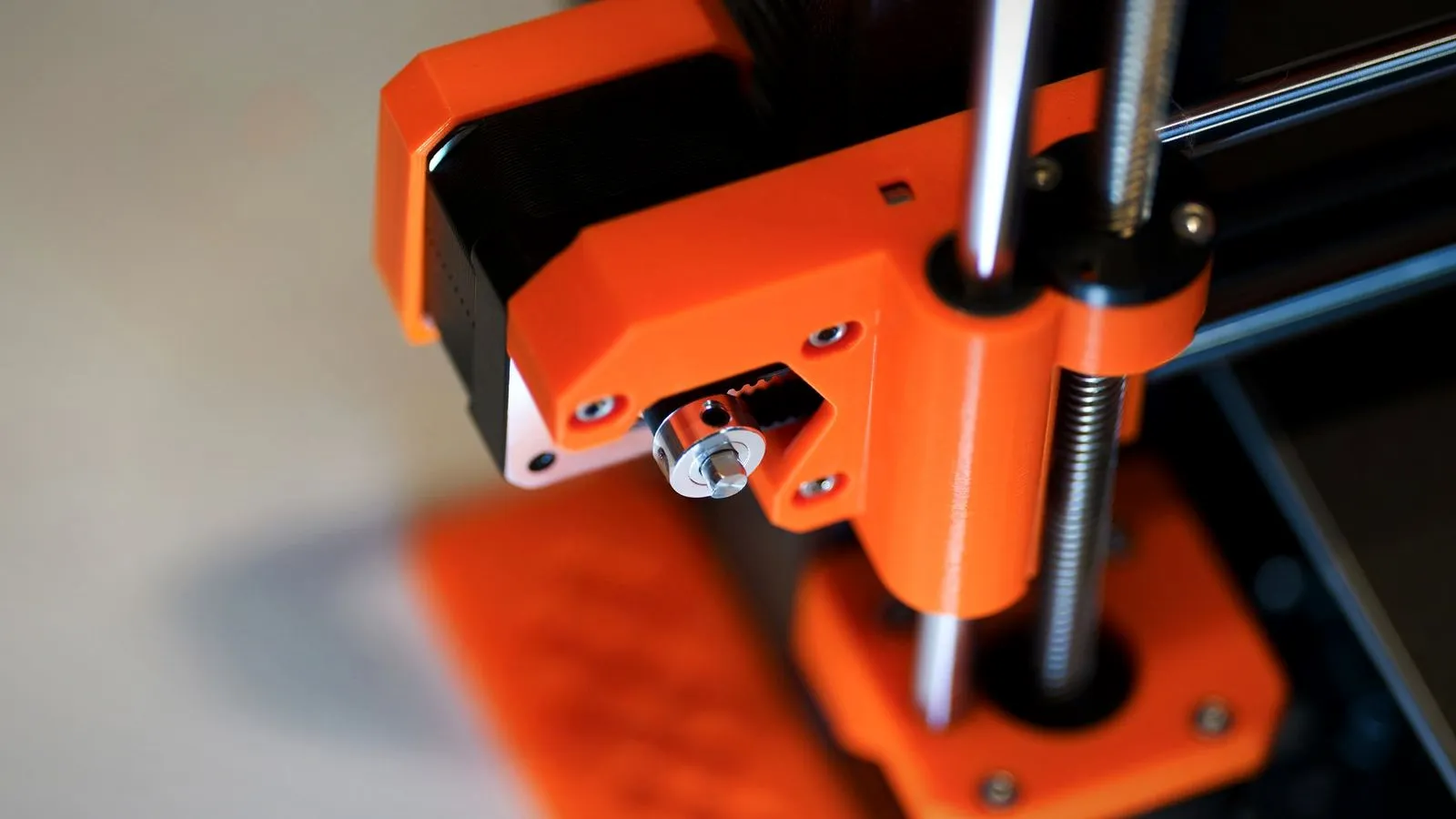
Prusa treats open source as part of the product, while Bambu Lab opens only its slicer. Prusa grew out of the RepRap project and says it wants its printers to stay moddable and repairable for decades.
Prusa publishes different parts on different schedules. For the CORE One, its open-source page lists:
- Printed parts on Printables.com.
- Firmware source code on GitHub, licensed under GPL v3, with graphics under CC BY-NC-SA 4.0.
- Electronics schematics, but not manufacturing data.
- Hardware as a full CAD assembly under Prusa’s own Open Community License.
Bambu Lab’s public GitHub account hosts Bambu Studio and supporting libraries, but no printer firmware. Its printers are built around Bambu’s own slicer, app and cloud, which keeps setup simple but limits what outside software can control.
Cloud, LAN and the 2025 Bambu firmware change
Bambu printers use the cloud by default, while Prusa printers are designed to work fully offline. In Bambu’s default Auto mode, print files pass through Bambu’s cloud server so you can reprint from the Bambu Handy phone app; the files are deleted automatically after 90 days unless you remove them sooner.
LAN Only mode keeps everything on your local network. You lose the Handy app, print history and remote starts from outside your home, but the slicer can still send jobs and show the camera.
The authorization change
On January 16, 2025, Bambu Lab announced an authorization control system: the printer checks that control commands come from official or authorized software and rejects the rest. It covers binding, remote video, firmware updates, starting prints, and motion, temperature, fan, AMS and calibration controls. Bambu said the change mitigates “remote hacks or printer exposure issues.”
It reached the X series first. The P1 and A1 firmware added it on June 3, 2025, together with:
- Bambu Connect as the route for third-party slicers such as OrcaSlicer.
- Developer Mode, available in LAN mode, which turns authorization off so the printer accepts all commands.
- The option to downgrade firmware.
Prusa says its printers are “primarily designed for completely offline operation” and that connecting to its Prusa Connect cloud service is your choice. PrusaLink runs locally on the printer instead. If remote viewing is the goal, our guide to the 3D printer camera covers both ecosystems.
Prusa and Bambu Lab lineups compared
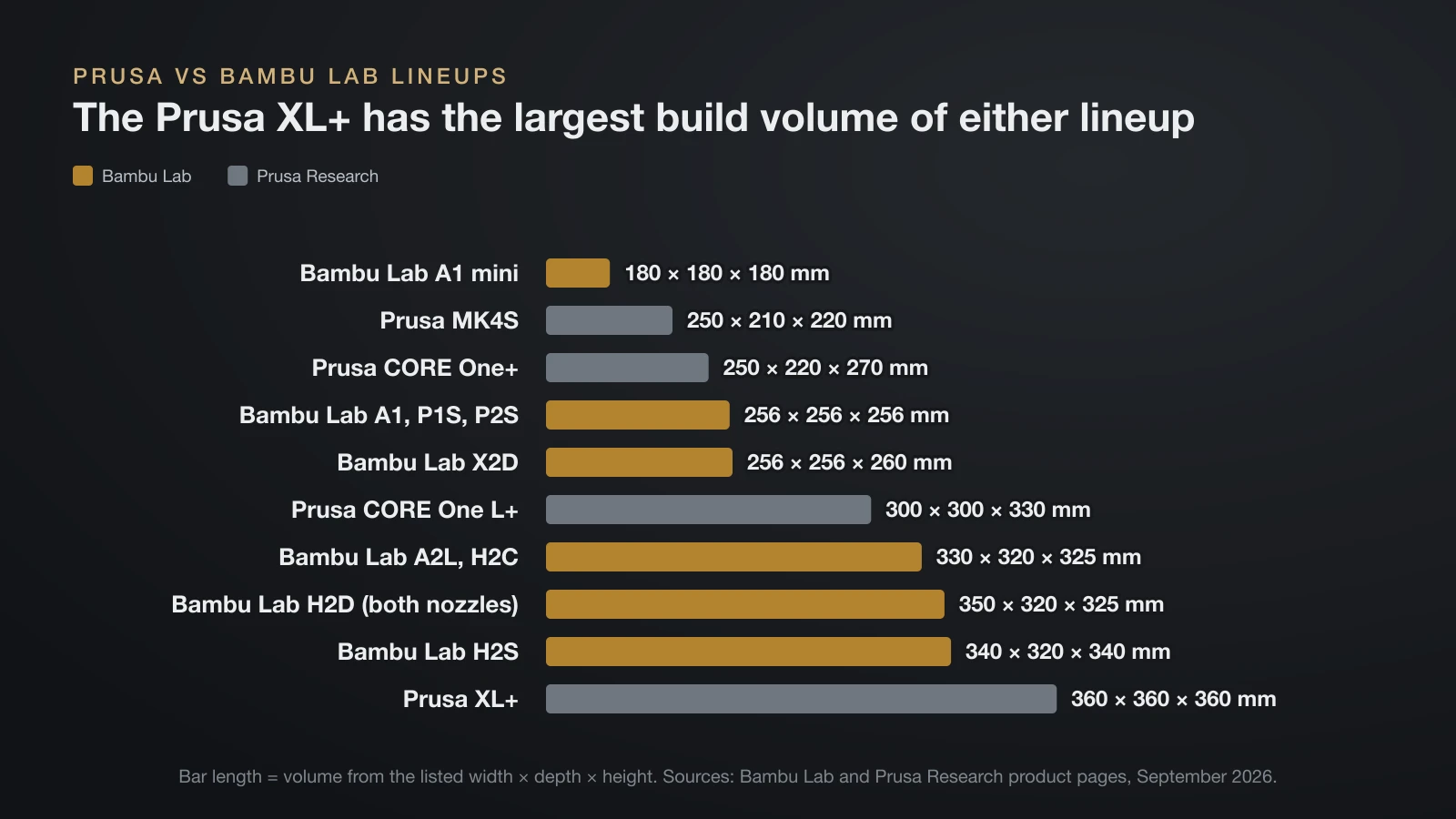
Bambu Lab sells more models, while Prusa covers a similar range with four main desktop printers. All specs below come from each maker’s product pages.
| Printer | Build volume (mm) | Frame and chamber | Multi-material |
|---|---|---|---|
| Bambu Lab A1 mini | 180 × 180 × 180 | Open | AMS lite |
| Bambu Lab A1 | 256 × 256 × 256 | Open | One AMS lite (4 spools) |
| Bambu Lab A2L | 330 × 320 × 325 | Open | AMS lite or second-gen AMS |
| Bambu Lab P1S | 256 × 256 × 256 | Enclosed, passive | AMS, up to 16 colors |
| Bambu Lab P2S | 256 × 256 × 256 | Enclosed, passive with airflow flap | AMS |
| Bambu Lab X2D | 256 × 256 × 260 | Enclosed, heated to 65 °C (149 °F) | Dual nozzle, up to 25 colors |
| Bambu Lab H2S | 340 × 320 × 340 | Enclosed, heated to 65 °C | AMS |
| Bambu Lab H2D | 350 × 320 × 325 (total, two nozzles) | Enclosed, heated to 65 °C | Dual nozzle, up to 25 colors |
| Bambu Lab H2C | 330 × 320 × 325 | Enclosed, heated to 65 °C | Hotend changer: 7 materials without purging |
| Prusa MK4S | 250 × 210 × 220 | Open, optional enclosure | MMU3, 5 filaments |
| Prusa CORE One+ | 250 × 220 × 270 | Enclosed, heated to 55 °C (131 °F) | MMU3 or INDX (4–8 tools) |
| Prusa CORE One L+ | 300 × 300 × 330 | Enclosed, heated to 60 °C (140 °F) | INDX upgrade, up to 8 tools |
| Prusa XL+ | 360 × 360 × 360 | Open, optional enclosure | Up to 5 toolheads |
The XL+ has the largest volume of either lineup, about 2.8 times a 256 mm cube (our calculation from the listed dimensions). For warping-prone plastics, compare the chamber column with our guide to enclosed 3D printers.
Multi-material: AMS vs MMU3, INDX and the XL toolchanger
Bambu Lab mostly uses filament changers, while Prusa pairs one filament changer with two toolchanger systems. A single-nozzle changer swaps spools and flushes the old color, so it wastes filament; a toolchanger gives each material its own nozzle.
- Bambu AMS lite and AMS: four-spool feeders. The A1 takes one AMS lite, and the P1S reaches 16 colors with four AMS units.
- Bambu dual nozzle and H2C: the X2D and H2D keep two nozzles hot for up to 25 colors. The H2C’s Vortek system swaps hotends, for up to 7 materials without purging or 24 with AMS units.
- Prusa MMU3: a five-filament changer for the MK4S and CORE One+, at 25–35 seconds per filament change.
- Prusa INDX and XL+: INDX, developed with Bondtech, adds 4–8 tools to the CORE One family; the XL+ carries up to five toolheads, each with its own nozzle.
Repairability and spare parts
Both companies sell spare parts, but Prusa publishes more of what you need to fix or rebuild a printer yourself. Its CORE One+ page says nothing is glued, everything comes apart with a screwdriver, and spare parts stay in stock for years after release. Printable parts are published on Printables.com, and Prusa sells upgrade kits, such as CORE One L to CORE One L+.
Bambu Lab runs a spare parts section in its store, with replacement hotends for each series, and its wiki has step-by-step replacement guides for parts such as the cameras. Newer models simplify the most common job: the A1 has a tool-free nozzle swap, and the P2S releases the whole hotend with one clip. Our guide to the 3D printer hotend explains what those parts do.
Parts support matters even more second-hand; our checklist for buying a used 3D printer shows what to check.
Slicers: Bambu Studio, PrusaSlicer and their shared roots
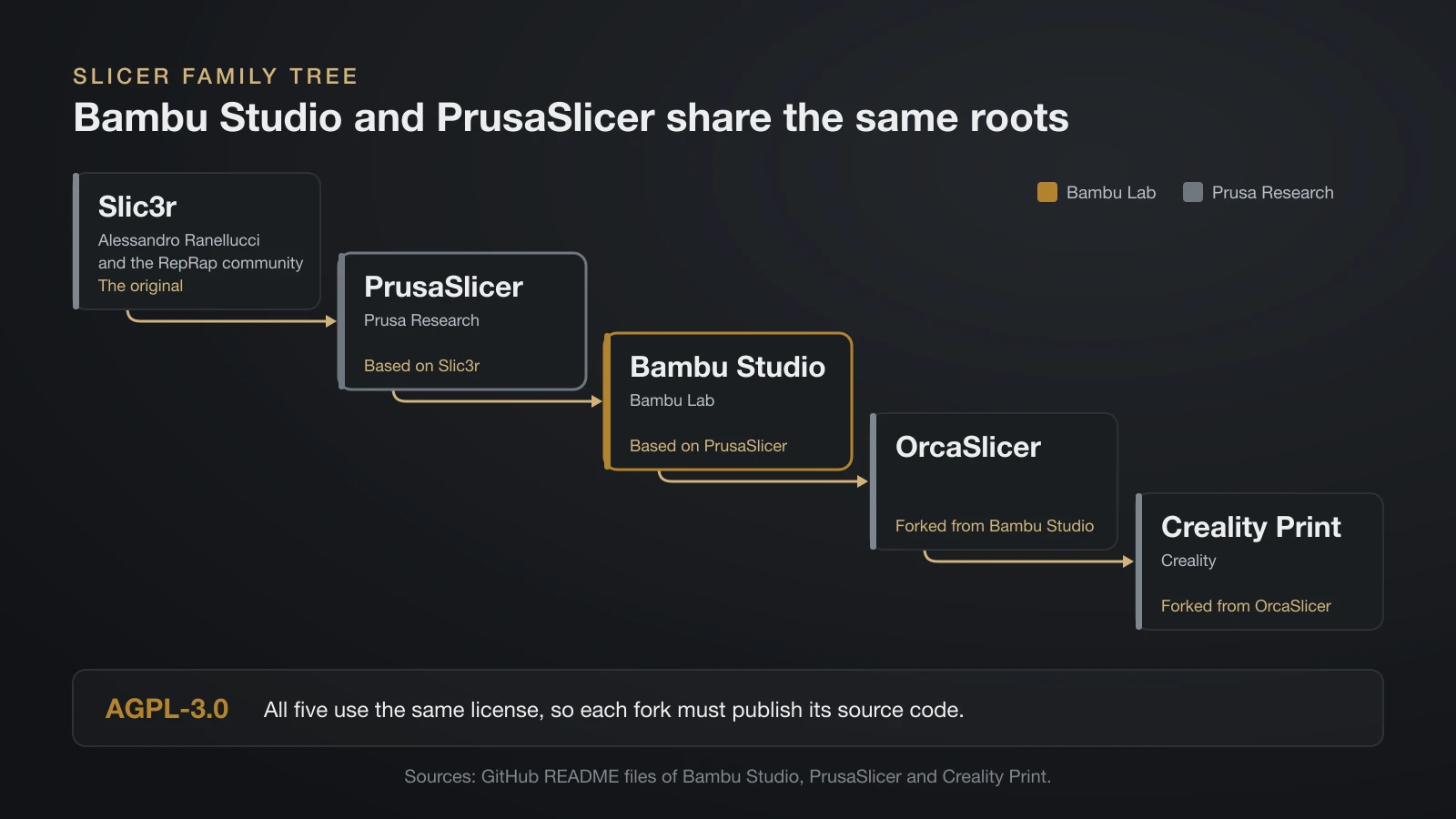
Bambu Studio and PrusaSlicer are close relatives: Bambu Studio’s own README says it is based on PrusaSlicer, which is based on Slic3r by Alessandro Ranellucci and the RepRap community. The family continues: OrcaSlicer is forked from Bambu Studio, and Creality Print is forked from OrcaSlicer.
All of them use the AGPL-3.0 license, so each fork must publish its source code. Each ships tuned profiles for its own printers, but PrusaSlicer and Bambu Studio both support other brands too. The slicer’s job is the same either way, as our explainer on converting STL to G-code shows.
Where Prusa and Bambu Lab printers come from
Prusa printers are mainly designed and built in Prague, Czech Republic, while Bambu Lab is based in China with a US site. Prusa describes the CORE One+ as “designed and manufactured in the EU”, runs its own circuit board production line in Prague and says it has also started manufacturing in the USA; the XL+ is listed as made in the EU and USA.
Bambu Lab’s wiki lists three sites: Shenzhen and Shanghai in China, and Austin, Texas. It does not say which site builds which printer.
Where Creality fits
Creality sits between the two: its firmware sources are public, but its newer enclosed printers pair an app and cloud service with a four-spool filament system, much as Bambu’s do. Founded in 2014, the company publishes GPL-licensed source code on GitHub for printers such as the Ender-3 and for the Klipper-based firmware of its K1 and K2 series.
The K1C prints 220 × 220 × 250 mm with an AI camera, and the K2 Plus prints 350 × 350 × 350 mm with a chamber heated to 60 °C and up to 16 colors from four CFS (Creality Filament System) units.
Bambu Lab A1 vs P1S vs X1C: the in-lineup differences
The A1, P1S and X1C share a 256 mm build volume; what changes is the frame, the materials each handles and the sensors. Specs come from Bambu Lab’s US store pages.
| A1 | P1S | X1C | |
|---|---|---|---|
| Frame | Open, bed moves front to back | Enclosed CoreXY (plastic and glass) | Enclosed CoreXY |
| Nozzle | Stainless steel, 300 °C (572 °F) | Stainless steel, 300 °C | Hardened steel, 300 °C |
| Max bed temperature | 100 °C | 100 °C | 110 °C at 220 V, 120 °C at 110 V |
| Max acceleration | 10,000 mm/s² | 20,000 mm/s² | 20,000 mm/s² |
| Materials listed as ideal | PLA, PETG, TPU, PVA | Adds ABS and ASA | Also PA, PC and fiber-filled blends |
| Multi-color | One AMS lite | Up to 16 with four AMS | Up to 16 colors |
| Camera and sensing | Low-frame-rate camera, up to 1080p | 1280 × 720 camera at 0.5 fps | Spaghetti detection, lidar first-layer check |
| Store status, September 2026 | Sold new | Sold new | Refurbished only |
The A1 mini is the same open design at a 180 mm cube. Bambu Lab now places the enclosed P2S and the dual-nozzle, heated-chamber X2D above the P1S.
Which fits which priority?
Your priorities point to an ecosystem more reliably than a spec sheet does, so treat this table as a starting point.
| If your priority is… | Look first at |
|---|---|
| Published firmware and offline use by design | Prusa |
| A phone app and cloud monitoring out of the box | Bambu Lab |
| Building the printer yourself from a kit | Prusa MK4S or CORE One+ kits |
| Many colors on a compact open printer | Bambu A1 series with AMS lite |
| Multi-material with little purge waste | Prusa XL+ or INDX, Bambu H2C |
| Engineering filaments in a heated chamber | Prusa CORE One+ or L+, Bambu X2D or H2 series |
| The largest build volume | Prusa XL+ |
| Full control from third-party software | Prusa, or Bambu in Developer Mode |
The bottom line
Prusa vs Bambu is mainly a choice between an open, offline-first platform and a closed, cloud-first one with a larger range of multi-color hardware. Both now offer fast enclosed CoreXY printers, heated chambers and multi-material systems, and their slicers share the same code roots. Decide which of openness, app convenience, multi-material method and build volume matters most, then compare individual models on the makers’ own spec pages.
Sources
- Bambu Lab: Authorization control system announcement (January 16, 2025); Wiki: LAN Mode, Remote Control and Monitoring, P1 firmware history, A1 firmware history, About Us (authorization, Developer Mode, LAN mode, 90-day file retention, sites)
- Bambu Lab US Store: A1, A1 mini, A2L, P1S, P2S, X2D, H2S, H2D, H2C, refurbished X1C, accessories and spare parts (specs, multi-material, hotends)
- Prusa Research: CORE One+, CORE One L+, MK4S, XL+, Open-source at Prusa Research (specs, MMU3, INDX, offline use, repairs, manufacturing, published files)
- GitHub READMEs: Bambu Studio, PrusaSlicer, Prusa-Firmware-Buddy, Creality Print, Bambu Lab repositories, Creality repositories (slicer lineage, licenses, published firmware)
- Creality: K1C, K2 Plus Combo, About Creality (specs, CFS, founding year)