A multi-color 3D printer prints two or more filaments in a single job. Most consumer machines do it with one nozzle and an automatic filament changer, which purges plastic at every swap. Tool changers give each color its own nozzle and waste far less. True full-color printing, with blended shades, is still an industrial inkjet-style technology.
Which type fits depends on how many colors you need, how much purge waste and extra print time you’ll accept, and which materials you want to combine. Figurines are the classic use, and our guide to 3D printed action figures shows what color adds there. This guide explains how each system works, compares current machines using the makers’ own specs and covers the cheaper alternatives.
The short answer
| System | How it works | Filaments per print | Purge waste | Examples |
|---|---|---|---|---|
| Filament changer | One nozzle; a feeder unit swaps spools and flushes the old color | 4–5 per unit, up to 16 with extra units | High on color-heavy models | Bambu Lab AMS, Creality CFS, Anycubic ACE Pro, Prusa MMU3 |
| Dual nozzle | Two nozzles on one print head, each fed by filament changers | Up to 25 (Bambu Lab) | Lower | Bambu Lab H2D, X2D |
| Tool or hotend changer | Separate toolheads or hotends swapped in and out | 4–8, depending on the model | Minimal | Prusa XL+, Prusa INDX, Snapmaker U1, Bambu Lab H2C |
| IDEX | Two independent print heads on the X axis | 2 | Low | Various |
| Full color (PolyJet, inkjet) | Droplets of colored resin or ink, cured layer by layer | Nearly 640,000 color combinations on a Stratasys J55 Prime | Not applicable | Industrial machines, service bureaus |
How does a multi-color 3D printer work?
Most multi-color 3D printers still have one nozzle. The color comes from a filament changer: a box of spools that feeds the right filament into the print head whenever the model calls for it. Bambu Lab describes each switch in roughly these stages:
- Cut and retract: the old filament is cut above the nozzle and pulled back into the changer.
- Load and flush: the new filament is pushed in, and the extruder flushes the old color out through the nozzle until only the new color comes out. The flushed plastic is directed away from the print.
- Wipe: the nozzle moves over a wiper to clean its tip.
- Prime: the nozzle prints on a prime tower, a sacrificial block next to the model, so the next line starts with steady flow.
The slicer does most of the planning. You assign colors to parts or paint them on the model, and the slicer orders each layer to minimize changes. Bambu Lab notes that the number of changes on a layer is normally one less than the number of colors on it, because the last color of one layer starts the next.
Types of multi-color 3D printers
Single-nozzle filament changers
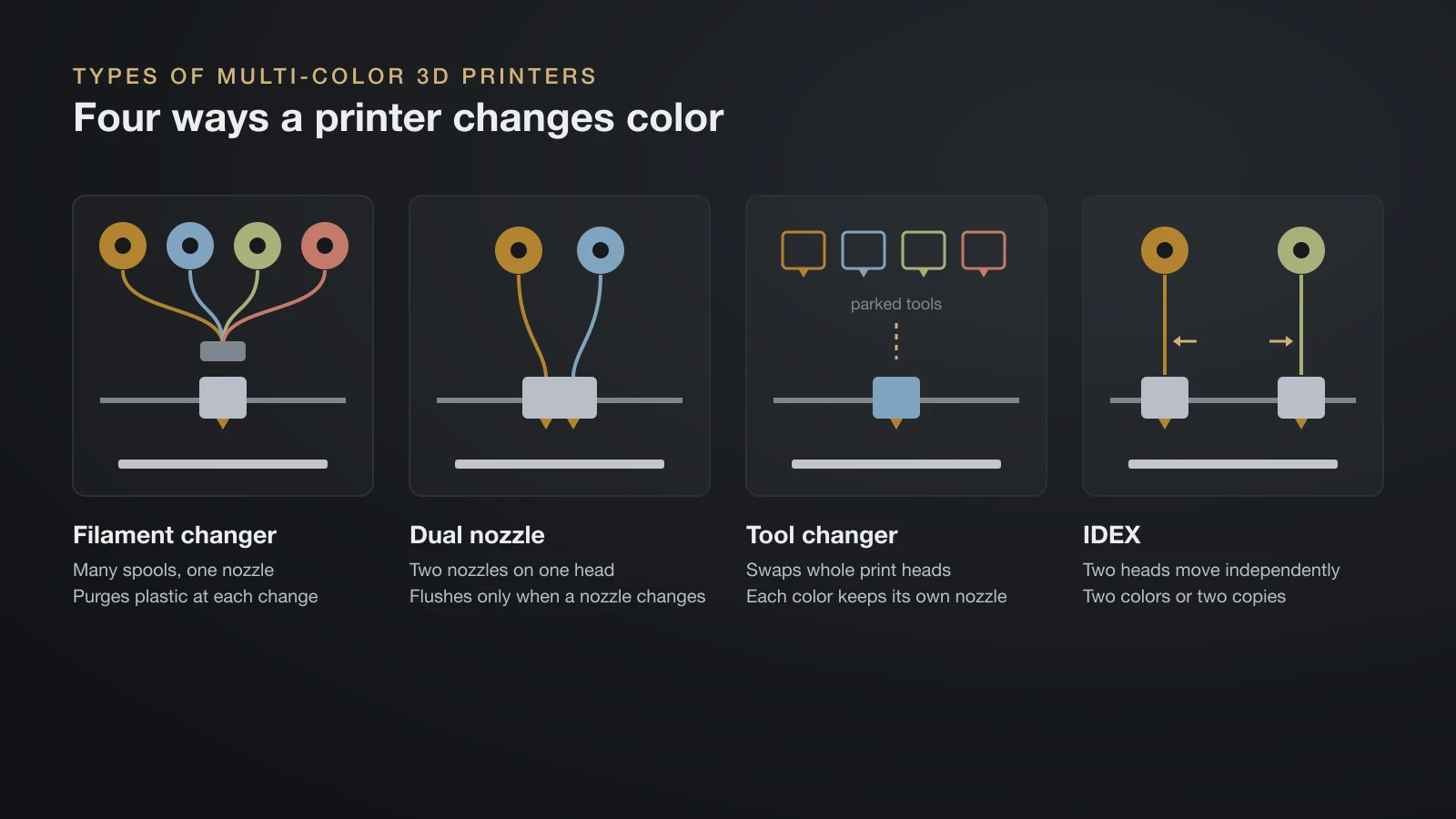
This is the most common and the cheapest way into multi-color printing. Bambu Lab’s AMS, Creality’s CFS and Anycubic’s ACE Pro each hold four spools, and Prusa’s MMU3 takes five. For how the two brands compare beyond color, see Bambu Lab vs Prusa. Chaining units adds colors: Bambu Lab lists up to 16 colors on a P1S with four AMS units.
The trade-off is purge waste and time. Every color change flushes filament, so a model with color on every layer can waste more plastic than the model itself weighs.
Dual-nozzle (dual extruder) printers
A dual-nozzle head, as on the Bambu Lab H2D and X2D, keeps two filaments hot and ready. Each nozzle can be fed by its own filament changer, so the printer only flushes when a nozzle changes color, not every time the model switches between the two. Bambu Lab rates both machines for up to 25 colors.
Tool changers and hotend changers
A tool changer parks several complete toolheads and picks up the one it needs. Each color stays in its own nozzle, so there is almost nothing to flush. The Prusa XL+ takes up to five toolheads, the Snapmaker U1 has four and swaps them in 5 seconds, and Prusa’s INDX system for the CORE One+ holds four to eight tools.
Bambu Lab’s H2C takes a hybrid route: its Vortek system swaps only the hotend, with up to six swappable hotends plus a seventh nozzle. Bambu Lab says it can print up to seven materials in one job without purging, and up to 24 when AMS units feed the hotends.
IDEX printers
IDEX (independent dual extruder) printers have two print heads that move independently on the X axis. Besides two-color printing, they can print two copies of a part at the same time, or a mirrored pair. The limit is two filaments per print.
Full-color 3D printing
Full-color printers work more like an inkjet: they jet droplets of colored material and blend them into shades. Stratasys lists its J55 Prime PolyJet printer at nearly 640,000 color combinations, including Pantone-verified colors, with up to five materials at once. These are professional machines; for a one-off full-color part, a print service is the practical route.
Purge waste and print time: the real cost of color
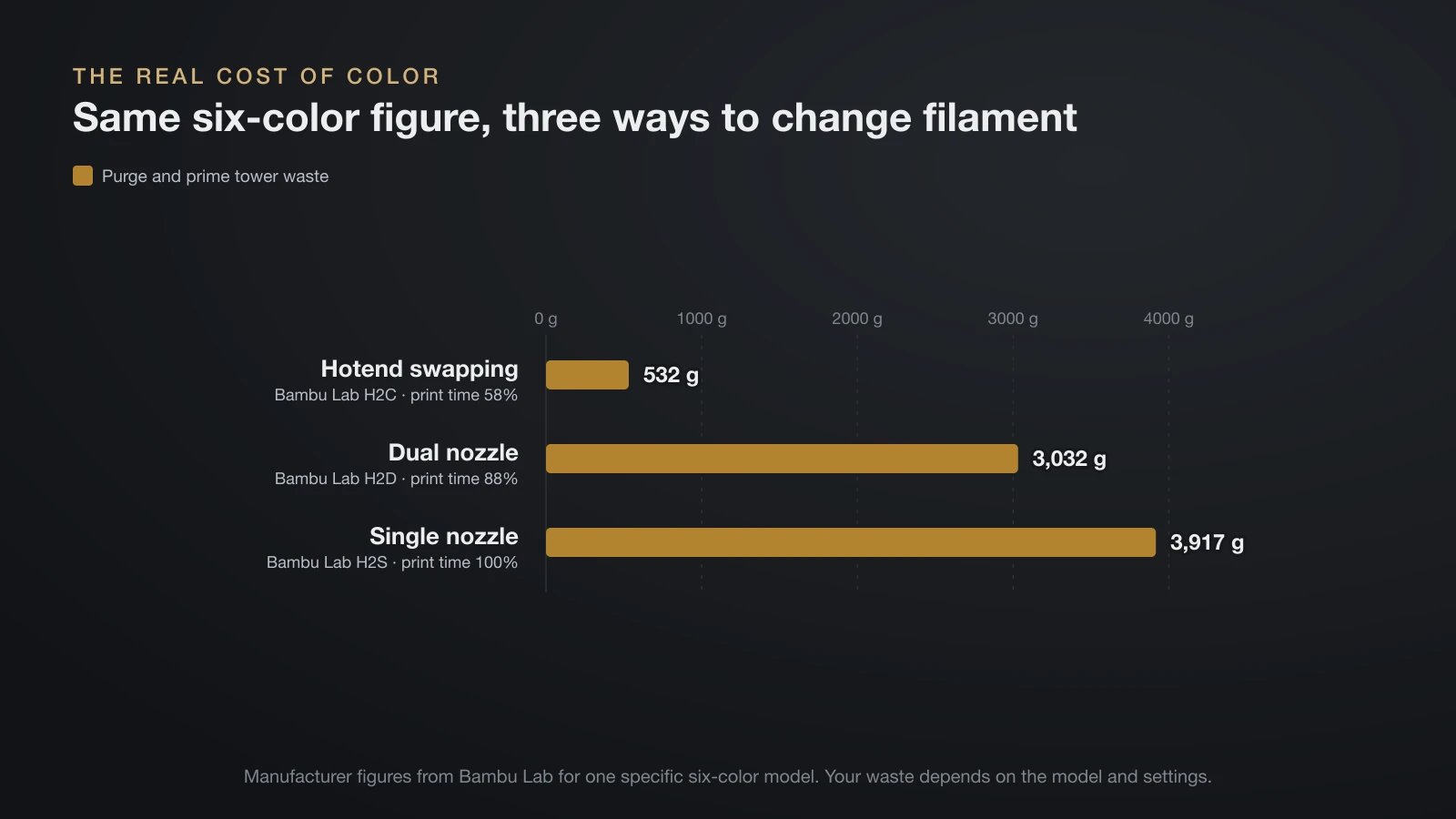
Single-nozzle printers pay for color twice: in wasted filament and in time. Bambu Lab’s own examples show how much the numbers move.
| Change (Bambu Lab example) | Filament changes | Wasted filament |
|---|---|---|
| Four-color cube at 0.2 mm layers | 153 | 83 g |
| Same cube at 0.28 mm layers | 111 (27% fewer) | 61 g (26% less) |
| Cube with flush material printed into extra “flush objects” | Same | Under 1 g wasted instead of about 70 g |
For hardware, Bambu Lab compared one six-color figure across three of its printers. Purge and prime tower waste was 532 g on the hotend-swapping H2C, 3,032 g on the dual-nozzle H2D and 3,917 g on the single-nozzle H2S, with print times of 58%, 88% and 100% respectively. Snapmaker makes a similar claim of up to 85% less waste for its U1 tool changer. Treat both as manufacturer figures for specific models.
Ways to cut waste on a filament changer:
- Flush into infill or supports: the slicer uses purge plastic inside the part where it won’t show. Light and translucent colors can show through thin walls.
- Lower the flush multiplier: Bambu Studio’s default is 1.00; Bambu Lab suggests trying 0.8 or 0.9, then checking for discolored layers.
- Use taller layers: fewer layers mean fewer changes.
- Reorient the part: in one Bambu Lab example, laying a tall part on its side cut changes and waste by almost 80% and print time by 70%. It can also backfire when colors already run in horizontal bands.
- Print several copies at once, so each change serves more parts.
- Keep color changes low in the model: the prime tower has to reach the highest layer with a change. Flipping one part so its changes sat at the bottom cut prime tower material from 14.76 g to 9.05 g.
Small nozzles also slow things down. Bambu Lab notes that a 0.2 mm nozzle flushes much more slowly than a 0.4 mm one.
Multi-color 3D printers compared
Specs come from each manufacturer’s product page or official wiki, checked in September 2026. Prices are left out because they change often.
| System | Type | Filaments per print | Maker’s notes |
|---|---|---|---|
| Bambu Lab AMS and AMS 2 Pro | Filament changer, 4 slots | Up to 16 on a P1S (four units) | No TPU or TPE; spools 50–68 mm wide |
| Bambu Lab AMS lite (A1 series) | Filament changer, 4 slots | 4 (one unit per printer) | TPU only at 77D, 55D or harder |
| Creality CFS (K2 Plus) | Filament changer, 4 slots, desiccant drying | Up to 16 (four units) | Not for TPU, damp BVOH or PVA, or warped cardboard spools |
| Anycubic ACE Pro | Filament changer, 4 slots, drying up to 55 °C (131 °F) | Up to 8 (two units) | For Kobra S1 and Kobra 3 series |
| Prusa MMU3 (CORE One+) | Filament changer | Up to 5 | Available now for the CORE One+ |
| Bambu Lab H2D | Dual nozzle | Up to 25 | Up to 4 AMS 2 Pro and 8 AMS HT units, 24 slots |
| Bambu Lab X2D | Dual nozzle | Up to 25 | 256 × 256 × 260 mm build volume |
| Bambu Lab H2C | Hotend changer (Vortek) | Up to 7 without purging, 24 with AMS | 8-second induction heating per swap |
| Prusa XL+ | Tool changer | Up to 5 toolheads | 360 × 360 × 360 mm; each toolhead keeps its own nozzle |
| Prusa CORE One+ with INDX | Tool changer | 4–8 tools | Multi-material option for the CORE One+ |
| Snapmaker U1 | Tool changer | 4 toolheads | Swaps in 5 seconds; 270 × 270 × 270 mm |
| Stratasys J55 Prime | PolyJet full color | Up to 5 materials at once | Nearly 640,000 color combinations |
Materials: what you can and can’t combine
Filament changers push filament through long tubes and gears, which limits what they can feed.
- TPU and other flexibles: Bambu Lab says to avoid TPU, TPE and absorbent PVA in the AMS because they can jam in the feed tube, and Creality’s CFS excludes flexible TPU too. Bambu Lab’s AMS lite accepts only hard TPU grades (77D or 55D), and the company sells a dedicated “TPU for AMS” filament.
- Fiber-filled filaments: Bambu Lab warns that third-party carbon- or glass-filled filaments can wear the AMS tubes or snap; its own fiber grades are tuned to work.
- Cardboard spools: Bambu Lab recommends plastic spools, or an adapter ring for cardboard ones, to avoid slipping and debris.
- Tool changers are more flexible: Prusa says its XL+ toolhead handles soft TPU, and Snapmaker shows the U1 combining rigid filaments with different TPUs in one print. Prusa also lists a silicone toolhead for the XL, which mixes a two-part liquid instead of melting filament; our guide on 3D printing silicone explains how it differs from TPU.
Mixing materials also means mixing print temperatures. Soluble or breakaway support filaments are the most practical second material. If you want colored parts in ABS or ASA, the machine also needs a chamber, so check our guide to enclosed 3D printers.
Multi-color printing without a multi-color printer
You don’t need special hardware for every colorful print:
- Color change at a layer: add a filament change or pause at a set height in the slicer, swap the spool by hand and resume. It works well for raised text, signs, logos, keychains and badges where colors stack in horizontal bands.
- Multi-color filament: gradient and dual- or tri-color “silk” filaments change color along the spool or across the strand, with no extra hardware.
- Print and assemble: print each colored part separately and glue, press-fit or screw them together.
- Paint: prime a single-color print and paint it. This is still the only way to get fine details and shading on small figures without an industrial printer.
Plenty of the 3D print ideas worth starting with look good in one color or with a single layer change.
Which multi-color system should you choose?
- Occasional two-tone prints: any printer plus a color change at a layer.
- Regular multi-color prints on a budget: a four-slot filament changer (AMS lite, CFS, ACE Pro, AMS). Expect purge waste and longer prints.
- Frequent multi-color work, less waste and faster jobs: a tool or hotend changer (XL+, U1, INDX, H2C).
- Two materials at once, such as supports or rigid plus flexible: a dual-nozzle printer or tool changer.
- Photo-realistic full color: a print service with PolyJet or similar machines.
Whatever you pick, keep the spools you leave loaded dry. For dryers and other add-ons, see our guide to 3D printer accessories that earn their place.
The bottom line
Most multi-color 3D printers use one nozzle and a filament changer: affordable and flexible, but wasteful on models with frequent color changes. Dual-nozzle printers and tool changers cut purge waste and time sharply at a higher hardware cost. For occasional color, a manual change at a layer, multi-color filament or paint still does the job.
Sources
- Bambu Lab Wiki: Reduce Waste during Filament Change, Notes for AMS and AMS lite FAQ (filament change stages, waste examples, flush multiplier, material limits)
- Bambu Lab US Store product pages: P1S, H2D, X2D and H2C (color counts, AMS limits, Vortek, waste comparison)
- Prusa Research: Prusa XL+ and CORE One+ product pages (toolheads, MMU3, INDX)
- Creality: K2 Plus Combo (CFS specs); Anycubic: ACE Pro; Snapmaker: U1
- Stratasys: J55 Prime (full-color PolyJet)