PETG temperature settings run hotter than PLA’s: manufacturer data sheets list about 230–260 °C (446–500 °F) at the nozzle and 60–90 °C (140–194 °F) on the bed. Keep the part cooling fan low, use glue on smooth PEI, and expect finished PETG parts to bend under a light load at about 68–78 °C (154–172 °F).
The details vary by brand and build plate, and PETG has a few traps that PLA does not: it strings easily, dislikes strong cooling and can bond to smooth PEI hard enough to damage the sheet. This guide gathers the settings from Bambu Lab, Prusa, Polymaker and Fiberlogy data sheets, compares them with PLA print temperatures and explains what PETG’s “melting point” really means.
The short answer
| Setting | Typical PETG value | Where it comes from |
|---|---|---|
| Nozzle temperature | 230–260 °C | Bambu Lab, Polymaker; Prusament 240–260 °C |
| Bed temperature | 60–90 °C, depending on plate and brand | Bambu Lab, Prusament, Polymaker |
| First layer | 230 °C nozzle, 85 °C bed, fan off | Prusa default settings |
| Build surface | Textured or satin PEI; glue stick on smooth PEI | Prusa, Bambu Lab, Fiberlogy |
| Part cooling fan | Low: off to 60%, by brand | Polymaker, Prusament, Bambu Lab |
| Speed | Up to 200 mm/s; Polymaker 50–100 mm/s | Data sheets |
| Drying | 65 °C (149 °F) for 6–8 h | Polymaker, Bambu Lab |
| Parts soften | Heat deflection 68–78 °C at 0.45 MPa | Prusament, Bambu Lab, Polymaker |
| Melting point | None listed: PETG is amorphous | Bambu Lab, Polymaker |
PETG print temperature: nozzle settings by brand
Most PETG prints at 230–260 °C at the nozzle, and the brands agree more than they differ: only Fiberlogy’s Easy PET-G sits lower, at 220–250 °C. The values below are from the manufacturers’ technical data sheets and default profiles.
| Filament or profile | Nozzle temperature | Fan and speed |
|---|---|---|
| Bambu Lab PETG Basic | 230–260 °C | Fan 0–60%, under 200 mm/s |
| Prusament PETG | 250 ± 10 °C (240–260 °C) | Fan 50%, up to 200 mm/s |
| Polymaker PolyLite PETG | 230–260 °C | Fan off to 20%, 50–100 mm/s |
| Fiberlogy Easy PET-G | 220–250 °C | Fan 0–25% |
| Prusa default PETG settings | 230 °C first layer, 240 °C after | Fan off for the first layers, then 50% |
Match the temperature to your speed. Bambu Lab’s PETG guide explains that fast printing makes the nozzle melt more plastic in less time, so it needs more heat to avoid gaps and layer separation. Slow printing at a high temperature does the opposite: the plastic gets too runny, which shows up as stringing, oozing and buildup on the nozzle.
PETG bed temperature and build surface
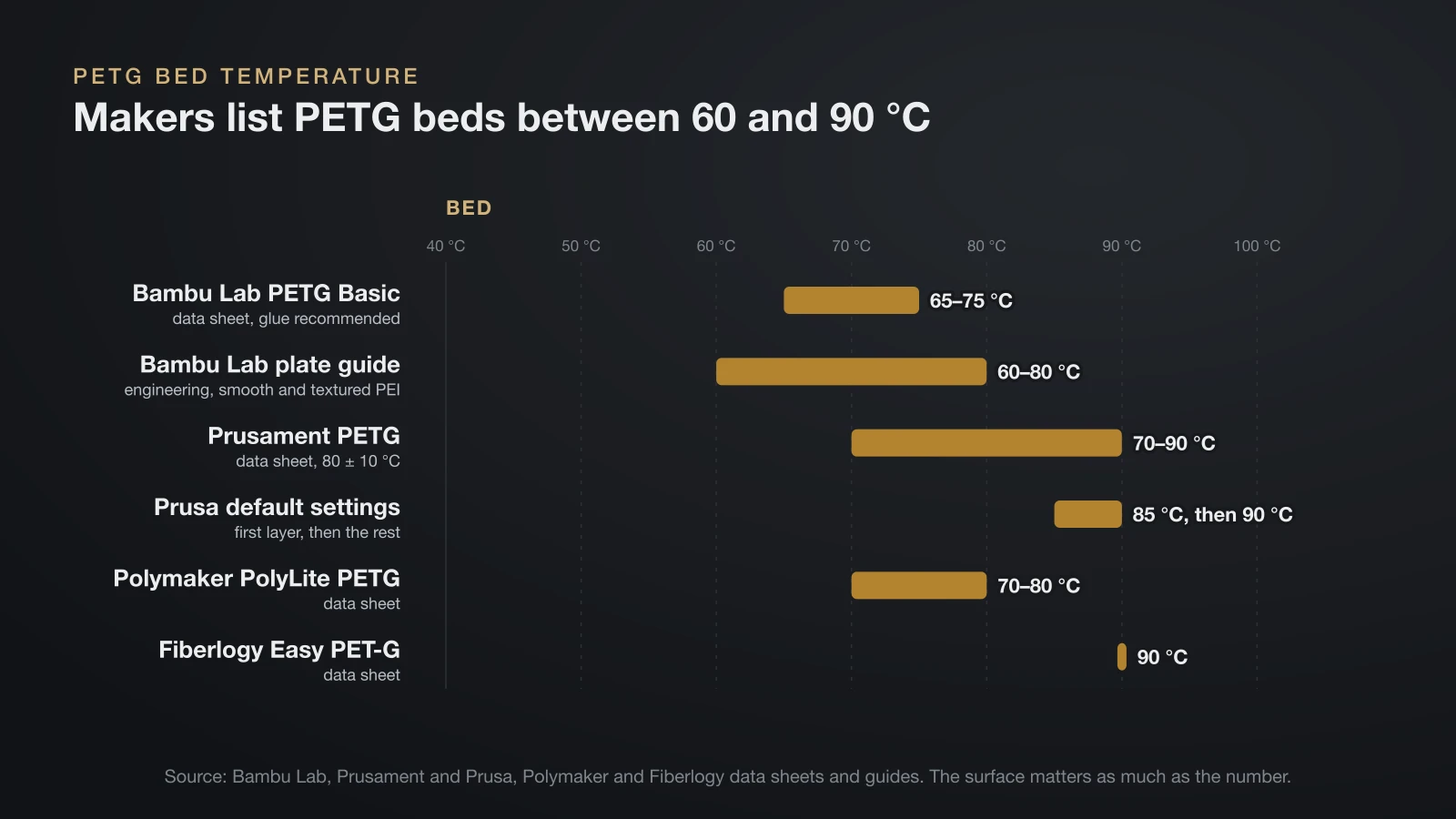
PETG needs a hotter bed than PLA, but the surface matters more than the exact number. The bed temps for PETG below come from the same manufacturers.
| Source | PETG bed temperature | Surfaces named |
|---|---|---|
| Bambu Lab PETG Basic data sheet | 65–75 °C | Textured PEI, smooth PEI, Cool Plate SuperTack; glue recommended |
| Bambu Lab plate guide | 60–80 °C | Engineering, smooth PEI and textured PEI plates; Cool Plate not recommended |
| Prusament PETG data sheet | 80 ± 10 °C (70–90 °C) | Satin, powder coated; smooth PEI with a glue stick |
| Prusa default settings | 85 °C (185 °F) first layer, 90 °C after | Powder coated or satin sheet |
| Polymaker PolyLite PETG | 70–80 °C | PC and textured PEI, glue when needed |
| Fiberlogy Easy PET-G | 90 °C | Textured PEI; smooth PEI or glass with adhesive |
An enclosure is optional. Polymaker and Fiberlogy say none is needed, while Bambu Lab recommends an enclosed printer for PETG so a cold room does not weaken the bond between layers. On its enclosed machines, Bambu Lab suggests opening the door or removing the top glass once a PETG bed runs above about 60–70 °C (140–158 °F), so the chamber does not get hot enough to soften the filament.
Why smooth PEI needs glue with PETG
PETG’s biggest bed problem is sticking too well. Prusa warns against printing PETG on its smooth PEI sheet because “the adhesion may be too strong,” adding that it might damage the sheet. It recommends a textured (powder coated) or satin sheet, or a glue stick on smooth PEI as a release layer.
The other brands agree. Prusament’s data sheet allows smooth PEI only with a glue stick, Fiberlogy lists smooth PEI and glass only with an adhesive, and Bambu Lab recommends glue with PETG Basic, noting that glue also makes parts easier to remove and protects the plate. Let the plate cool fully before you flex it to release the part. Our guide to the 3D printer build plate compares textured, smooth and satin surfaces in more detail.
First layer, cooling fan and speed
These are the PETG print settings, beyond temperature, that decide whether a print works:
- First layer: Prusa prints it cooler, not hotter: 230 °C at the nozzle and 85 °C on the bed, then 240 °C and 90 °C for the rest of the print.
- Cooling fan: keep it low. Prusa prints the first few layers with the fan off, then runs it at half power, and suggests turning it off entirely for the strongest parts. Data sheets range from off to 20% (Polymaker) up to 0–60% (Bambu Lab).
- Speed: Prusament and Bambu Lab list up to 200 mm/s, Polymaker a more conservative 50–100 mm/s. Raise the temperature toward the top of the range only if you print fast.
- Warping: Bambu Lab says PETG warps more easily than PLA, mostly because layers cool too quickly. Glue on the plate and a brim help.
PETG vs PLA temperature settings
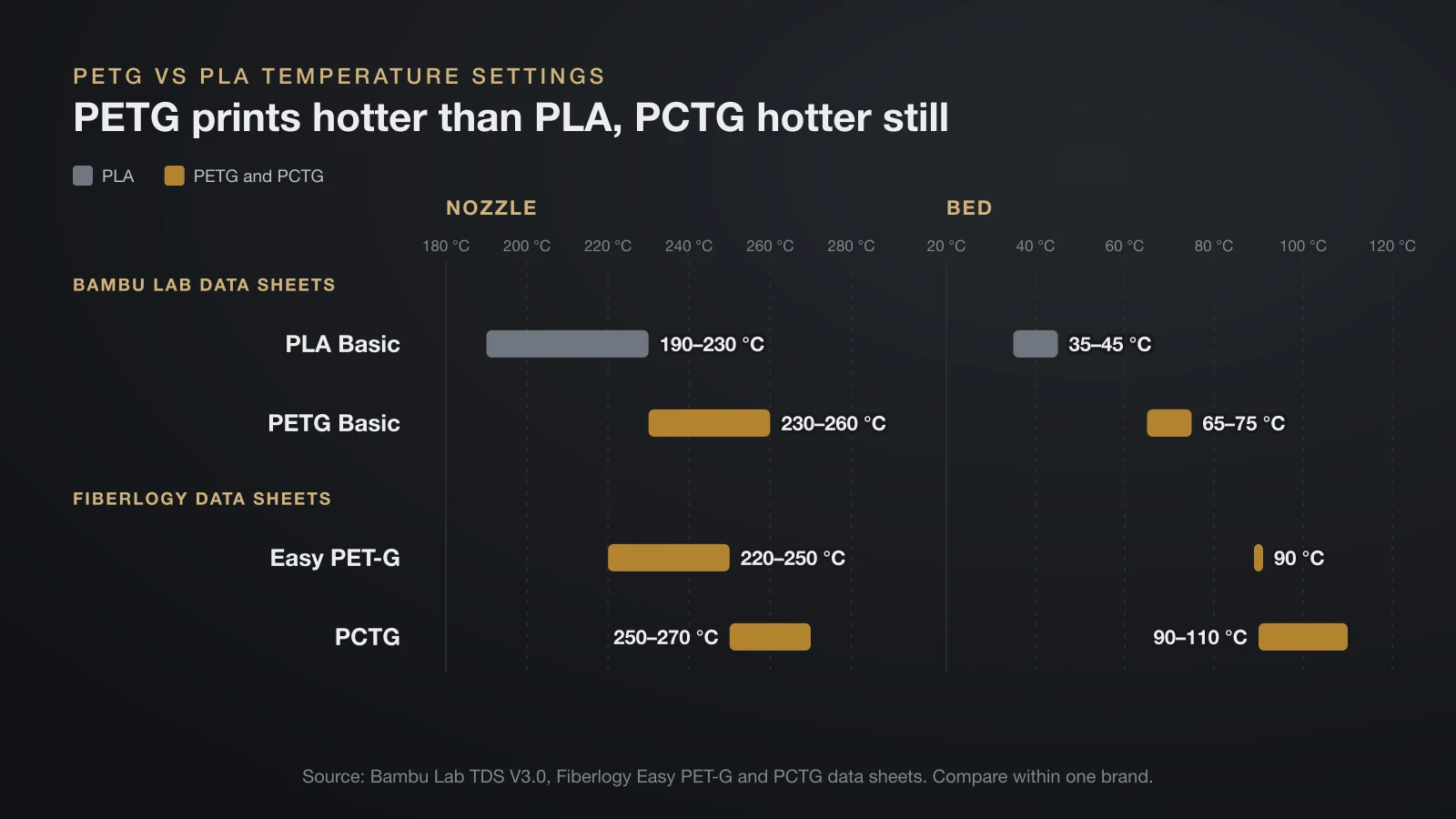
The fairest comparison uses one manufacturer’s data. Bambu Lab publishes both materials with the same test methods:
| Bambu Lab data sheet | PLA Basic | PETG Basic |
|---|---|---|
| Nozzle temperature | 190–230 °C | 230–260 °C |
| Bed temperature | 35–45 °C | 65–75 °C |
| Part cooling fan | On | 0–60% |
| Chamber temperature | 25–45 °C | 35–50 °C |
| Glass transition (DSC) | 60 °C | 69 °C |
| Heat deflection, 0.45 MPa (ISO 75) | 57 °C | 71 °C |
| Melting temperature (DSC) | 160 °C | Not applicable |
In short, PETG prints 30–40 °C hotter at the nozzle and about 30 °C hotter on the bed, with far less cooling, and the finished part handles about 14 °C more heat in this data set. If you switch between the two often, keep a separate filament profile for each rather than editing one.
PCTG, PETG’s tougher relative, runs hotter still: Fiberlogy lists a 250–270 °C nozzle and a 90–110 °C bed for its PCTG, against 220–250 °C and 90 °C for its Easy PET-G. Our PCTG filament guide compares the two materials.
How to dial in a new spool of PETG
To dial in a new spool of PETG, dry it, prepare the plate, start in the middle of its temperature range and print a temperature tower before you save the profile.
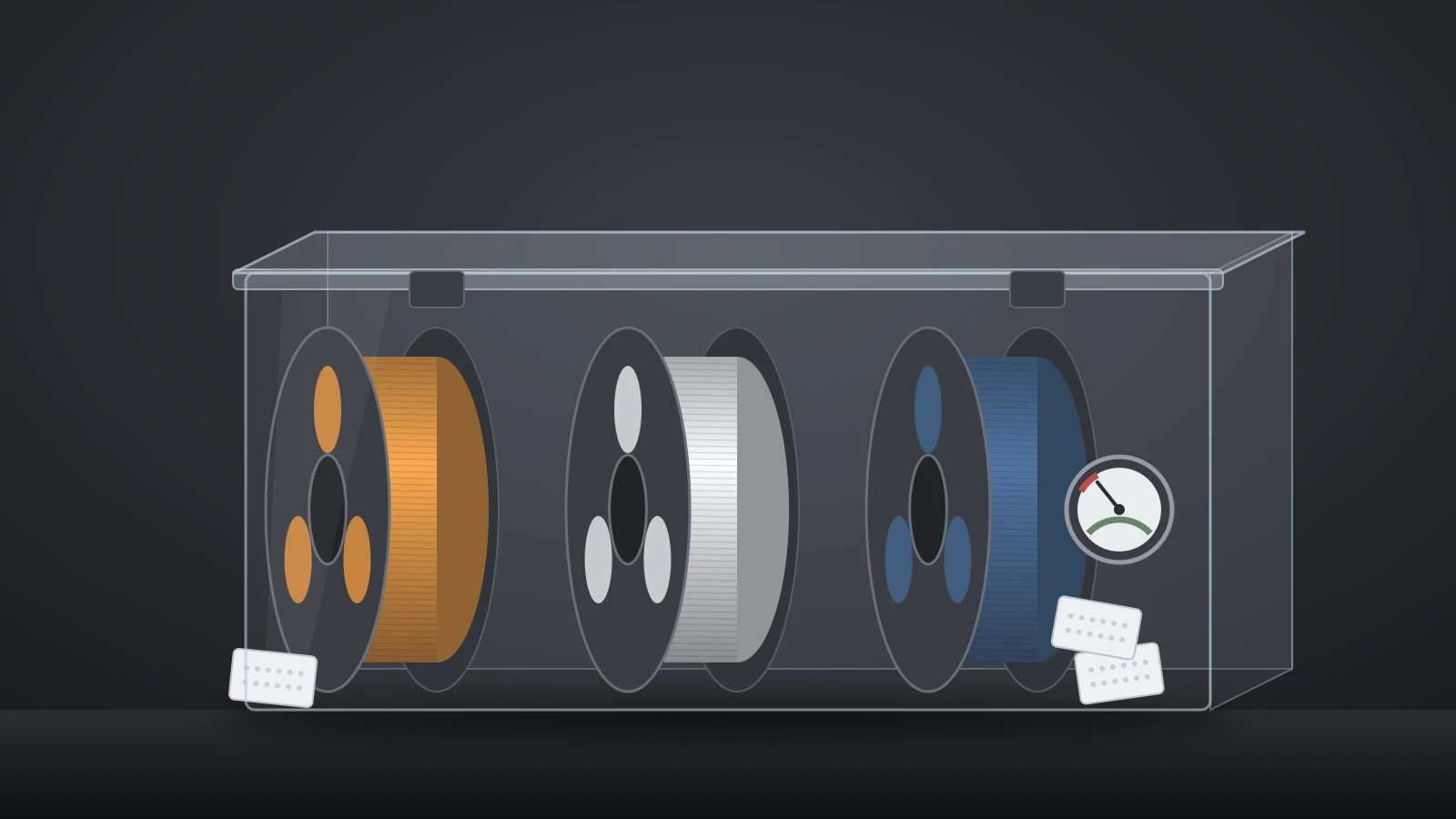
- Dry it first. Bambu Lab calls PETG highly hygroscopic and links damp filament to stringing, bubbles, holes, rough surfaces and weak parts. Polymaker dries PolyLite PETG at 65 °C for 6 hours; Bambu Lab uses 65 °C for 8 hours in a forced-air oven.
- Prepare the plate. Use textured or satin PEI, or put glue on smooth PEI.
- Start mid-range. For a 230–260 °C spool that means about 245 °C, with the bed in the middle of its range.
- Print a temperature tower. OrcaSlicer recommends the middle of the range that looks good, or the upper end for fast printing. Check stringing, bridges and how well the layers hold when you try to snap the tower.
- Tune out stringing. Prusa says stringing can be reduced with longer retraction and a lower nozzle temperature. A dry spool matters just as much.
- Save the profile and repeat the tower for every new brand.
Bambu Lab advises running the printer in a well-ventilated room, or with filtration, for PETG as for its other filaments. The temperature tower is one part of a longer routine; see how to calibrate a 3D printer for the full order.
PETG temperature resistance: how much heat can parts take?
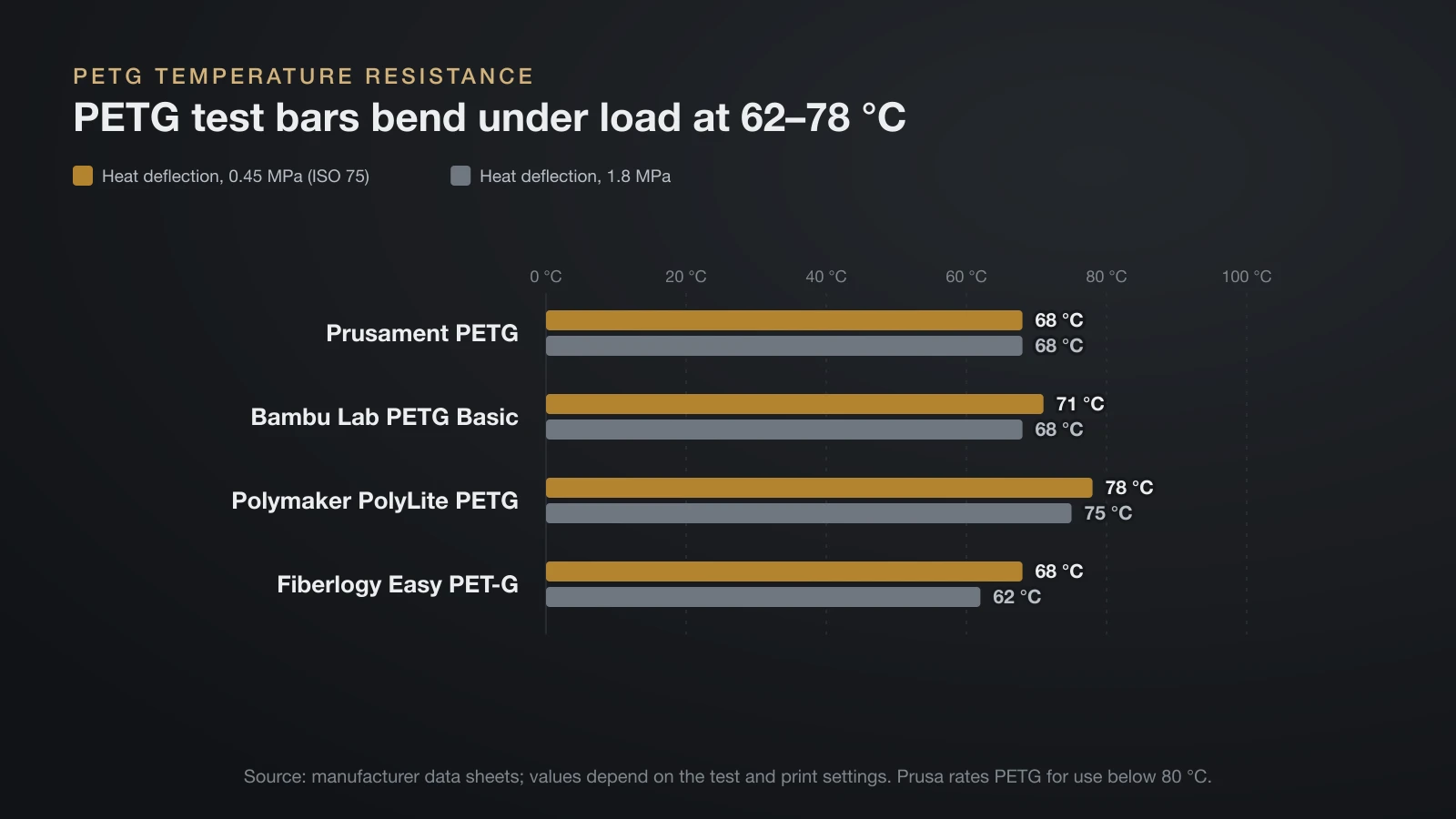
Printed PETG parts hold their shape up to about 68–78 °C (154–172 °F) under a light load, which is PETG’s main advantage over PLA. The table uses heat deflection temperature (HDT), the point at which a loaded test bar bends by a set amount (ISO 75), at a light 0.45 MPa and a heavier 1.8 MPa load.
| Filament (data sheet) | Glass transition (DSC) | HDT, 0.45 MPa | HDT, 1.8 MPa |
|---|---|---|---|
| Prusament PETG | Not listed | 68 °C | 68 °C |
| Bambu Lab PETG Basic | 69 °C | 71 °C | 68 °C |
| Polymaker PolyLite PETG | 81 °C | 78 °C | 75 °C |
| Fiberlogy Easy PET-G | Not listed | 68 °C | 62 °C |
Prusa rates PETG for indoor and most outdoor use below 80 °C, and Prusa’s material table lists PETG brands between 63 and 78 °C at 0.45 MPa. That is roughly 10–20 °C more than PLA on the same test. Around the house, it is plenty for brackets, hooks and clips, which makes PETG a sensible material for 3D printed cable management behind a desk or TV.
For more heat, look elsewhere. PCTG gains only a few degrees (76 °C at 0.45 MPa in Fiberlogy’s data), while Prusament ASA reaches 93 °C (199 °F) and adds UV resistance; see our ASA filament guide. For parts that live in a parked car, our guide to 3D printed car parts compares the options.
Annealing is not a shortcut here. Bambu Lab does not recommend annealing PETG Basic prints, because the gain is very limited and complex shapes can deform. If you try it anyway, it suggests 60–70 °C for 6–12 hours.
Does PETG have a melting point?
PETG does not have a sharp melting point, because it is an amorphous plastic rather than a semi-crystalline one like PLA. PLA melts at a defined temperature: 160 °C on Bambu Lab’s PLA Basic data sheet. PETG, as Bambu Lab notes, has no crystals to melt. Both Bambu Lab and Polymaker list PETG’s DSC melting temperature as not applicable.
Instead, PETG softens gradually as it heats up. It turns from rigid to rubbery at its glass transition, 69 °C for Bambu Lab’s PETG Basic and 81 °C for Polymaker’s PolyLite PETG, and keeps getting softer until it flows well enough to print in the 230–260 °C nozzle range. So the useful answers to “what temperature does PETG melt at” are three numbers:
- Softening: about 69–84 °C (glass transition and Vicat softening on Bambu Lab and Polymaker sheets).
- Shape loss under light load: 68–78 °C (HDT at 0.45 MPa).
- Printing: 230–260 °C at the nozzle.
The bottom line
Print PETG at 230–260 °C, usually starting near 245 °C, with the bed at 60–90 °C depending on the plate, and keep the fan low. Put glue on smooth PEI or use a textured sheet, dry the spool, and tune each brand with a temperature tower. Finished parts handle about 68–78 °C under light load, 10–20 °C more than PLA, and PETG has no true melting point because it is amorphous.
Sources
- Bambu Lab: technical data sheets V3.0 for PETG Basic and PLA Basic, plus the wiki PETG usage guide, PLA usage guide and filament guide (print, drying and annealing settings, plate temperatures, glue, enclosure, speed vs temperature, warping, glass transition, Vicat, heat deflection, melting temperature, amorphous PETG, food contact, ventilation)
- Prusa: PETG material guide, Prusament PETG data sheet, material table and Prusament ASA page (first layer and later layer settings, smooth PEI warning, fan, stringing, use below 80 °C, heat deflection values)
- Polymaker: PolyLite PETG data sheet (print and drying settings, glass transition, Vicat, heat deflection, melting temperature not applicable)
- Fiberlogy: Easy PET-G product page and PCTG data sheet (print settings, build surfaces, heat deflection)
- OrcaSlicer Wiki: Temperature calibration (temperature tower method and how to pick a value)